If youhave a SonyDVDPlayer/Video
Cassette Recorderor Video
Cassette Recorder/DVDRecorder
If the supplied remote interferes with your other
Son?: DVD Player'v_ideo Cassette Recorder or
Video Cassette RecorderiDVD Recorder, set the
command mode number for this recorder and the
supplied remote to one that differs from the other
Sony DVD Player/Video Cassette Recorder or
Video Cassette RecorderiDVD Recorder.
The default command mode setting for this
recorder and the supplied remote is DVD
COMBO3.
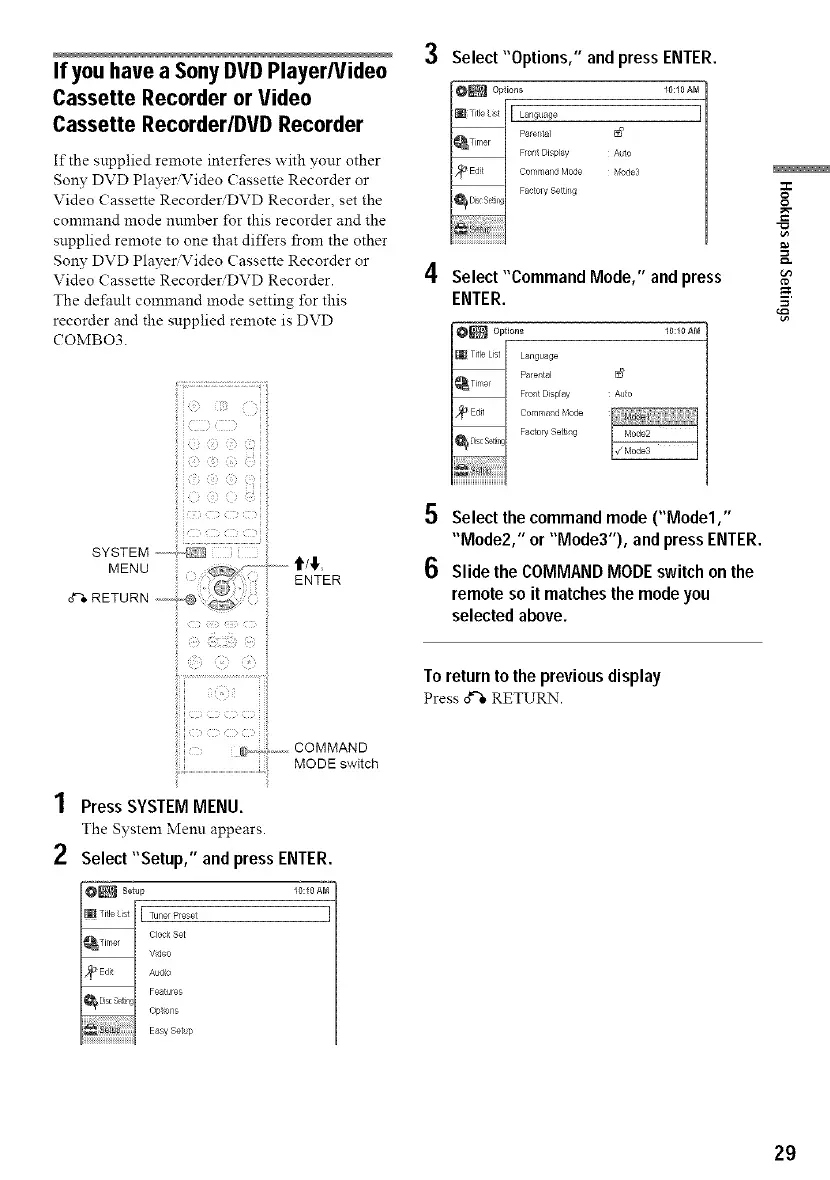
SYSTEM ........
MENU
ENTER
_i!_,__:,!,i_iE:_:_ii_'iii_;__i,:!,:_if'
i il
_,.,_j,,,._, COMMAND
MODEswitch
1 Press SYSTEMMENU.
The System Menu appears.
2 Select"Setup," and pressENTER.
O_ Setup
_l_iTitleLisl 1%uaeiPreset
_Timer C}ock Set
Video
/_° Edit Audio
Features
_ DiscSe{tin Opl_ons
10:10 AM
]
Easy Set}p
Select "Options," and press ENTER.
10:10 AM
I
A_to
Ilode3
4 Select "Command Mode," and press
ENTER.
10:10 &N
N'
Auto
5 Select thecommand mode ("Model,"
"Mode2," or "Mode3"), and pressENTER.
6 Slide the COMMANDMODEswitch onthe
remote so it matchesthe modeyou
selected above.
To returnto thepreviousdisplay
Press o_-'*RETURN.
O
g
29



 To Next Page