Technical data are subject to change without notice.
© Copyright SPM 2002-04. 71650.B
SPM Instrument AB • Box 504 • S-645 25 Strängnäs • Sweden
Tel +46 152 225 00 • Fax +46 152 15075 • info@spminstrument.se • www.spminstrument.se
Passwords for identification tags
All tags are safeguarded and can only be read with SPM instruments. In addition, you can set (and
change) read and write passwords in Condmaster
®
Pro. These passwords are automatically sent to
data logger and tag when downloading measuring points.
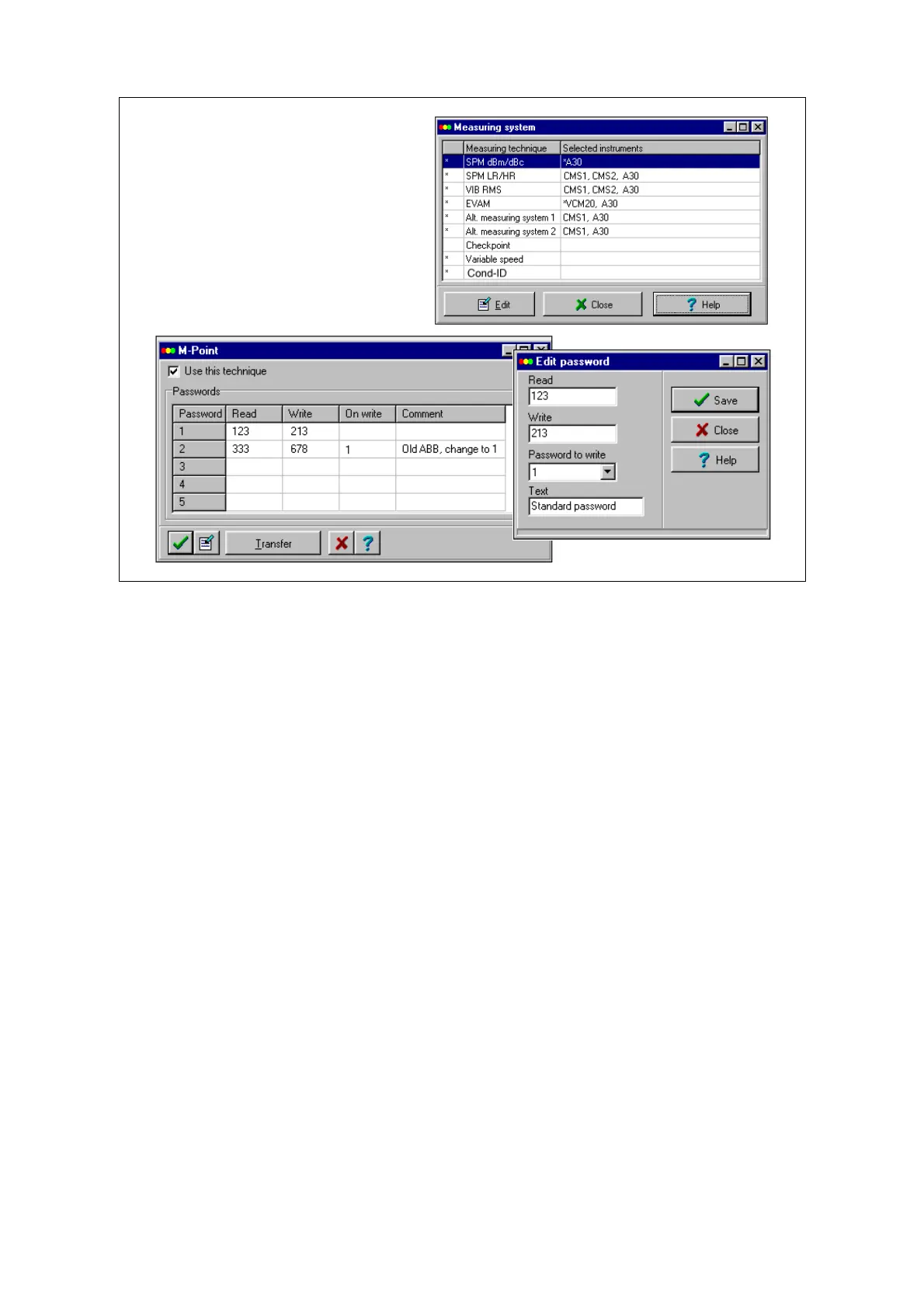
As passwords you can use the numbers 1 to 65000 or blank. Go to MEASURING SYSTEM under
SYSTEM. Mark COND ID and click EDIT. The password menu has five lines with four columns. The
first column is for READ protection. When your instrument has this password, it can read the tag
and also write to it, unless a second WRITE password is input in the second column. You can, for
instance, give your READ password to the user of another Condmaster
®
Pro. If he sets it on this
menu, he will be able to read your tags, but without your WRITE password he cannot write to them.
The third column, ”On write”, is used to change password. In the example above, there is a second
set of passwords on line 2. The ”On write” column on this line shows ”1”, i. e. it refers to line 1. The
instrument can contact tag with both sets of passwords. However, when it writes to a tag having
the passwords ”333” and ”678” (from line 2), it will write the passwords ”123” and ”231” (from line
1). After all tags have thus changed password, the old password can be deleted from line 2.
To input or change passwords, click on the EDIT button. The text you input appears in the
”Comment” columns. The button TRANSFER can be used if you want to load a data logger with
passwords (but not, as yet, measuring points). Connect the instrument to the COM port as with
downloading measuring points.
Please note: The menu shown here is the only place where the passwords are set (and visible). The
exchange of passwords between instrument and tag does not require any action on behalf of the
user.
Setting passwords for tags
• Got to MEASURING SYSTEM
under SYSTEM
• Mark COND ID, click EDIT
• Click EDIT to input, change
• Option: Transfer to data logger
68 Identification tag



 To Next Page