Innagator | Technical Pack171
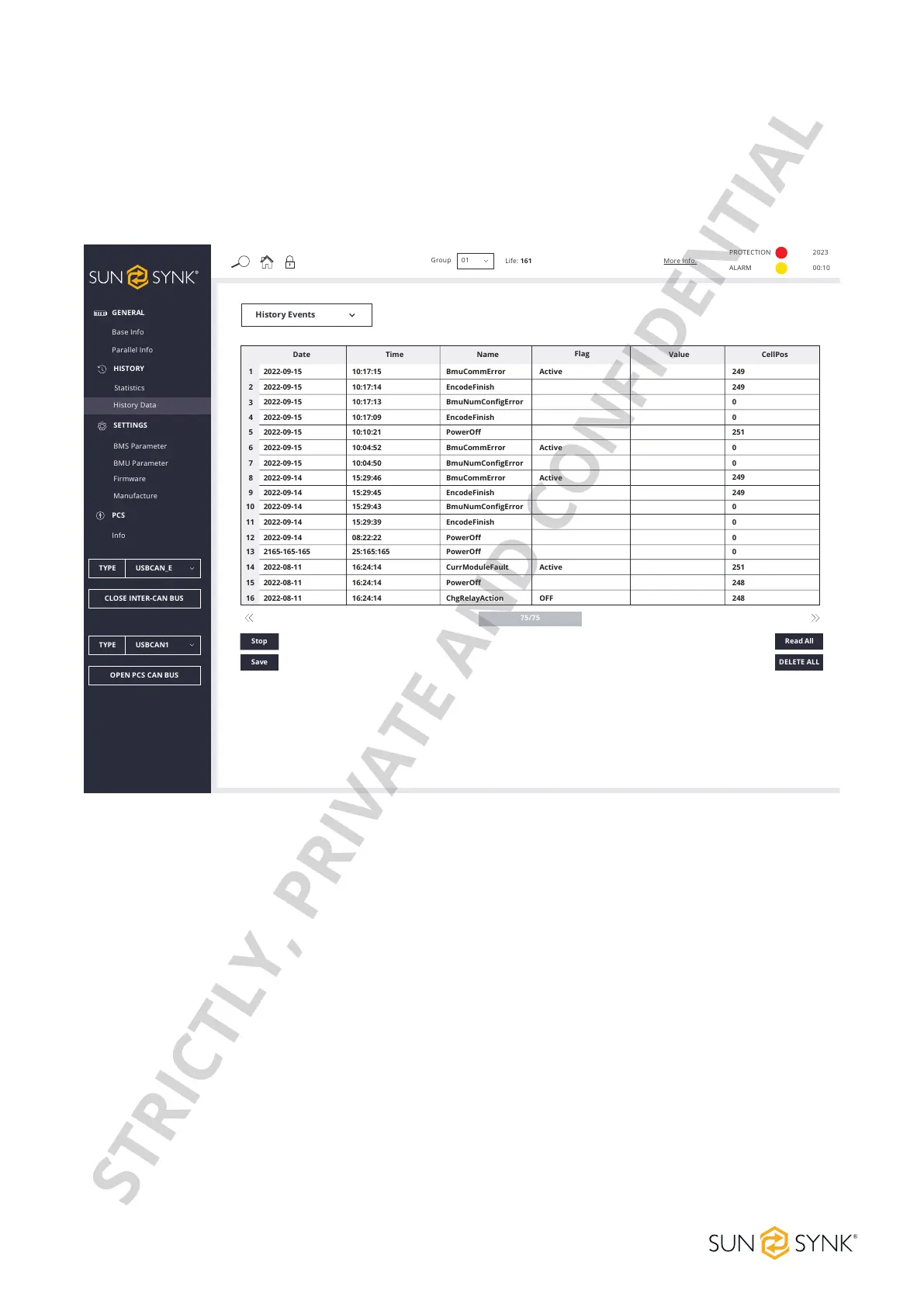
History Events
Select Events, and click the READ ALL button. The HVESS-Monitor will start the task of reading history events,
and create the reading process with the slave computer. After receiving the response, the received history
events will be analysed and displayed in the list, and the latest time will be displayed above the list. Click the
SAVEbuttontosavethereadhistoryeventstotheuser-selectedpathforoineanalysis.
GENERAL
PCS
Base Info
Info
Parallel Info
HISTORY
Statistics
History Data
SETTINGS
BMS Parameter
BMU Parameter
Firmware
Manufacture
TYPE USBCAN_E
CLOSE INTER-CAN BUS
TYPE USBCAN1
OPEN PCS CAN BUS
Group
Life: 161
01
More Info.
PROTECTION
ALARM
2023
00:10
History Events
75/75
DELETE ALL
Read All
Date
Time
Name
Flag
Value CellPos
1
2
3
4
5
6
7
8
9
10
11
12
13
14
15
16
2022-09-15
2022-09-15
2022-09-15
2022-09-15
2022-09-15
2022-09-15
2022-09-15
2022-09-14
2022-09-14
2022-09-14
2022-09-14
2022-09-14
2165-165-165
2022-08-11
2022-08-11
2022-08-11
10:17:15
10:17:14
10:17:13
10:17:09
10:10:21
10:04:52
10:04:50
15:29:46
15:29:45
15:29:43
15:29:39
08:22:22
25:165:165
16:24:14
16:24:14
16:24:14
BmuCommError
EncodeFinish
BmuNumConfigError
EncodeFinish
PowerOff
BmuCommError
BmuNumConfigError
BmuCommError
EncodeFinish
BmuNumConfigError
EncodeFinish
PowerOff
PowerOff
CurrModuleFault
PowerOff
ChgRelayAction
Active
Active
Active
Active
OFF
249
249
0
0
251
0
0
249
249
0
0
0
0
251
248
248
Stop
Save
STRICTLY, PRIVATE AND CONFIDENTIAL


 To Next Page