Innagator | Technical Pack99
Operation
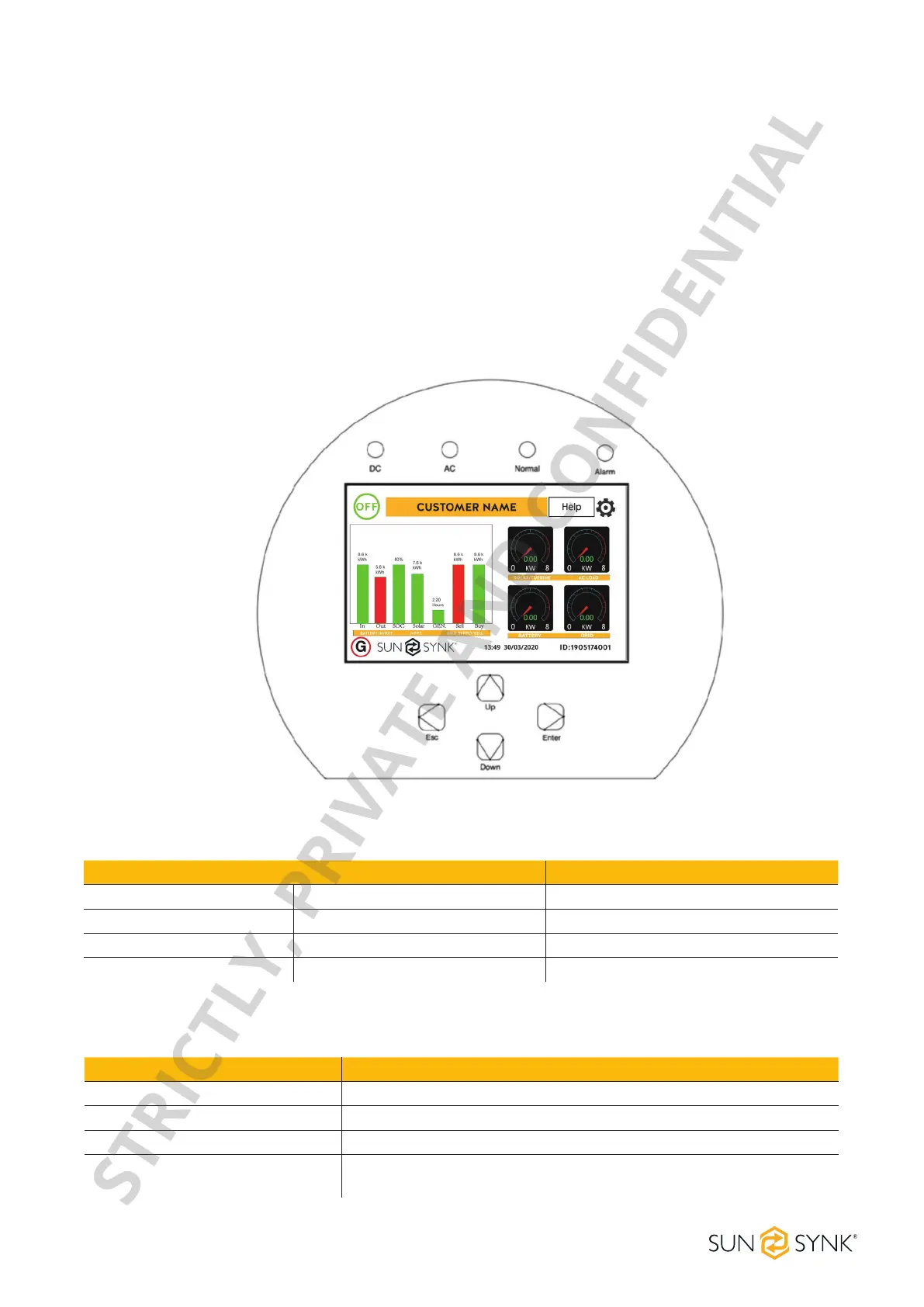
LED indicator Meaning
DC Green LED solid light PV connection normal
AC Green LED solid light Grid connection normal
Normal Green LED solid light Inverter functioning normally
Alarm Red LED solid light Fault
Function Key Description
Esc To exit the previous mode
Up Increase the value of a setting
Down Decrease the value of a setting
Enter Conrmsettingchange(Ifnotpressedeachtimethesettingwillnot
be saved)
Switching ON/OFF
Once the inverter has been correctly installed and the batteries have been connected, press the ON/OFF
button (located on the left side of the case) to activate the system. When the system is connected without a
batterybutconnectedwitheitherPVorgridandtheON/OFFbuttonisswitchedo,theLCDwillstillillumi-
nate(displaywillshowo).Inthiscondition,whenswitchingontheON/OFFbuttonandselecting‘NoBattery’,
the system can still work.
Display
LED indicators
Function buttons
STRICTLY, PRIVATE AND CONFIDENTIAL


 To Next Page