Innagator | Technical Pack174
INTER-CAN Firmware Upgrade
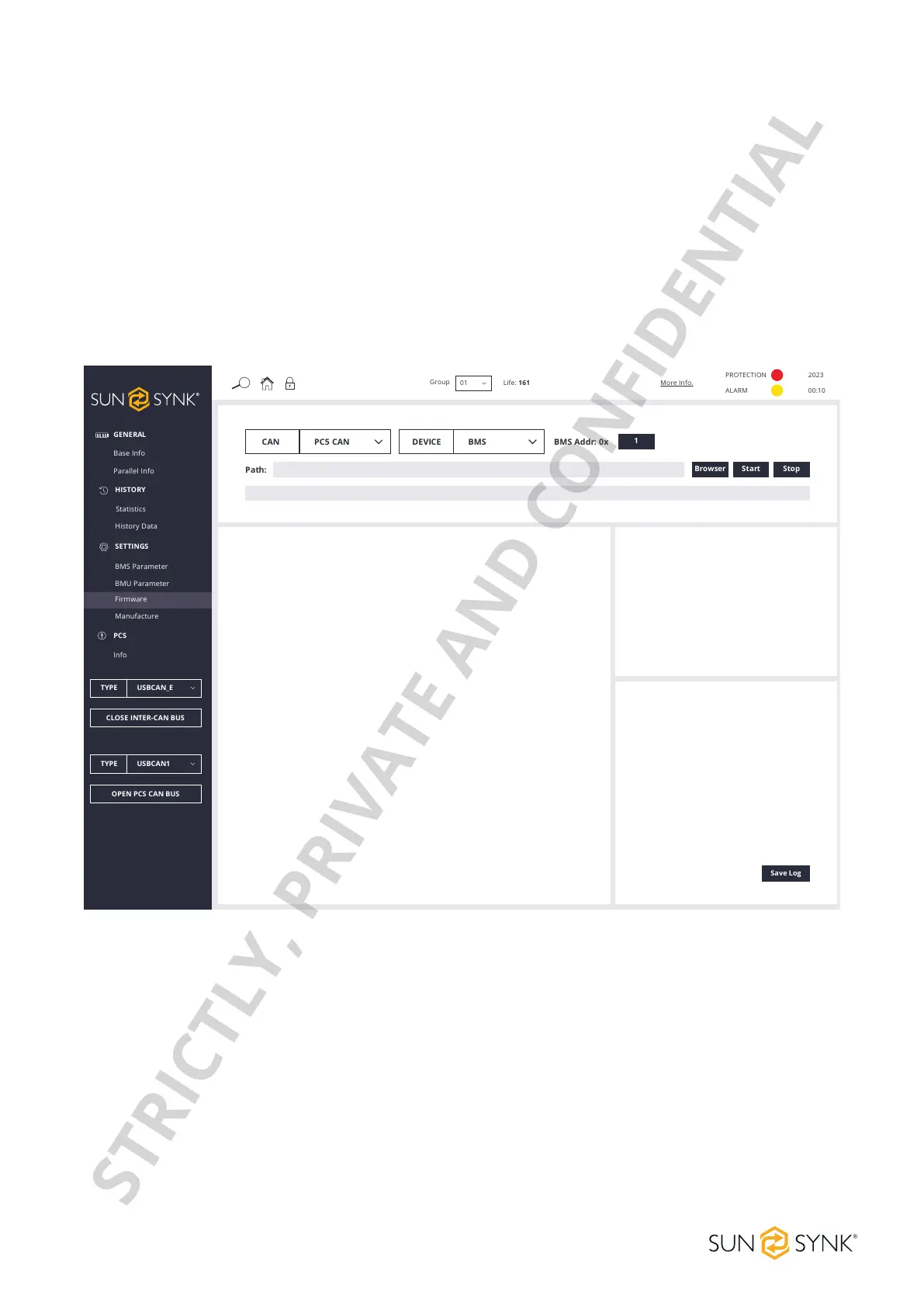
Make a selection in the red box of the BMS CAN-BUS upgrade and BMU CAN-BUS upgrade interface. Click
theBrowserbutton,selectthecongurationletobeupgradedfromthecomputer,ordragtheBINleto
beupgradedtotheupgradeinterface.TheHVESS-Monitorwillreadandanalysethedataintheleanddis-
play it on the corresponding input interface. Click Start to start upgrading.
Inthecaseofparalleldeviceoperation,whenthedeviceaddressislledinwith1,theHVESS-Monitorwill
start with No.1 BMS to upgrade BMS and BMU in the entire system one by one. Regardless of whether a
BMS upgrade succeeds or not, it will continue to upgrade BMS at the next address. When the device address
islledwithagureotherthan1(forexample,2),theHVESS-MonitorwillonlyupgradeasingleBMSwhose
address matches the input. The single BMU upgrade operation is similar. After the upgrade, OK will be dis-
played.
Manufacture
Click the Read button to read the product serial number and other related information. The default opera-
tional or working mode is Factory Mode. To display more details, change to Debug Mode and click the Set
button. The number of read/set successes/failures is displayed in the lower right corner. Restart to automati-
cally return to Factory Mode.
GENERAL
PCS
Base Info
Info
Parallel Info
HISTORY
Statistics
History Data
SETTINGS
BMS Parameter
BMU Parameter
Firmware
Manufacture
TYPE USBCAN_E
CLOSE INTER-CAN BUS
TYPE USBCAN1
OPEN PCS CAN BUS
Group
Life: 161
01
More Info.
PROTECTION
ALARM
2023
00:10
CAN PC5 CAN
DEVICE BMS BMS Addr: 0x
1
Path:
Browser Start Stop
Save Log
STRICTLY, PRIVATE AND CONFIDENTIAL


 To Next Page