SWDM40 OPERATION & MAINTENANCE MANUAL
Users can listen to the radio in different
channels and slow fatigue according to their
own needs and interests.
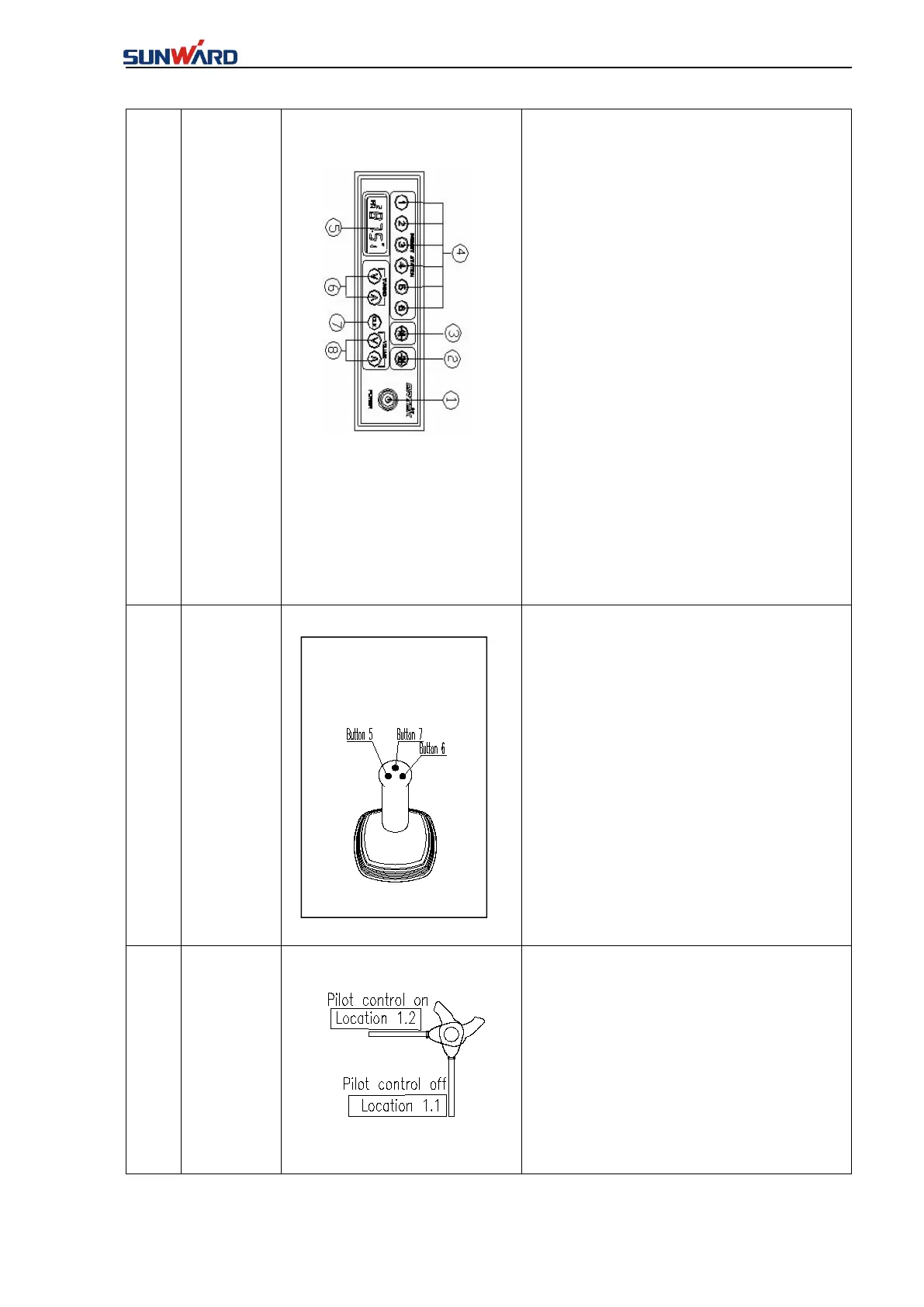
①-Power control
②-Band selection
③-Automatic search
storage/Pre-storage radio audition
④-Radio presets
⑤-LCD
⑥-Manual sorting table:“∧”
frequency increase,“∨”frequency
decrease
⑦-Clock
⑧-Volume control:“∧”Volume
increase,“∨”Volume decrease
“Button 1- Working switch” in the membrane
key panel is not connected:
Handle forward, auxiliary winch down.
Handle backward, auxiliary winch up.
Push handle leftward to rotate Rotary drive
clockwise;
Push handle rightward to rotate Rotary drive
anticlockwise;
★Press “Button 7” once, push the handle
leftward and rightward to the end respectively
to lock it, press again to unlock it.
The handle must be locked before the driver
leaves the seat of the cab. All the hydraulic
functions are disabled when the safety handle is
in the “OFF” position.
Enable the pilot control: the handle is moved to
the position 1.2;
Disable the pilot control: the handle is moved
to the position 1.1.



 To Next Page