C
LEAR
P
ATH
-EC
U
SER
M
ANUAL REV
1.11
19
O
PEN
C
LEAR
V
IEW
3.0
(M
OTOR
S
ETUP
P
ROGRAM
)
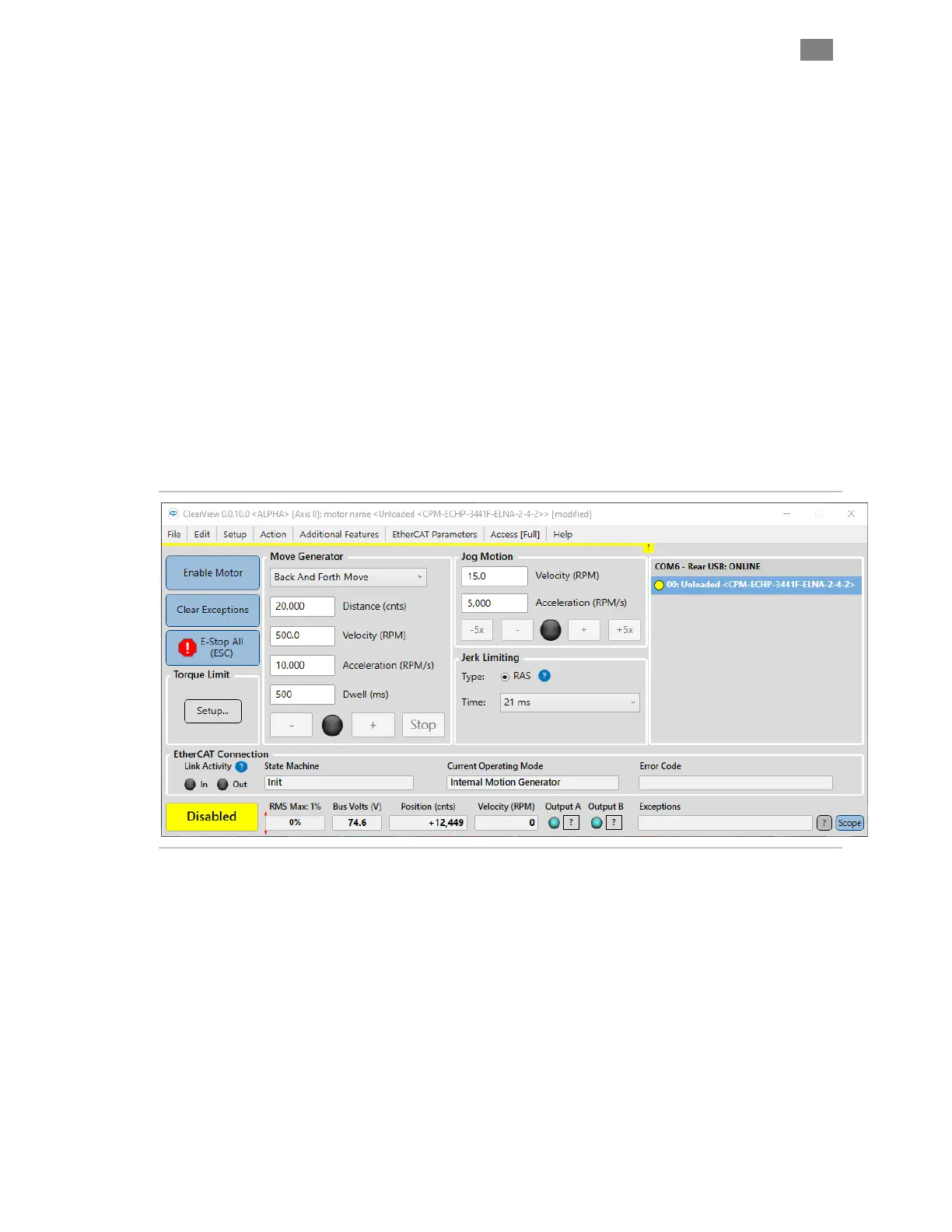
After you open ClearView 3.0, your ClearPath-EC motor will attempt to
establish communication with your PC. When successfully connected, the
ClearView 3.0 UI will look similar to that of the figure shown below.
M
AIN
UI
F
EATURES
x Enable/Disable button
x Clear Exceptions button
x E-Stop button (or Esc key on keyboard)
x Torque Limit Setup
x Move Generator (allows you to command several different move
types).
x Jog Motion Controls allow you to manually jog the motor.
x EtherCAT Connection Status
x Motor Status
ClearView 3.0 motor setup and configuration software
T
EKNIC
,
I
NC
. T
EL
.
(585)
784-7454


 To Next Page