C
LEAR
P
ATH
-EC
U
SER
M
ANUAL REV
1.11
48
D
ASHBOARD
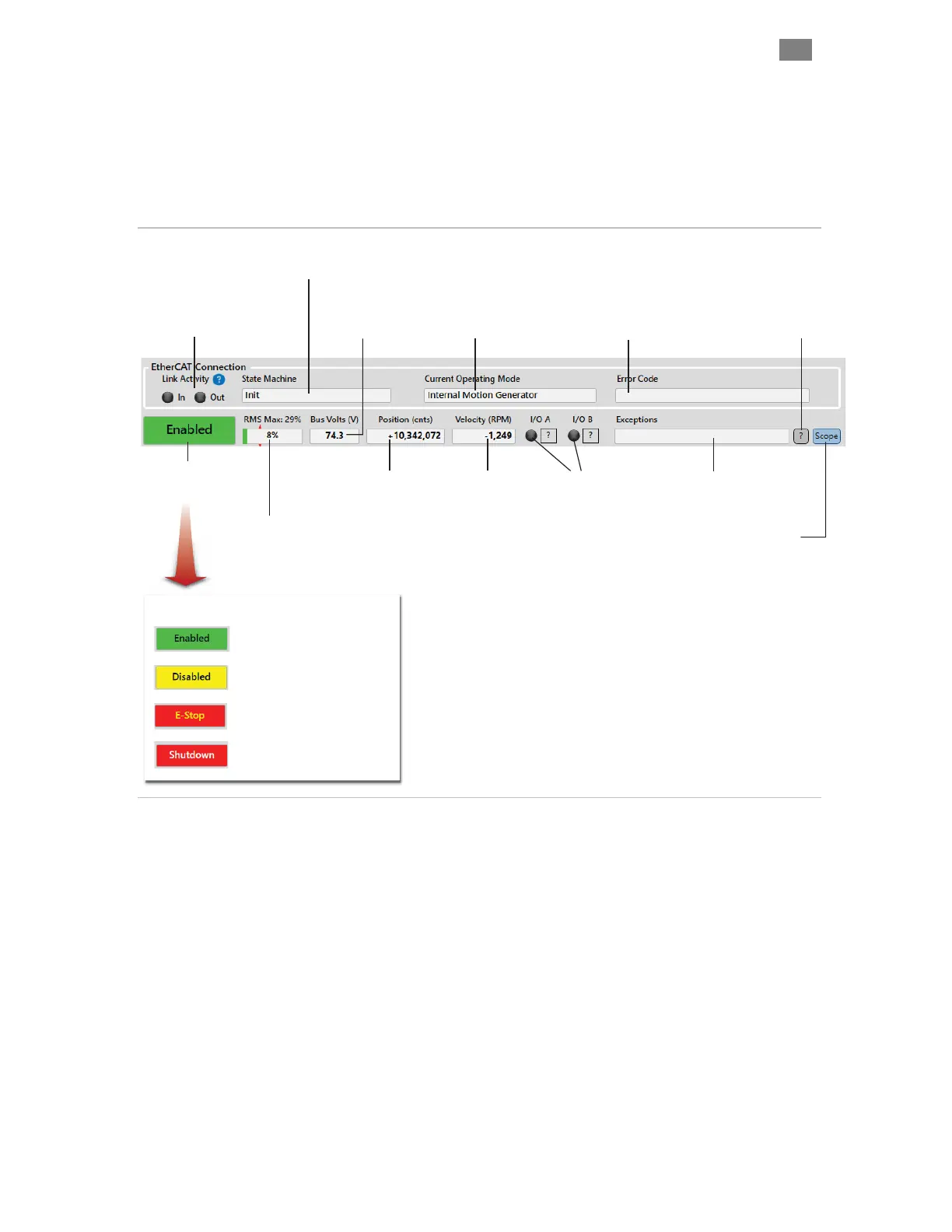
The Dashboard contains a number of visual elements (virtual LEDs,
meters, numerical readouts) to give the user real-time access to key motor
information including motor status, encoder position, motor velocity, bus
voltage, I/O states, exception messages, etc.
Motor/Drive Status
(Tip: double click to
clear exceptions).
DC Bus Power
Supply Voltage
I/O-A, I/O-B
Status LEDs
LED on = Input asserted
LED off = Input de-asserted
RMS Meter
Displays real-time (and maximum
recorded) RMS motor current.
ClearPath shuts down if RMS
reaches 100% to prevent burnout.
Position Counter
Displays position
of motor shaft in
encoder counts.
Exception Information
Click here to open a dialog
box containing additional
information on any active
exception or shutdown.
Velocity Meter
Displays motor
shaft velocity in
kcounts/sec or RPM.
Exception Messages
Displays a brief message
related to any active
ClearPath exception.
Motor is enabled.
Caution: Motor colis are energized.
Motor is disabled.
Motor coils are not energized.
ClearPath is in a shutdown state.
Motor coils are not energized.
An E-stop was issued.
Motor coils are not energized.
Motor Status Messages
Link Activity Display
Black: No link, no activity
Blue: Link detected, no activity
Yellow: Link detected, has activity
EtherCAT State Machine (ESM)
Different functions are accessible
depending on the current state.
Operating Mode
Displays the current
motor operating mode.
Error Code
Displays any active
error codes (e.g. 0x603F)
Soft Scope Launcher
Click to open Soft Scope.
Dashboard section of ClearView 3.0
T
EKNIC
,
I
NC
. T
EL
.
(585)
784-7454


 To Next Page