C
LEAR
P
ATH
-EC
U
SER
M
ANUAL REV
1.11
65
U
SING THE
D
IAGNOSTIC
P
ORT
EtherCAT Port vs. Diagnostic Port
ClearPath-EC motors communicate with the EtherCAT Master over the
EtherCAT Port.
The Diagnostic Port is used for temporary tasks such as motor
configuration and diagnostic work. It requires a separate PC running
ClearView 3.0. Communication occurs through the motor's rear USB-IR
Port.
A key benefit of the Diagnostic Port is that it allows the user to run their
machine software on the "main" channel (aka, the EtherCAT Port) while
simultaneously monitoring performance on the Diagnostic Port.
T
ERMS
U
SED IN THIS
S
ECTION
Master. This is the EtherCAT Master device that controls the machine
application.
EtherCAT Port. This is the communication channel between the Master
and the ClearPath-EC motors.
Diagnostic Port. This is a secondary data channel that sends data
between the ClearPath-EC and a separate PC running ClearView 3.0. The
Diagnostic Port is accessed via the USB-IR Port on the back of the
motor.
C
ONNECTING TO THE
M
OTOR
D
IAGNOSTIC
P
ORT
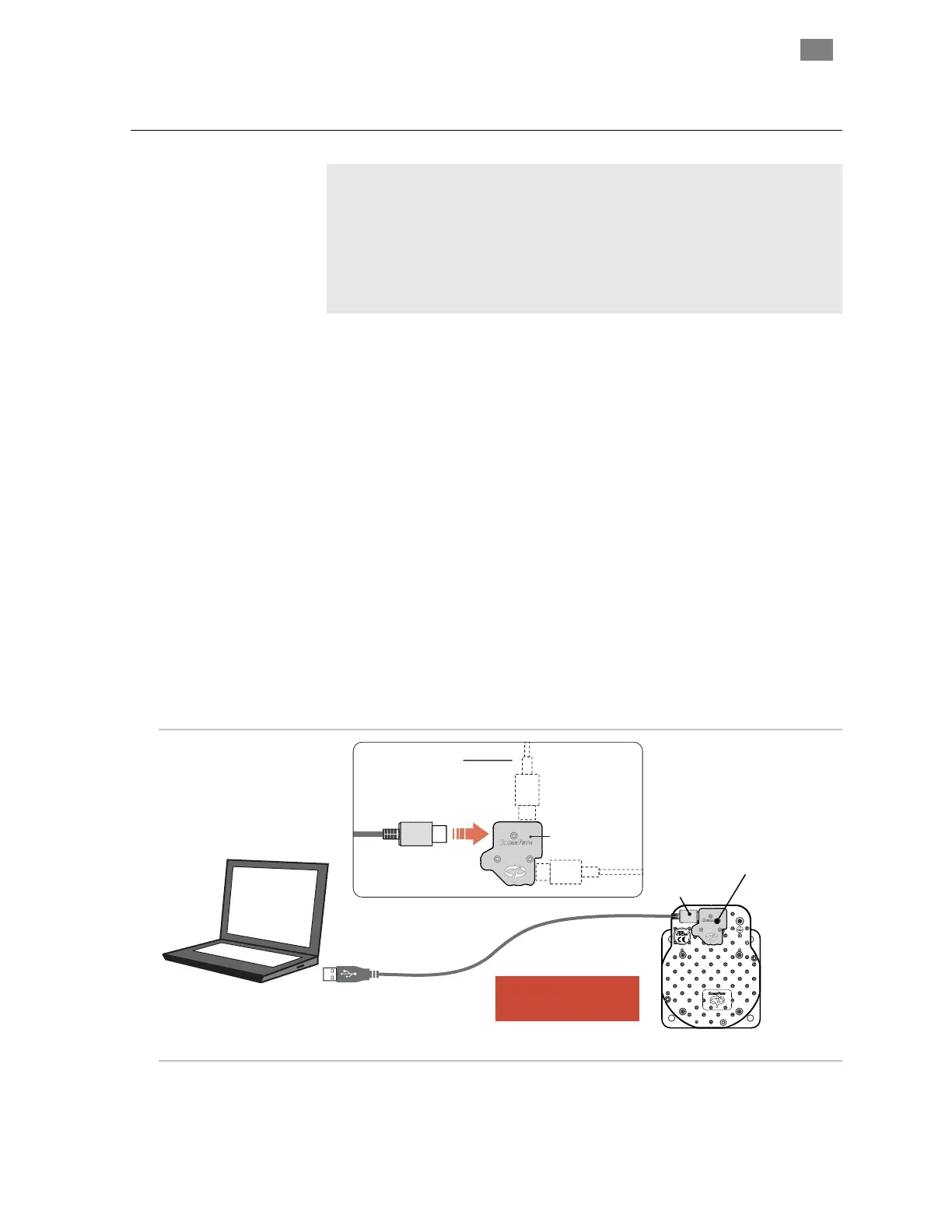
1. Connect a USB cable (Type A-C) to the USB-IR Converter and
magnetically attach to the motor's USB-IR Port. Then plug the
other side into your PC.
USB Type A
Windows PC
(Win 7, 8.1, 10, 11 with
MSP application installed)
ClearPath Motor
Attach USB-IR Converter to
USB-IR Port
(magnetic attachment)
Note: ClearPath motor must
be powered up in order
to establish communication.
USB-
IR Converter
P/N: CPMS-USB-IR
USB Type C
Connect USB cable to ANY ONE
of the three available connectors.
USB Type C
2. ClearView 3.0 should automatically identify your motors as
shown below.
T
EKNIC
,
I
NC
. T
EL
.
(585)
784-7454


 To Next Page