C
LEAR
P
ATH
-EC
U
SER
M
ANUAL REV
1.11
89
A
PPENDIX
H:
M
ISCELLANEOUS
T
OPICS
H
OW TO MAKE A
L
OGIC
P
OWER
S
UPPLY CABLE FOR YOUR
POWER4-HUB-S
This section describes how to make an inexpensive, no-crimps-required
cable to connect your Logic Power Supply to a POWER4-HUB-S.
Notes:
x Most users choose a Logic Power Supply of 12VDC or 24VDC, but
the ClearPath-EC motor will work with any Logic Supply
between 12-75VDC.
x The minimum power requirements of a logic power supply
depends on application requirements.
Instructions
1. Select a Logic Power Backup Supply. Typically 12V or 24V, but
can be any voltage from 12V-75V.
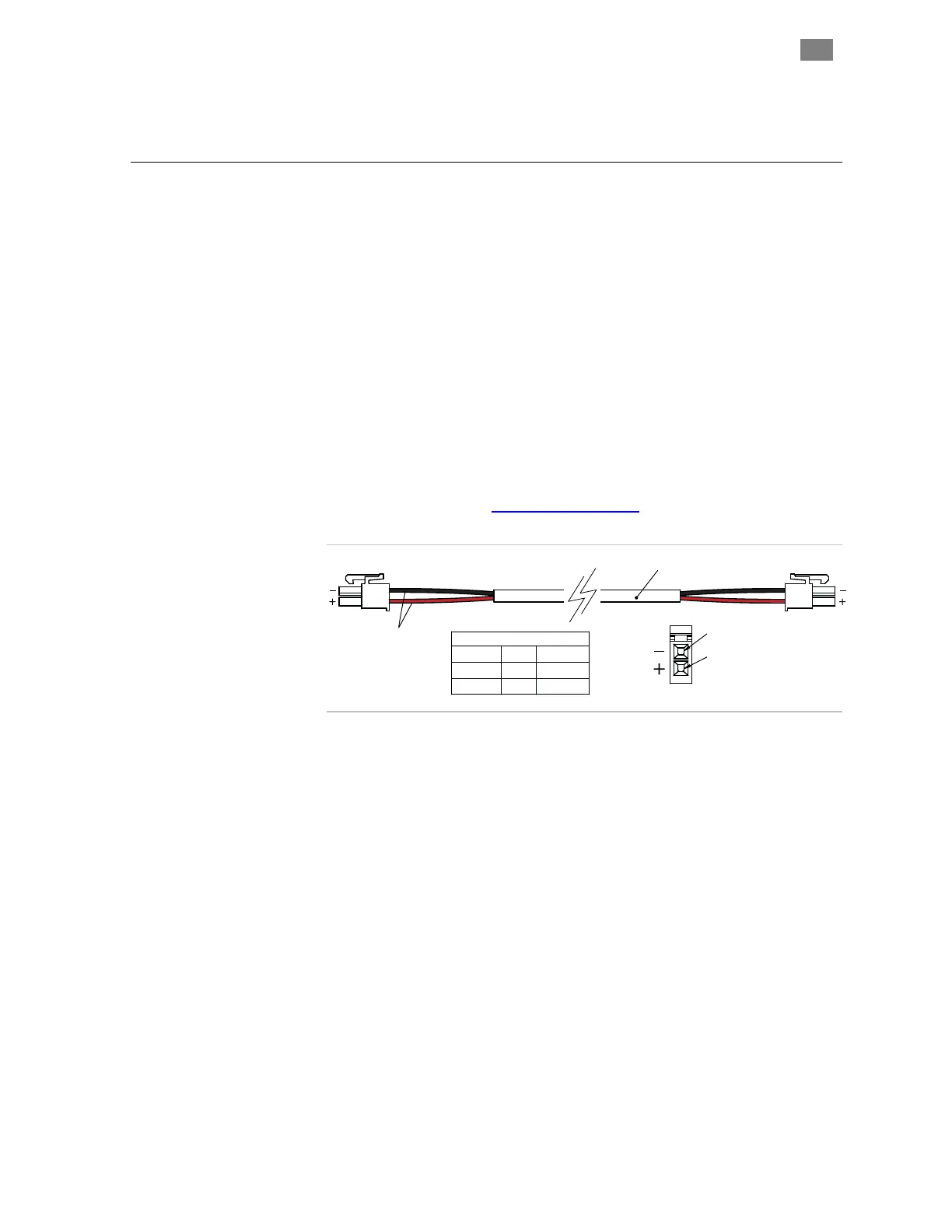
2. Order a Teknic CPM-CABLE-M2P2P-120
. This is a 120" (10-ft.), 2-pin
Molex to 2-pin Molex cable as shown below.
2
1
wire entry view
Pin Assignments
COLOR
PIN SIGNAL
RED
1
BLK
2
V +
V -
CPM-CABLE-M2P2P-120
20 AWG
CPM-CABLE-M2P2P-120
3. Cut the cable to the desired length. If you cut it exactly in half, you
can make two five foot cables.
4. Strip the outer jacket and conductors on the unterminated end of
the cable to create flying leads.
5. Connect the flying leads to your Logic Power backup supply.
Insulate any exposed conductors with heat shrinkable tubing,
electrical tape or similar.
Test DC output polarity before connecting. Use a DMM to verify
proper polarity at the DC output connector. Use the above diagram as a
reference.
T
EKNIC
,
I
NC
. T
EL
.
(585)
784-7454


 To Next Page