C
LEAR
P
ATH
-EC
U
SER
M
ANUAL REV
1.11
20
T
EST
S
PIN
Y
OUR
M
OTORS
U
SING
M
OTION
G
ENERATOR
Note: This section describes how to spin an unloaded motor (i.e. a motor
with nothing attached to the shaft). Important: ClearPath-EC motors ship
out pre-configured for unloaded use only. You must run the Auto-
Tune application whenever you connect your motor to a
different mechanical system.
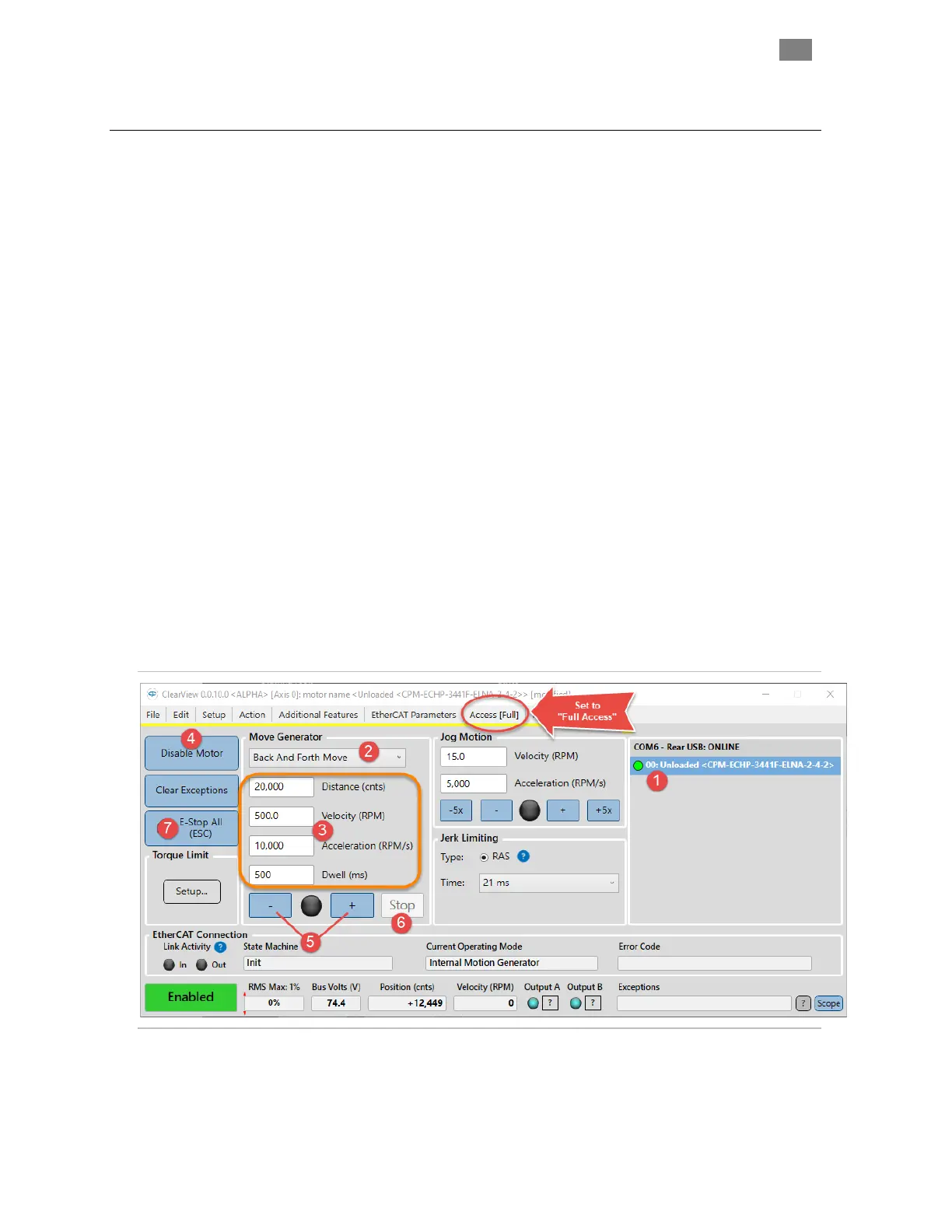
Click and spin—no Master required! Once your system is powered
up and communicating, you can take your motors for a test spin using
ClearView's Move Generator or Jog Motion controls. Refer to instructions
below.
Important: To change settings and run moves you must set ClearView to
Full Access mode using the "Access" dropdown menu.
1. Select the motor you'd like to spin from the Motor List.
2. Set the Move Type: Back and Forth, Single, Repeating, or
Constant Velocity.
3. Enter the Move Parameters: Distance, Velocity, Acceleration, and
Dwell (Dwell is just the pause time between repeating moves).
4. Click Enable/Disable button to enable the motor.
5. Click "+" to start in the CCW direction. Click "-" to start in the CW
direction.
6. Single click the "Stop" button to end motion cycling. Double click
the Stop button to stop motion immediately.
7. Click "E-Stop All" or hit your Esc key to stop motion immediately.
ClearView 3.0 UI
T
EKNIC
,
I
NC
. T
EL
.
(585)
784-7454


 To Next Page