Displaying Signals
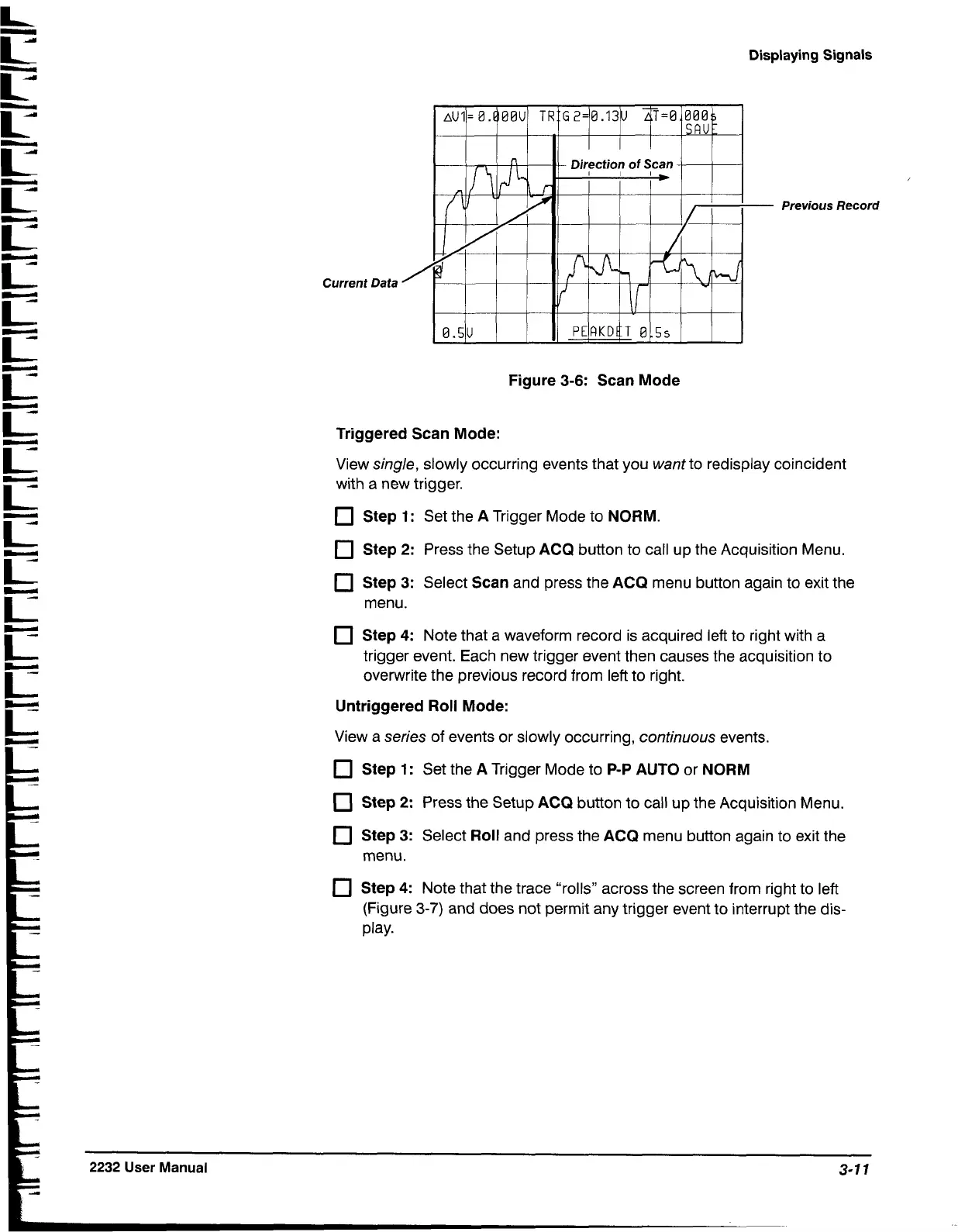
Current
Data
Previous Record
Figure 3-6: Scan Mode
Triggered Scan Mode:
View single, slowly occurring events that you want to redisplay coincident
with a new trigger.
Step 1:
Set the
A
Trigger Mode to
NORM.
Step
2:
Press the Setup
ACQ
button to call up the Acquisition Menu.
Step 3:
Select
Scan
and press the
ACQ
menu button again to exit the
menu.
Step 4:
Note that a waveform record is acquired left to right with a
trigger event. Each new trigger event then causes the acquisition to
overwrite the previous record from left to right.
Untriggered Roll Mode:
View a series of events or slowly occurring, continuous events.
Step 1:
Set the
A
Trigger Mode to
P-P
AUTO
or
NORM
Step
2:
Press the Setup
ACQ
button to call up the Acquisition Menu.
Step 3:
Select
Roll
and press the
ACQ
menu button again to exit the
menu.
Step 4:
Note that the trace "rolls" across the screen from right to left
(Figure
3-7)
and does not permit any trigger event to interrupt the dis-
play.


 To Next Page
 Loading...









