EasyManua.ls Logo

Thermal Dynamics CUTMASTER 151 - Page 101

Thermal Dynamics CUTMASTER 151
172 pages
Print Icon
To Next Page IconTo Next Page
To Previous Page IconTo Previous Page
Loading...
Manual 0-4691 5-33 SERVICE
5
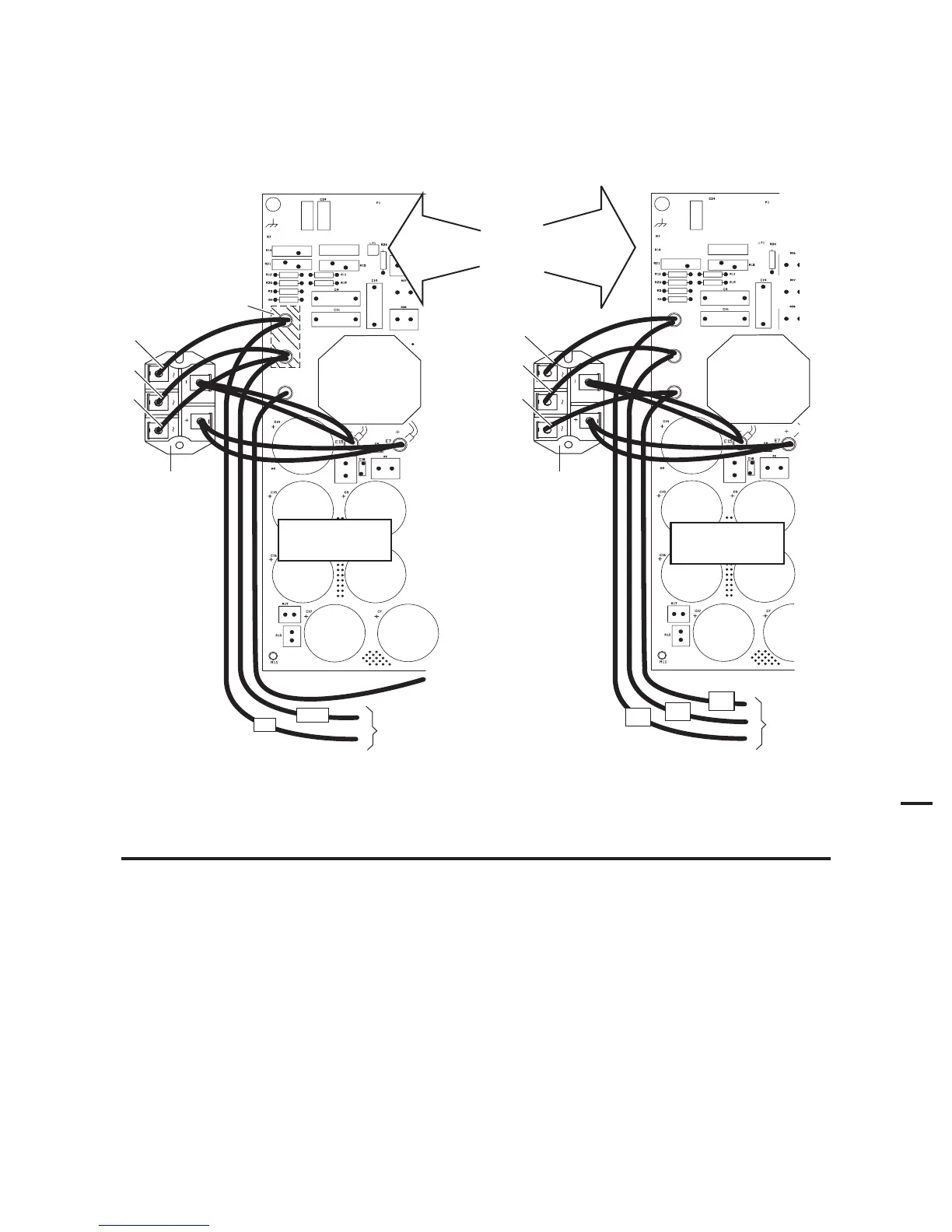
10. Use the hardware removed previously to re-connect wires per the appropriate diagram. Ensure that the star washers are
in place between the screws and the wire ring terminals.
Input
Diode
(mounts
to center
chassis)
E2
E3
E1
To Input
Contactor
Copper
Strap
#78
#1
Input
Diode
(mounts
to center
chassis)
E2
E3
E1
To Input
Contactor
208/230V Units
460V
Art # A-04610
#1
#2
#3
#1
#2
#3
Power Supply
Main PC Board
Power Supply
Main PC Board
#2
#3
#1
400V
600V
415V
Units
11. Torque the screws securing the wires to the bridge to 22 in-lbs. (2.5 Nm).
NOTE
Failure to torque properly will cause component damage.

Table of Contents

Other manuals for Thermal Dynamics CUTMASTER 151

Related product manuals