13.3.2 Selecting or modifying a patient
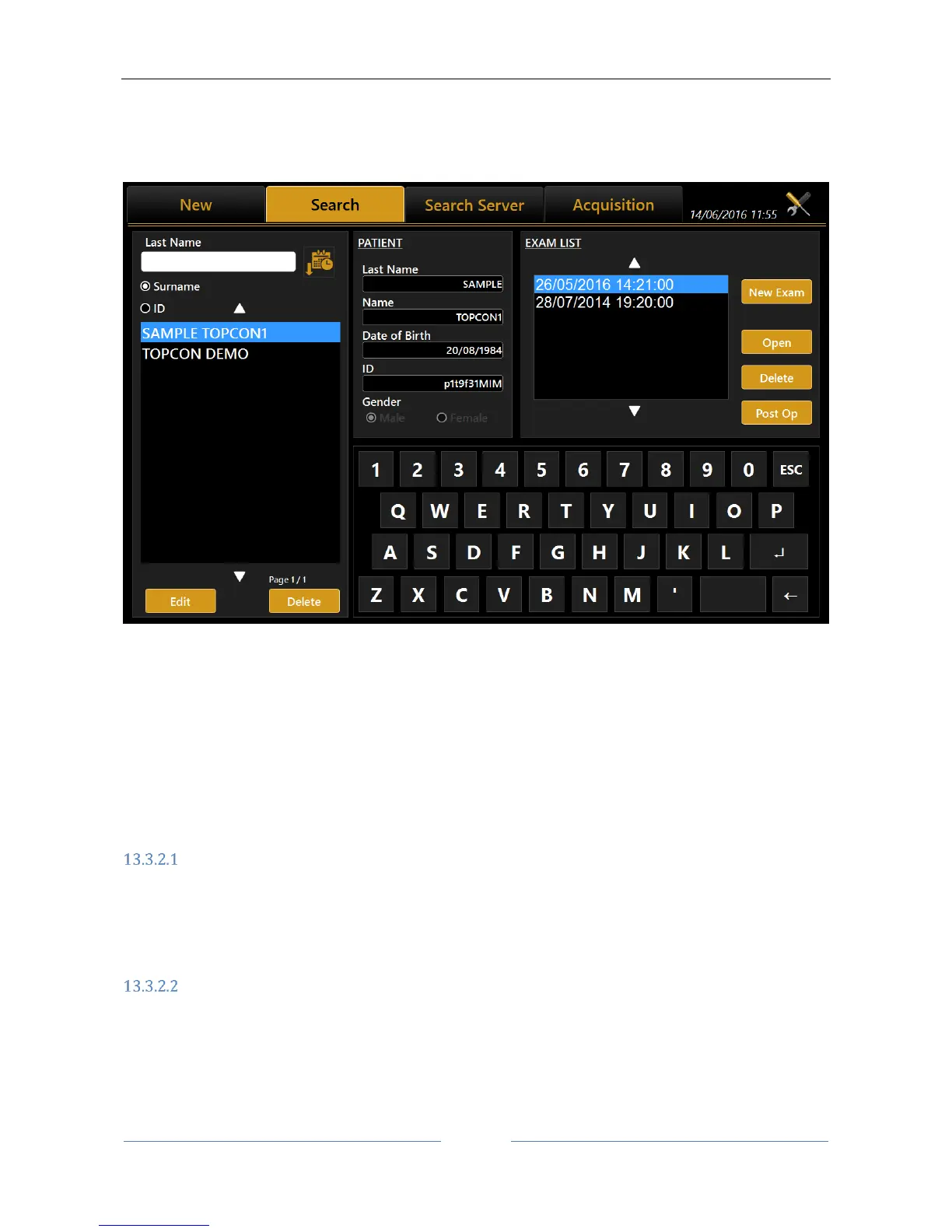
On the input screen, click on the "List" tab to access all the patients included in the database (see Errore.
L'origine riferimento non è stata trovata.).
Figure 23
On this screen you can select a previously created patient and the examinations associated with him/her.
The list can be viewed by patient ID or by Last Name (and name) selecting the corresponding radio button.
If you type into the “Last Name” field, a search is done in the local database for patients with the
corresponding surname or whose surname contains the selected key, same for patient ID.
By pressing the button on the right, the patient list is ordered alphabetically (A to Z) or by last exam date
(most recent first).
Open an examination or acquire data for the selected patient
In the left column, clicking on a patient in the “Exam List” frame displays the list of associated examinations.
In this list, you can access examinations or delete them, using the “Open” or “Delete” buttons.
After having selected a patient, another examination can be carried out by pressing the "Acquisition” tab or
pressing on “New Exam” button.
Delete or edit the selected patient
From the list of patients, select the exam you want to delete and press the "Delete" button. The program will
ask you to confirm the choice.



 To Next Page