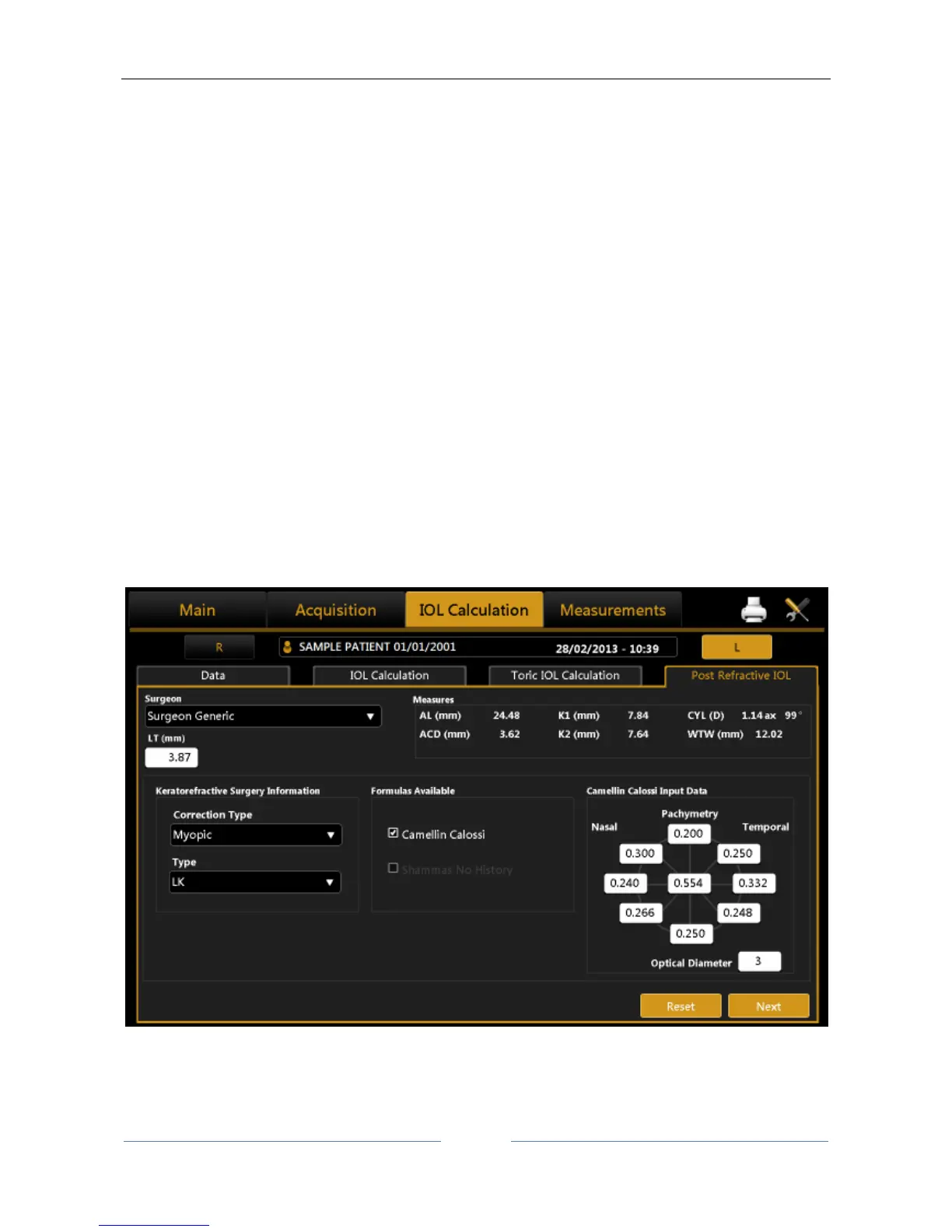
If the correction type is myopic or hyperopic, you have to select the surgery type performed on the patient
from those listed:
1. Radial Keratotomy (RK)
2. Photo Refractive Keratectomy (PRK)
3. Lasik
4. Lasek
5. LK
6. PTK
7. Unknown
In case of Radial Keratotomy, Photo Refractive Keratectomy, Lasik and Lasek you need to insert in the
“Refractive Change” frame the correct ametropia type and the correction factor obtained by the operation
( “SIRC”).
In case of LK, PTK or Unknown only the Camellin Calossi formula is available and you need to insert the
current Pachymetric data as well as the diameter of the optical zone to improve the accuracy of the final
calculation (Figure 55).
The Unknown option must be selected every time that you don’t know the type of surgery or one of the
associated information.
For example if you know your patient has undergone Radial Keratotomy or Photo Refractive Keratectomy or
Lasik or Lasek but you don’t know the SIRC value, select Unknown and insert the pachimetry values.
Figure 55
By pressing “Next” you move on to the final diagram of the calculation. Here you decide on the “Target” and
select the lens make and model.
If you highlight the lens selected, the result is memorized and highlighted on the report.



 To Next Page