Troubleshooting
Topcon HiPer Lite and HiPer Lite+ Operator’s Manual
5-8
Bluetooth Problems
The following are some of the most commonly encountered error
messages. BTCONF reports the error messages in the status bar.
The receiver has
already logged 512
files into the internal
memory.
• Delete unnecessary files (see “Deleting
Files” on page 4-13).
• Use the AFRM feature. See
“Automatic File Rotation Mode
(AFRM) parameters” on page 2-26.
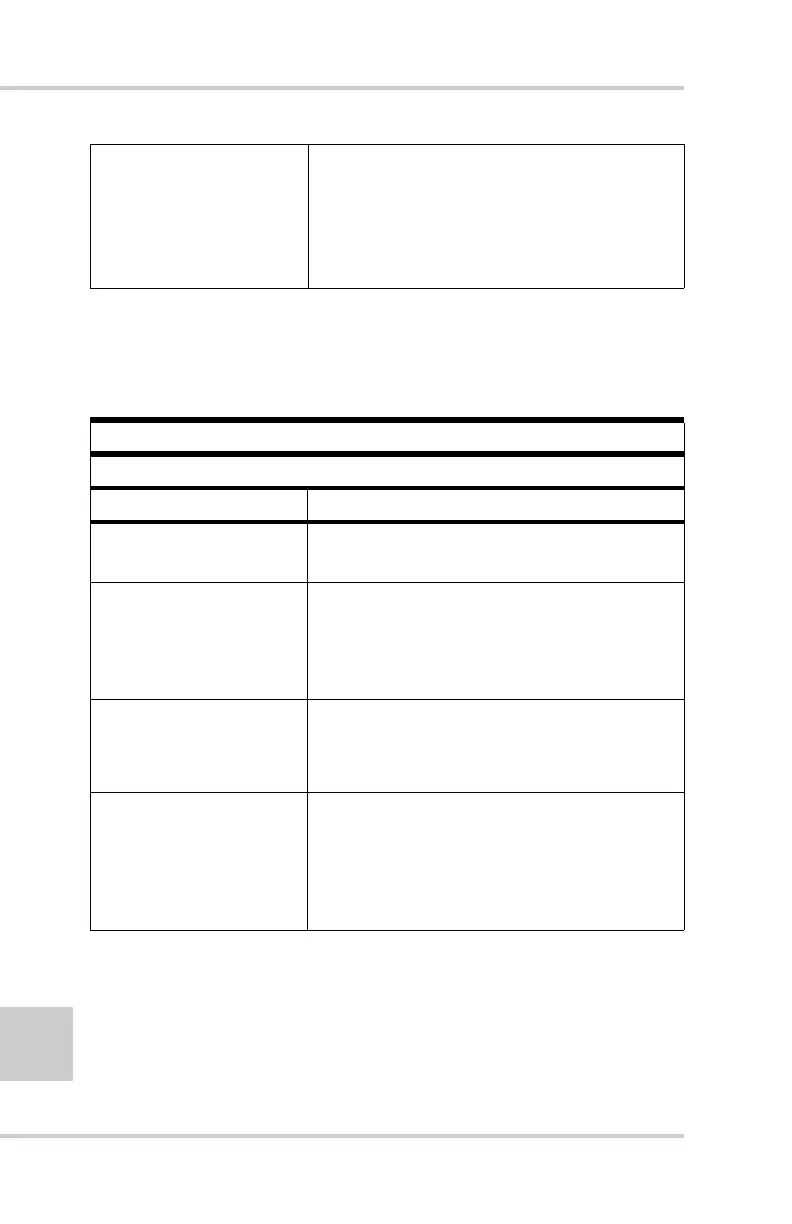
Error Message
Can’t find receiver.
Causes Solutions
The receiver is turned
off.
Ensure the receiver has power and is
turned on.
If using a cable, the
cable’s connectors are
improperly attached.
• Check that the cable connector is
attached to the correct serial port.
• Unplug the cable, then securely and
properly reconnect it to the receiver.
If using a cable, the
cable is damaged.
• Use an undamaged cable.
• Contact your Dealer to purchase a new
cable.
The COM port the
receiver is attached to
differs from the one
selected in BTCONF.
Ensure that the RS232 cable is attached
to the COM port specified in the
BTCONF communication port drop-
down list. See “Bluetooth Module
Configuration” on page 2-37 for details.



 To Next Page