Configuration
Topcon HiPer Lite and HiPer Lite+ Operator’s Manual
2-22
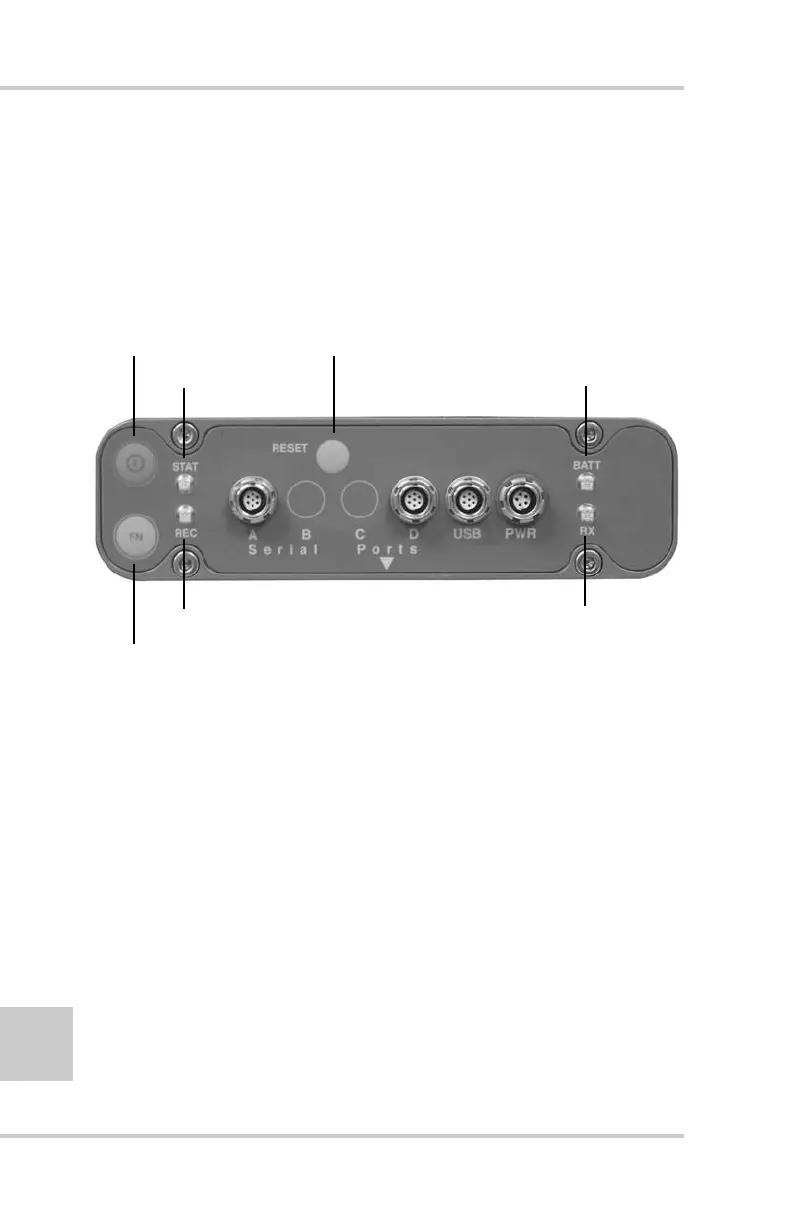
MINTER Configuration
The Minimum INTERface (MINTER) consists of three keys
(Power, FN, and Reset) and four LEDs (STAT, REC, BATT, and
RX) that control and display the receiver’s operation (Figure 2-21).
The MINTER is the same for both the HiPer Lite and the HiPer
Lite+ receiver.
Figure 2-21. MINTER (HiPer Lite+)
The MINTER performs numerous functions:
• Turn the receiver on or off, put it in either Sleep mode or Zero
power mode.
• Turn data recording on or off (FN key).
• Change the receiver’s information mode.
• Show the number of GPS (green) and GLONASS (orange)
satellites being tracked (STAT led).
• Show data recording status (REC led).
• Show each time data is recorded to internal memory (REC led).
Power Button
Reset
BATT
(battery LED)
RX
(modem status LED)
STAT (status LED)
FN (function/recording button)
REC (recording LED)



 To Next Page