Operation
Topcon HiPer Lite and HiPer Lite+ Operator’s Manual
4-10
Downloading Files to a Computer
When your survey finishes, you can download survey files to a
computer for storage, post-processing, or backup. Also, the receiver
memory holds a finite amount of files and information, so
downloading the files prevents files from being lost.
You should download files as soon as possible after collecting data
at the jobsite. PC-CDU provides a File Manager to download files
to your computer and delete files from the receiver.
1. Connect your receiver and computer. See “Connecting the
Receiver and a Computer” on page 2-11 for this procedure.
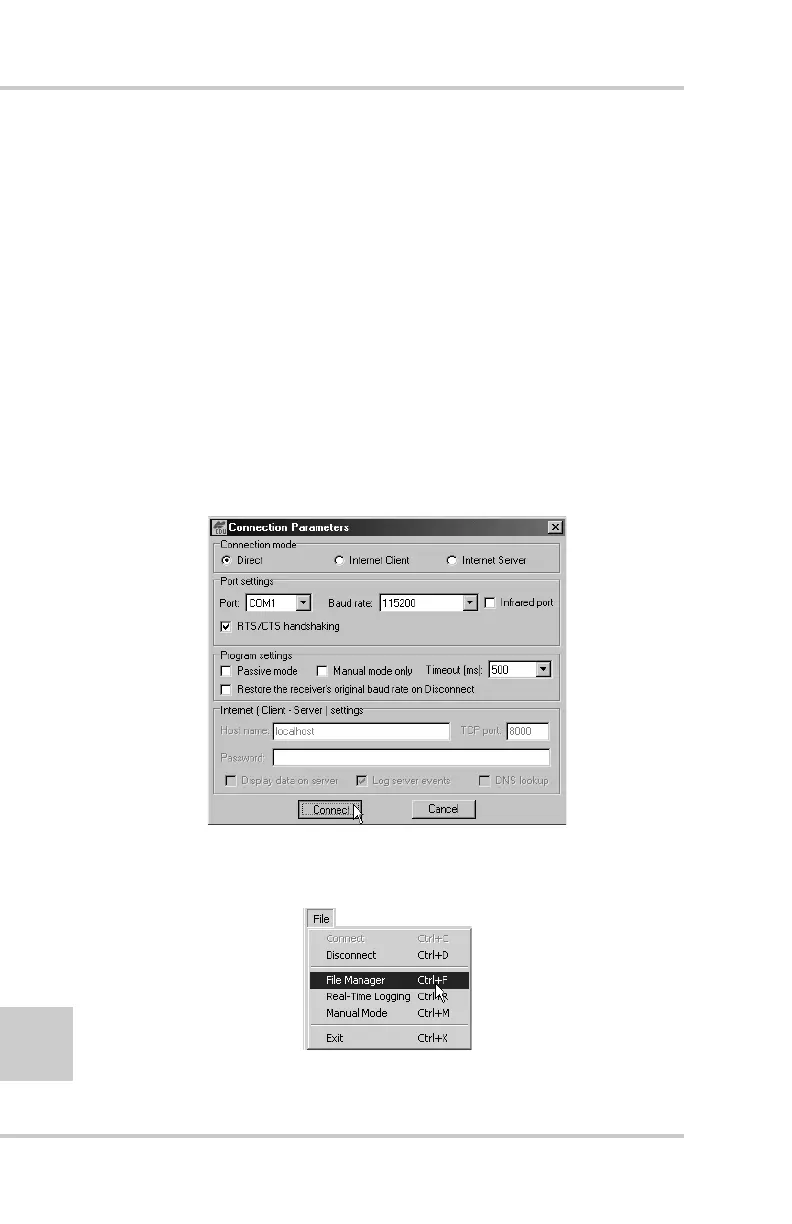
2. On the Connection Parameters dialog box, enable RTS/CTS
handshaking (Figure 4-2).
Figure 4-2. Connection Parameters – RTS/CTS Handshaking
3. Click FileFile Manager (Figure 4-3).
Figure 4-3. Open File Manager



 To Next Page