Setup and Survey
Topcon HiPer Lite and HiPer Lite+ Operator’s Manual
3-8
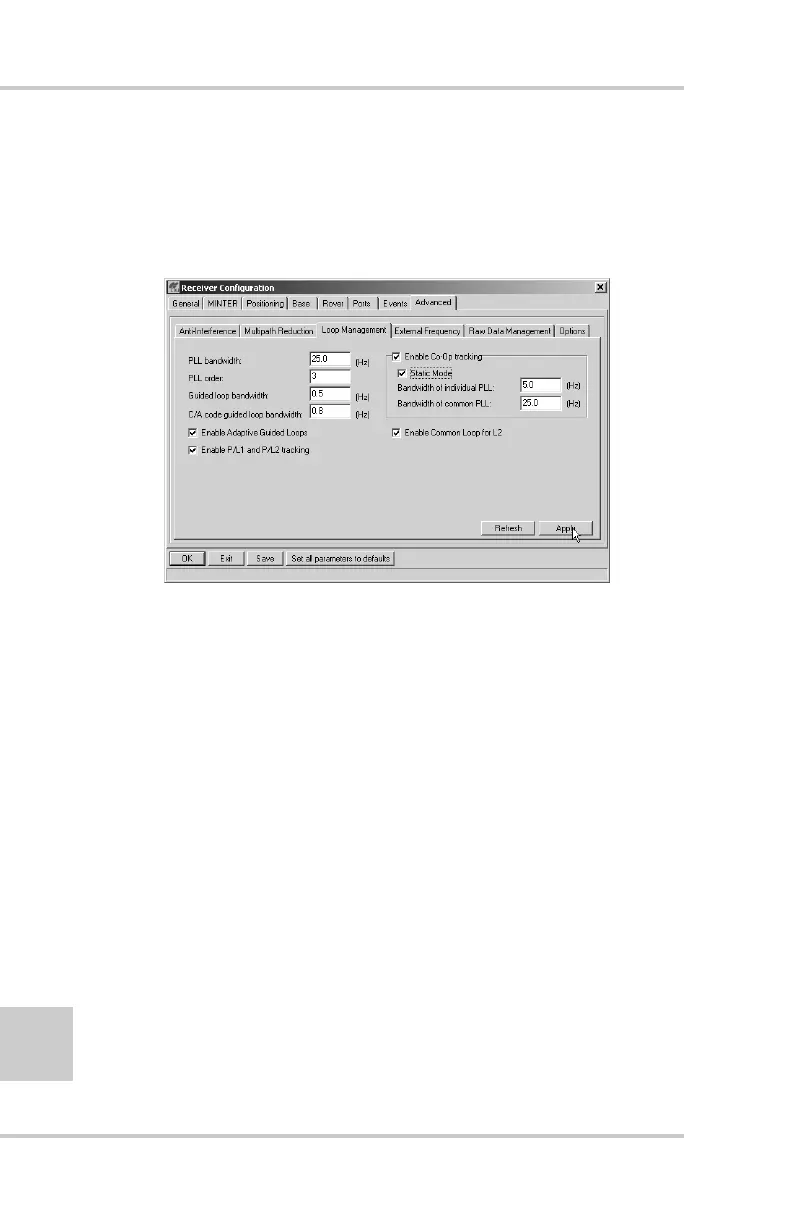
4. Click the Loop Management tab and set the following
parameters, then click Apply (Figure 3-4):
• Enable Co-Op tracking – enable
• Static mode – enable
Figure 3-4. Advanced->Loop Management
5. Set up each antenna and receiver as described in “Receiver
Setup” on page 3-1.
6. Begin surveying.
Kinematic (Stop and Go) Survey
In a kinematic, stop and go, survey, the stationary receiver
(Base station) is set up over a point, such as a survey
monument. The receiver continually tracks the satellites and
logs the raw data into its memory. The rover receiver is set up
over a point and collects data in static mode for 2 to 10 minutes.
When finished, assign the Rover to kinematic status and move
to the next survey point. At this point, and each subsequent
point, the receiver is changed to static mode to collect data. So,
while moving, the Rover is in kinematic mode, and while
collecting data, the Rover is in static mode.



 To Next Page