Troubleshooting
Topcon HiPer Lite and HiPer Lite+ Operator’s Manual
5-10
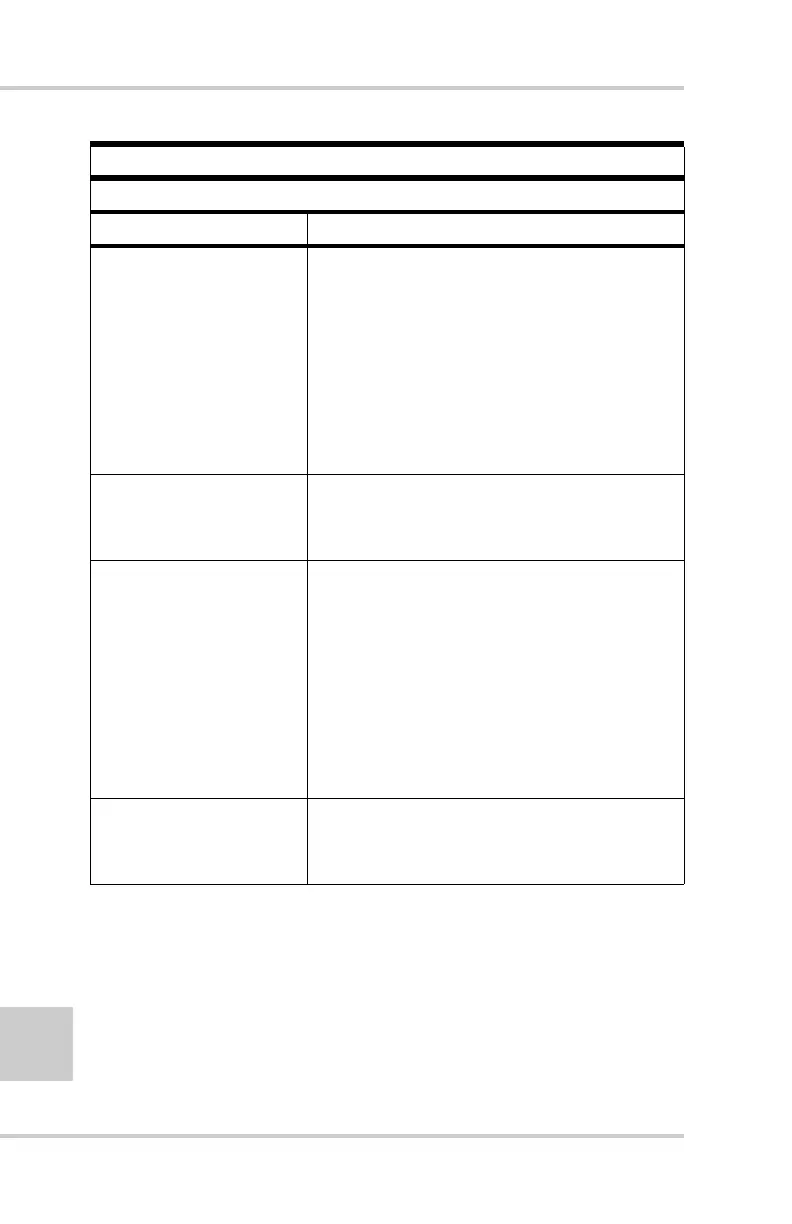
Error Message
Can’t find Bluetooth.
Causes Solution
The receiver’s Slot 3 is
turned off.
1. Connect your receiver and a
computer using an RS232 cable (see
“Establishing an RS232 Cable
Connection” on page 2-13).
2. Click ConfigurationReceiver
General.
3. In the Turn on/off Slots area, enable
the Slot 3 (B) check box.
The Bluetooth module
is linked with another
device.
Close the connection with the device,
then connect to your receiver.
The Bluetooth
module’s processor is
overloaded.
1. Put your receiver in Zero Power
Mode. See “Zero Power Mode” on
page 4-21 for details.
2. Press and hold the Reset key for
about one second to return the
receiver to normal mode.
3. Re-connect to the Bluetooth module.
The receiver does not
have a Bluetooth
module.
Contact your dealer to purchase a
Bluetooth enabled receiver.



 To Next Page