Step-by-Step Installation Instructions
100-11672 - Rev D Page 31
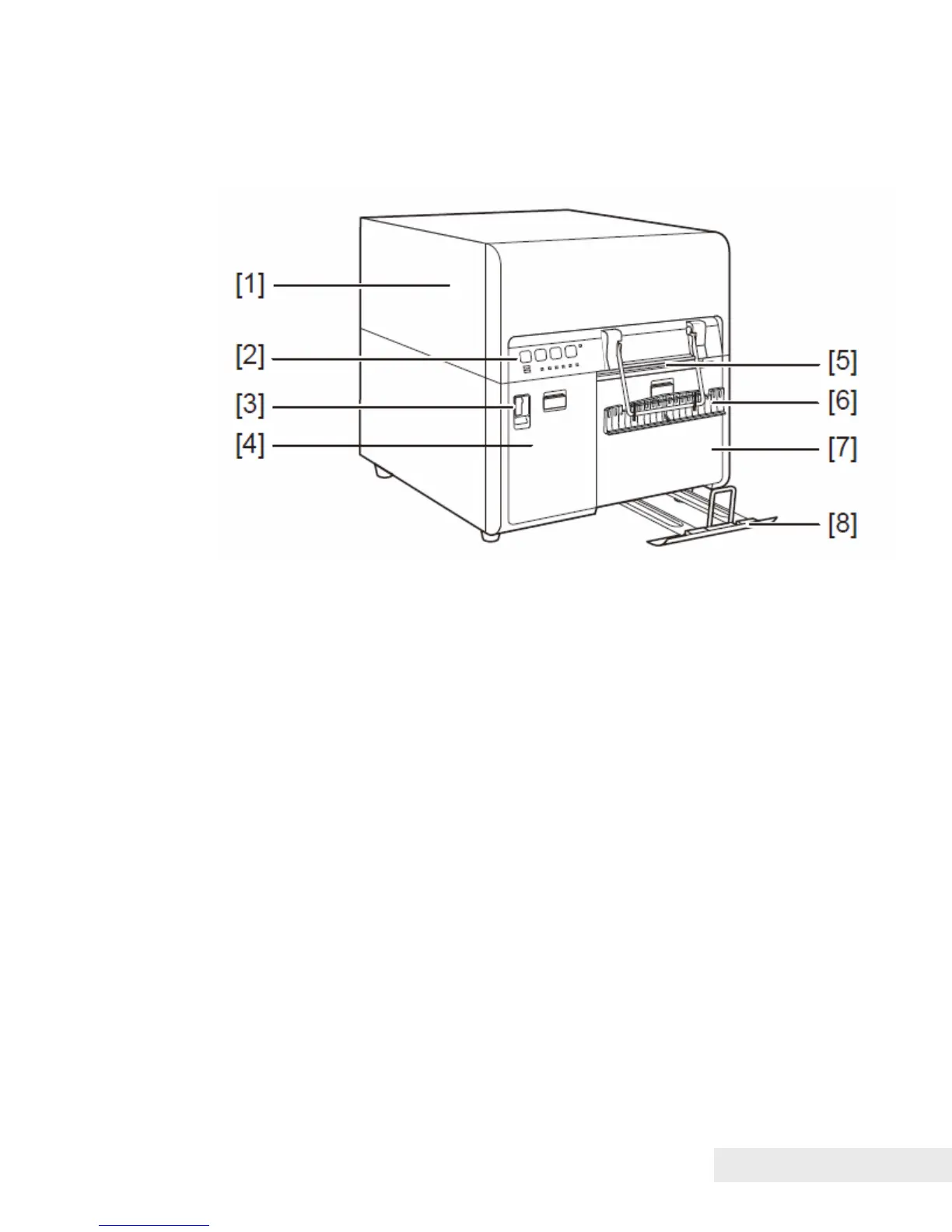
Printer Part Names and Function
Front View
[1] Upper unit
Open this unit when set paper or removing the paper jammed in the paper
feed path or cleaning inside of the machine. This unit incorporates print
modules, PCBs, and so on.
[2] Operation panel
This panel has the key switches necessary for printer operation and the lamps
that indicate printer status.
[3] Power switch
Use this switch when the printer is scheduled to be unused for a long period of
time or it is relocated.
[4] Ink tank door
Open this door when replacing ink tanks. Ink tank door is locked while the
printer operates.
[5] Paper delivery slot
Paper is ejected through this slot.
[6] Paper retainer
This retainer allows paper to be ejected steadily.
[7] Maintenance cartridge door
Open this door when replacing the maintenance cartridge. Maintenance
cartridge door is locked while the printer operates.



 To Next Page