2INSTALLING IN A CONTROL PANEL
8
2 INSTALLING IN A CONTROL PANEL
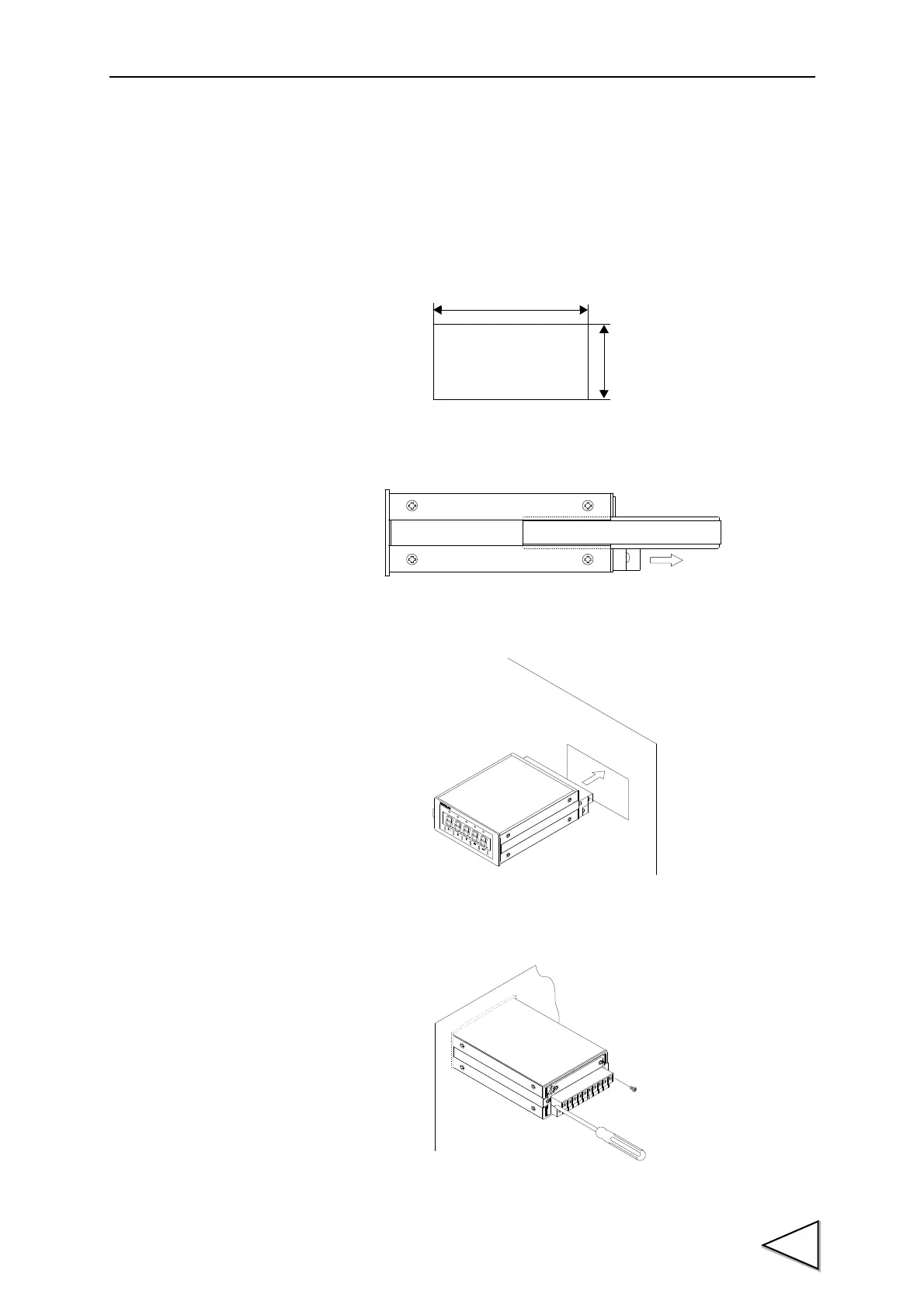
Install the F320 in a control panel by the following procedures.
1. Make a hole in the panel according to the panel cutout dimensions.
2. Remove the guide rails from both sides
.
3. Insert the F320 from the front of the panel.
4. Mount the guide rails from the back, and fix them with the attached screws.
92mm
45mm
Panel cutout
+ 1
0
-
+ 1
0
-
dimensions
㧲㧟㧞㧜
㧰
㨕㨓㨕
㨠
㨍
㨘
㧵㨚㨐㨕
㨏
㨍
㨠
㨛
㨞
㧴
㧵
㧻㧷
㧸
㧻㨃
㧼㧱
㧭㧷
㧴㧻㧸㧰
㧲
㧺
㧯
㧳㧭㧵㧺
㧯
㧭㧸
㨆
㧱
㧾
㧻
㧴㧻㧸
㧰



 To Next Page