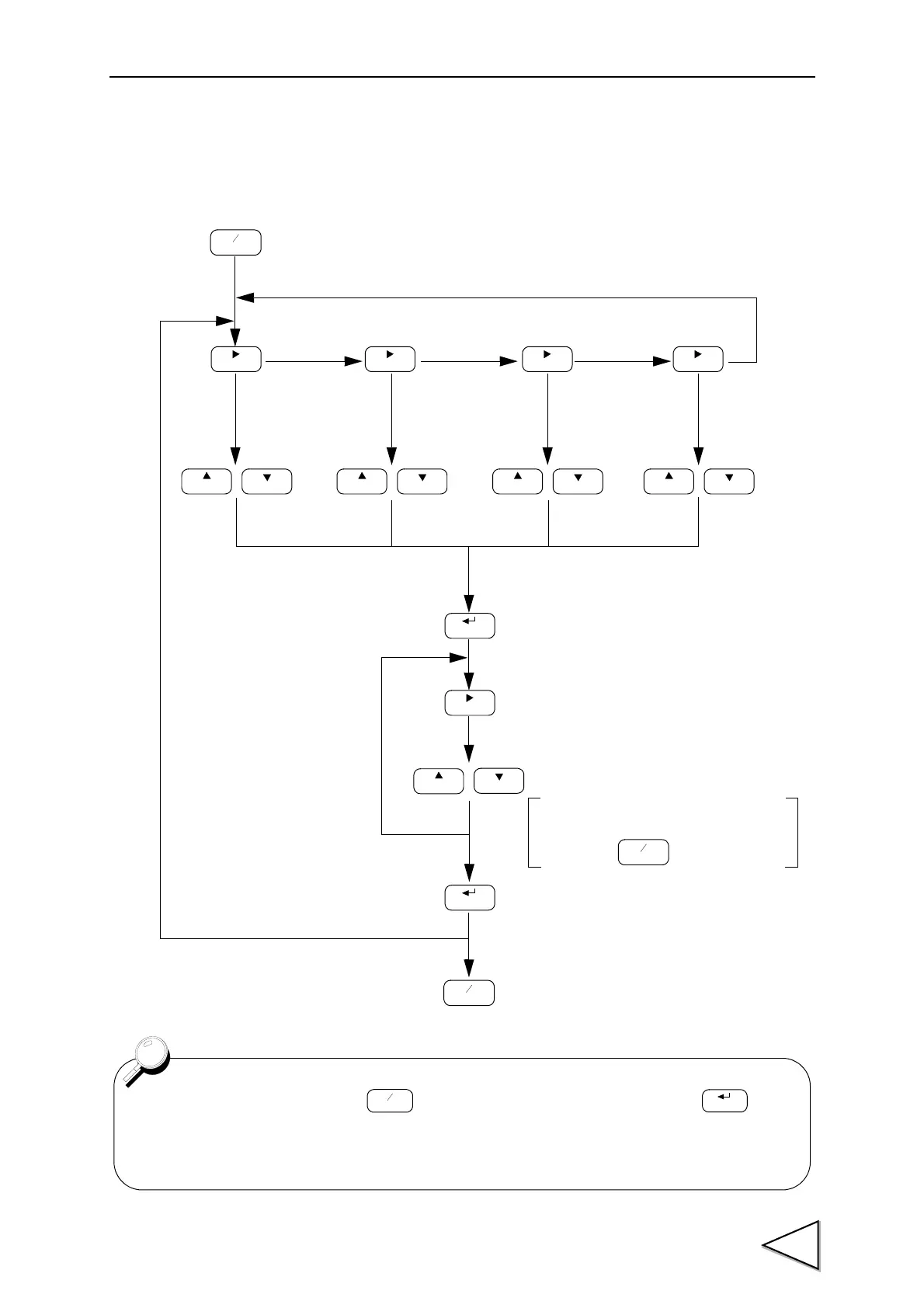
4-4. Setting Procedure
If wishing to affix a sign to the high/low limit
and d
igital offset, D/A zero setting full scale
setting, press
key.
Set Value is validated.
CAL
FNC
+
-
ZERO
FNC
+
-
ZERO ZERO ZERO
GAIN
CAL
GAIN
CAL CAL
GAIN
HOLD
HOLD
CAL
GAIN
GAIN
ZERO
FNC
+
-
“F1” of setting Mode1
is displayed.
“F2” of setting Mode2
is displayed.
“F3” of setting Mode3
is displayed.
“F4” of setting Mode4
is displayed.
Select a
setting item.
Select a
setting item.
Select a
setting item.
Select a
setting item.
The most significant digit starts blinking
to prompt setting.
Select a digit where setting is desired.
Set a value.
Setting Mode is terminated to return to
the indicated value display.
If one minute has elapsed after key is pressed without any key hit before key
is pressed,the setting is canceled and the indicated value is displayed again. The set value
is not stored in this case.



 To Next Page