VEMCO – VR100 Manual 28 May 2018 25
3.8.1 Add a Tag
The Add sub-menu (in PC Setup) allows a sensor tag to be added.
Adding a tag refers to entering a sensor transmitter’s information so the
received data can be displayed in the correct units, which must be done
for each sensor transmitter being used with the VR100.
A sensor transmitter’s information must be entered in the VR100 for the
data to be displayed correctly. A new sensor transmitter can be added by
doing the following the steps.
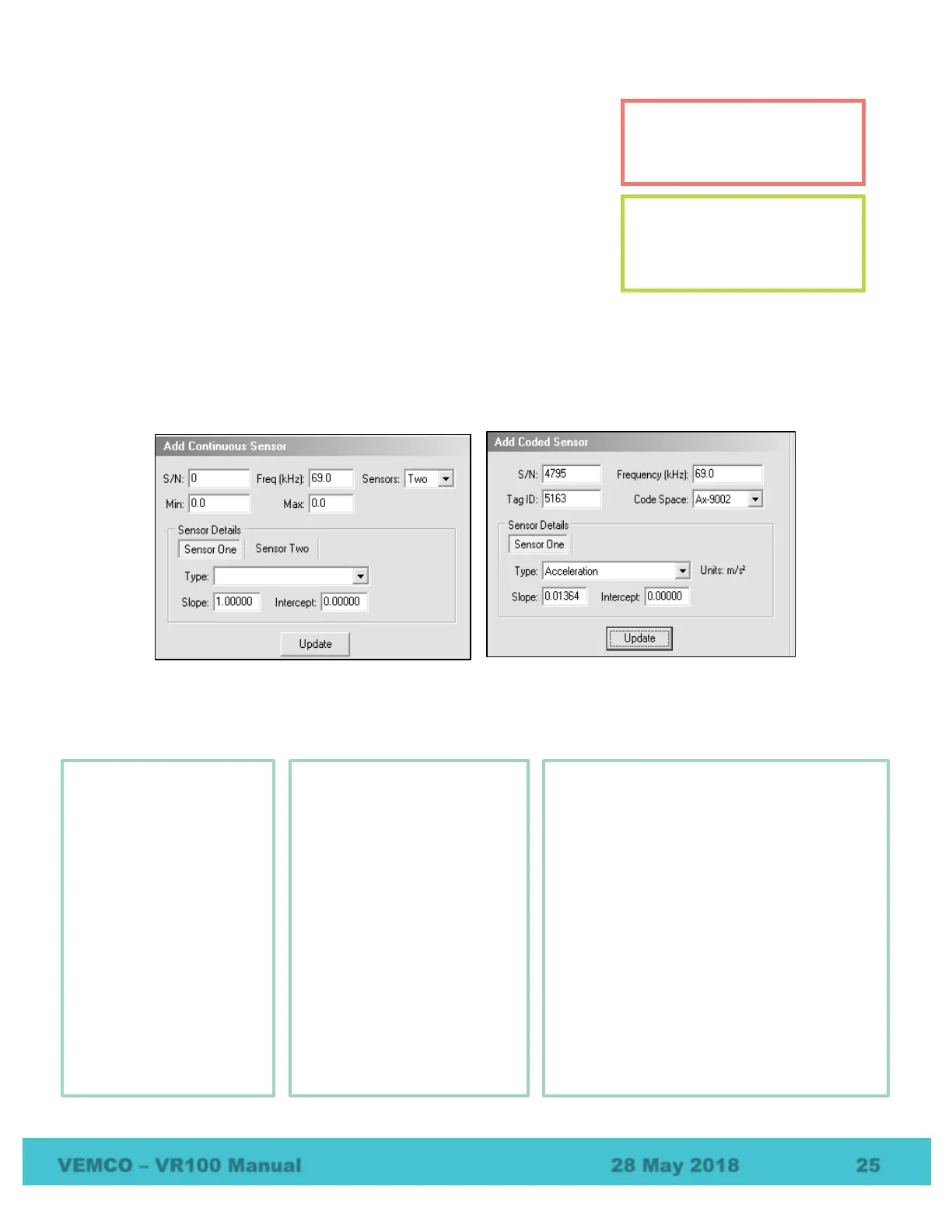
1. Select the tag type (coded sensor, continuous one sensor, or continuous two sensor) by either using the
PC Setup menu or by clicking the desired sensor type in the PC Managed Setup on the left half of the
screen. In either case, the bottom left corner of the Tag Manager window will display data entry boxes
similar to the two samples shown below. Initially the boxes are empty, as seen in the sample window on
the left. The sample window on the right has the information entered and is ready for the Update button
to be clicked.
2. Enter the information as identified in the window (see example above on the right). The information
needed is listed below by tag type. The information can be found in the Transmitter Specification manual
shipped with the sensor transmitters.
Tags with a sensor should be
entered in the VR100 receiver
before detections occur.
Only tags with sensors need to
be entered in the receiver.
Pingers (tags without sensors)
don’t need to be entered.
Sensor Tag
Serial number
Frequency in kilohertz
(kHz)
ID number
Code Space – select
from the pull-down list
Sensor type –
temperature, depth or
acceleration
Slope
Intercept
Setup Info for Continuous
One-Sensor Tag
Serial number
Frequency in kilohertz
(kHz)
Number of sensors – One
Minimum period possible,
in milliseconds (ms)
Maximum period possible,
in milliseconds (ms)
Sensor type –
temperature or depth
Slope
Intercept
Setup Info for Continuous
Two-Sensor Tag
Serial number
Frequency in kilohertz
Number of sensors (Two)
Minimum period possible (milliseconds)
Maximum period possible (milliseconds)
Sensor One:
o Sensor type (typically temperature)
o Slope
o Intercept
Sensor Two:
o Sensor type (typically pressure)
o Slope
o Intercept
Sync in milliseconds



 To Next Page