VEMCO – VR100 Manual 28 May 2018 8
1.5.5 VR100 Screen
The LCD screen on the VR100 receiver has four lines for text and changes based on the task at hand. The
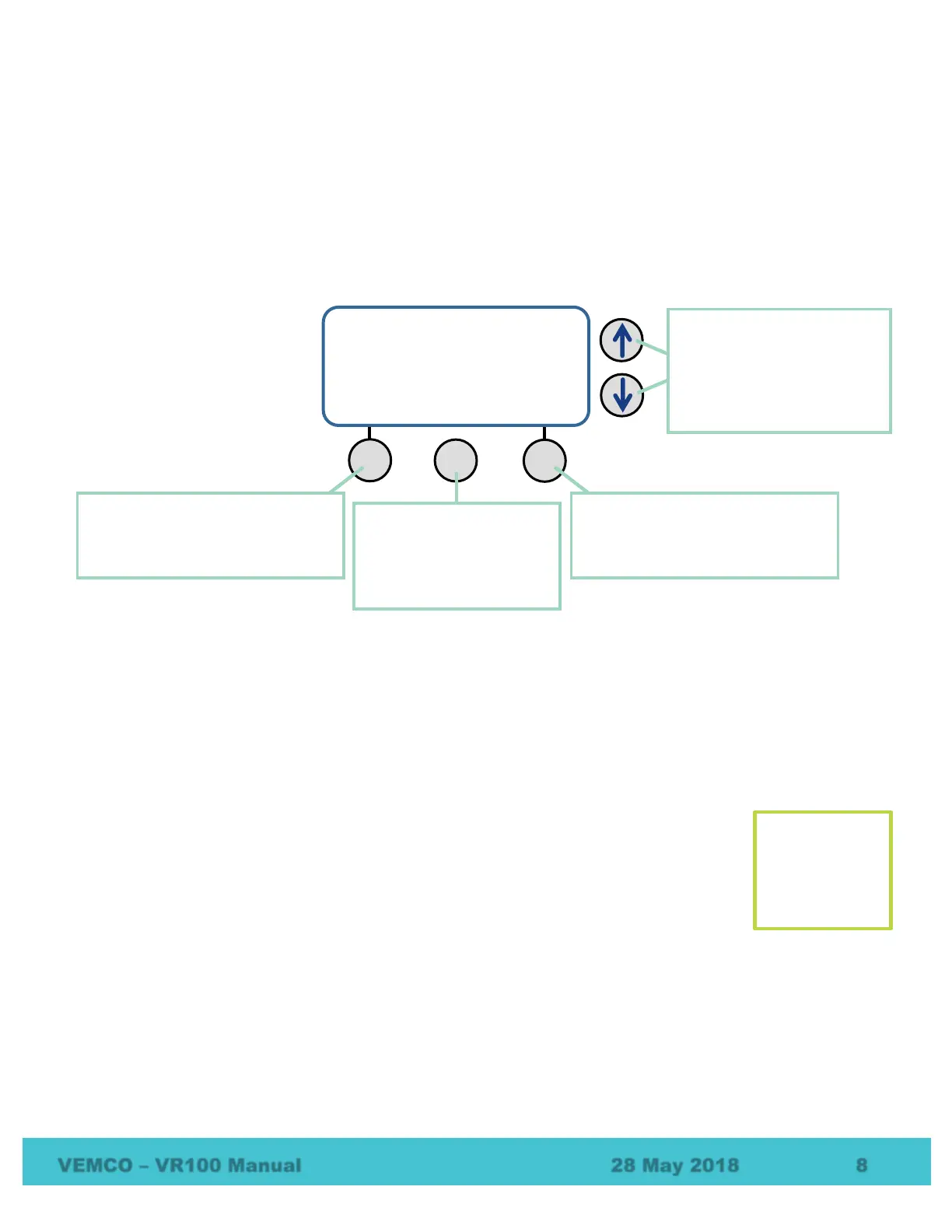
Main Screen is shown below and appears when the VR100 is turned on. The buttons used with the screen are
identified and described in the sketch below. These buttons are used throughout the menu architecture.
While the Main Screen is visible, the left selection button begins the monitoring process explained in section
4.2. The MENU button opens the Configure menu where the ability to configure the VR100 is available, as
explained in section 6.1.2. The Transponding menu, found in the VR100-200, is entered with the right
selection button (“Transpond”).
The Direction Arrows are used to scroll through a display that contains more than four lines or a list of
options. Look for an arrow in the right side of the screen to know if the Direction Arrows should be used.
1.6 Attachments
1.6.1 Hydrophones
The hydrophone can be compared to a human ear where the VR100 is the human brain. Our
ear hears the noises around us and transfers the signals to the brain where they are analyzed
and identified. The hydrophone hears pings from acoustic tags in the water, as well as other
noises in the environment such as current flow, marine animals, and ship engines. It
transfers all these noises to the VR100 receiver which uses electronic filters to separate the
pings from other noises. The pings are then identified and recorded. The VR100 can’t
function without a hydrophone.
Omni-directional hydrophones can receive signals from any direction, making them excellent for listening for
any tags in an area. The directional hydrophones are designed so pings are heard in only one direction
allowing them to be used to determine the direction from which a ping originated.
The transponding hydrophone (VHTx) is an omni-directional hydrophone with the ability to transmit as well
as receive, or to talk as well as listen. It is visually different from the “receive only” omni-directional
hydrophones with a larger case and a protective cage around the more delicate end of the hydrophone.
2014 05 28 16:45:11-
GPS: Getting Fix
Sats: 0
Monitor Transpond
Right selection button: selects the
action listed in the bottom right
corner of the screen, directly above
the button.
Direction Arrows: used to
move up and down a list.
Arrow(s) appear on the right
edge of the screen to indicate
the current list is greater than
the four lines shown.
Left selection button: selects the
action listed in the bottom left corner
of the screen, directly above the
button.
.
Menu button: moves up
through the menu
hierarchy. Also used to
enter Config mode from the
main menu.
The VR100
can’t function
without a
hydrophone.



 To Next Page