VEMCO – VR100 Manual 28 May 2018 71
6.10 MAP Updating
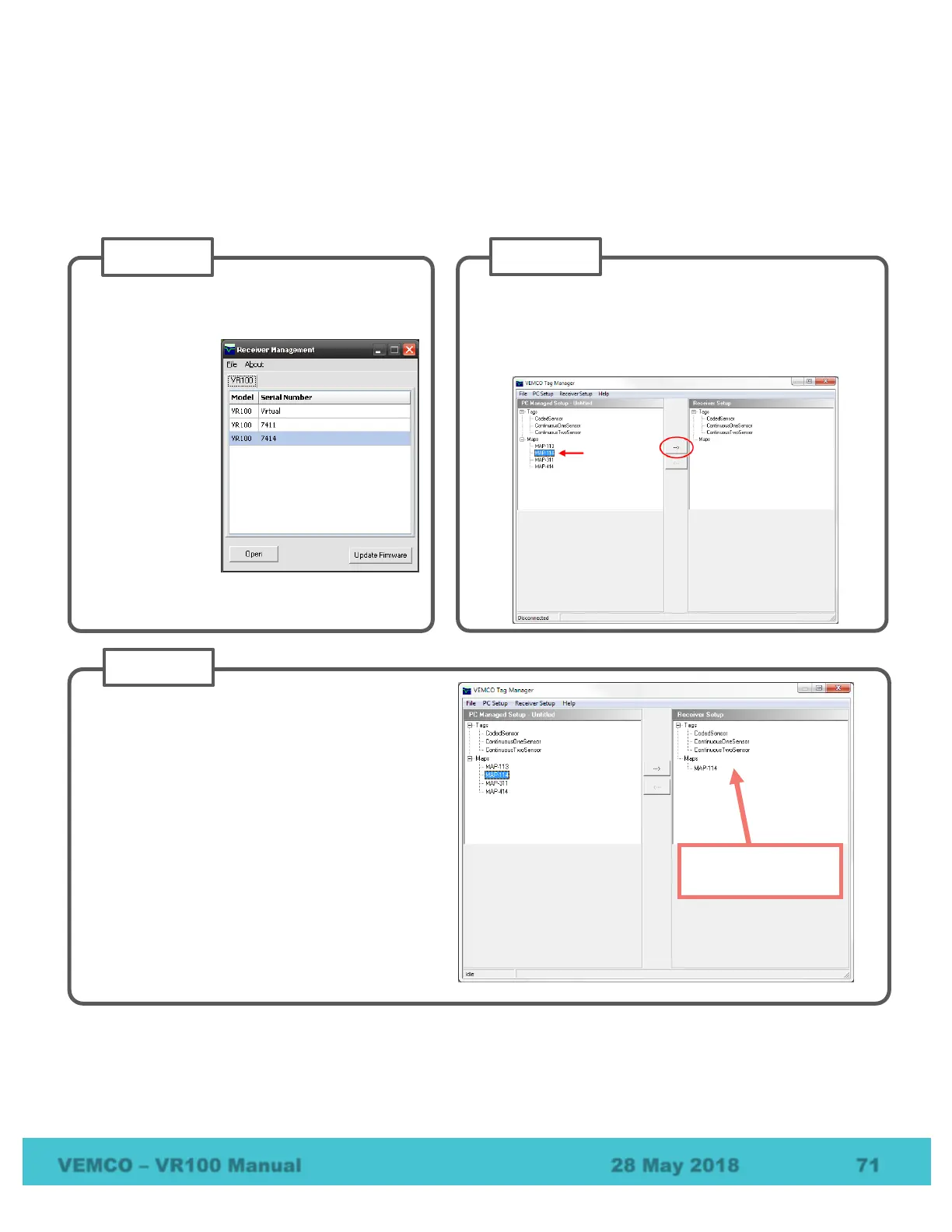
VEMCO’s current code map is MAP-114. If your VR100 does not contain this map, updating the map in the
VR100 is as simple as transferring settings from the VR100 PC software to the VR100 receiver. Follow these
basic steps to make the transfer.
Download and install the latest VR100 PC
software from
www.vemco.com.
Connect the
VR100 to the
computer running
VR100 PC
software. Details
are located in the
VR100 user
manual.
Select the
receiver from the
list and click
“Open”, or simply
double-click the desired receiver in the list.
Select Tag Manager in the Settings
menu to open the VR100 Receiver window.
Select “MAP-114” in the PC Managed Setup on
the left and click the arrow pointing to the right.
Verify “MAP-114” appears in the Receiver Setup
list on the right.
NOTE: MAP-114 is the default map used for
69 kHz coded tags.
MAP-414 is the default map used for
180 kHz coded tags.
Maps in VR100
listed here.



 To Next Page