BASIC SYSTEM PROGRAMMING TASKS DX-120 Programming Manual
- 42 -
Assigning Attendants via PC-DBA (continued)
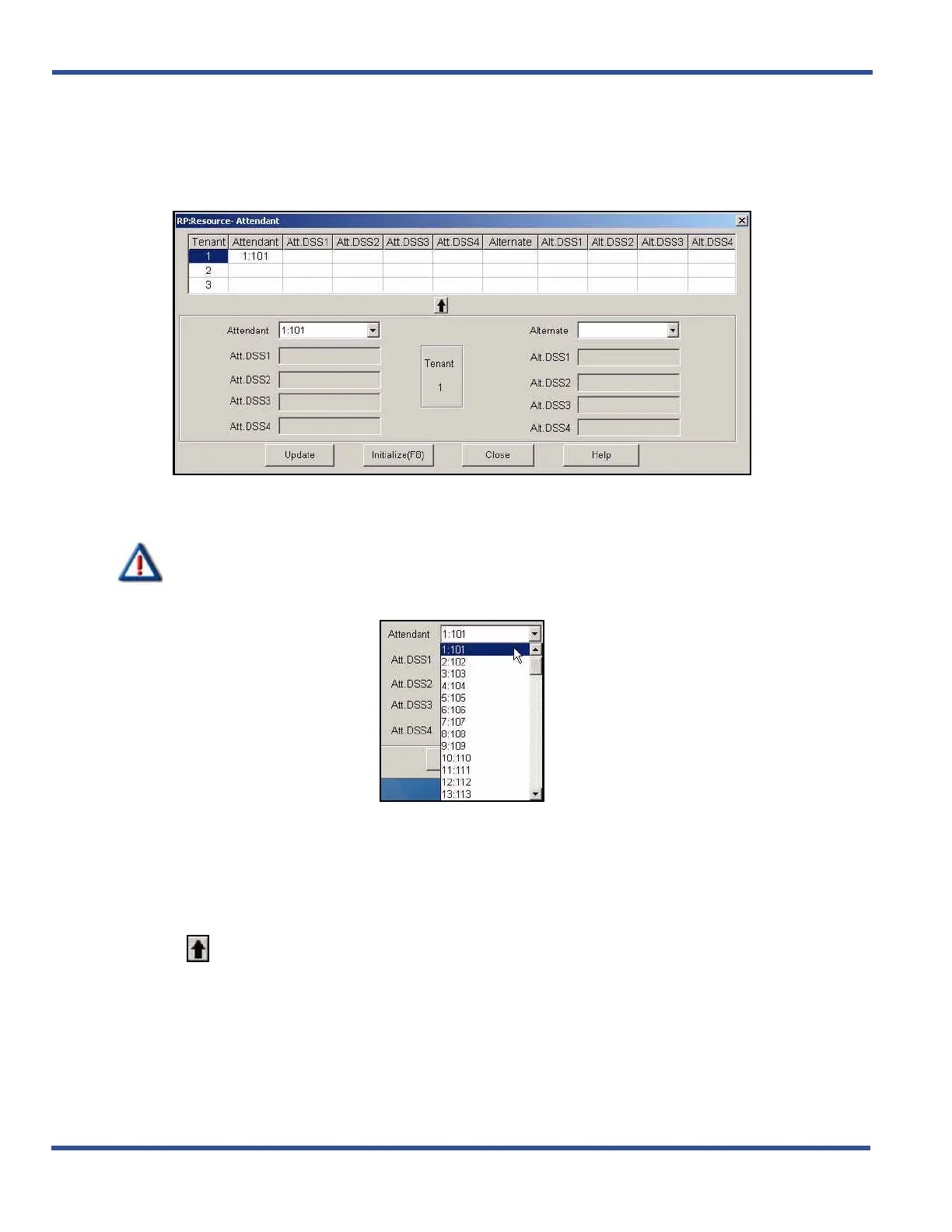
1) Go to ProgrammingXSystem ResourceXAttendant to display the Attendant screen.
• This screen has two parts: a table at the top that summarizes the current settings, and some entry
fields at the bottom that are used to change the information in the table.
2) Click on the line that corresponds to the tenant group you want to program
• "1" is highlighted initially.
IMPORTANT!
If you are not using a tenant group, leave the Attendant and Alternate fields blank.
3)Click the down arrow to the right of the Attendant field.
4) Scroll to the extension/directory number you want to use for the primary attendant
5) Click on that extension.
• Valid numbers are any extension within the tenant group you have not already assigned as an alternate
attendant.
• The default is 101.
6) Click in the middle of the screen to move the number you have selected into the table.
• Your selections are now entered for the tenant group you selected in Step 2.
Assigning Attendants via PC-DBA (continued on next page)



 To Next Page