Analog Phone Feature Codes 7-2
About Wave Analog Phones
Wave Phone User Guide
Analog Phone Feature Codes
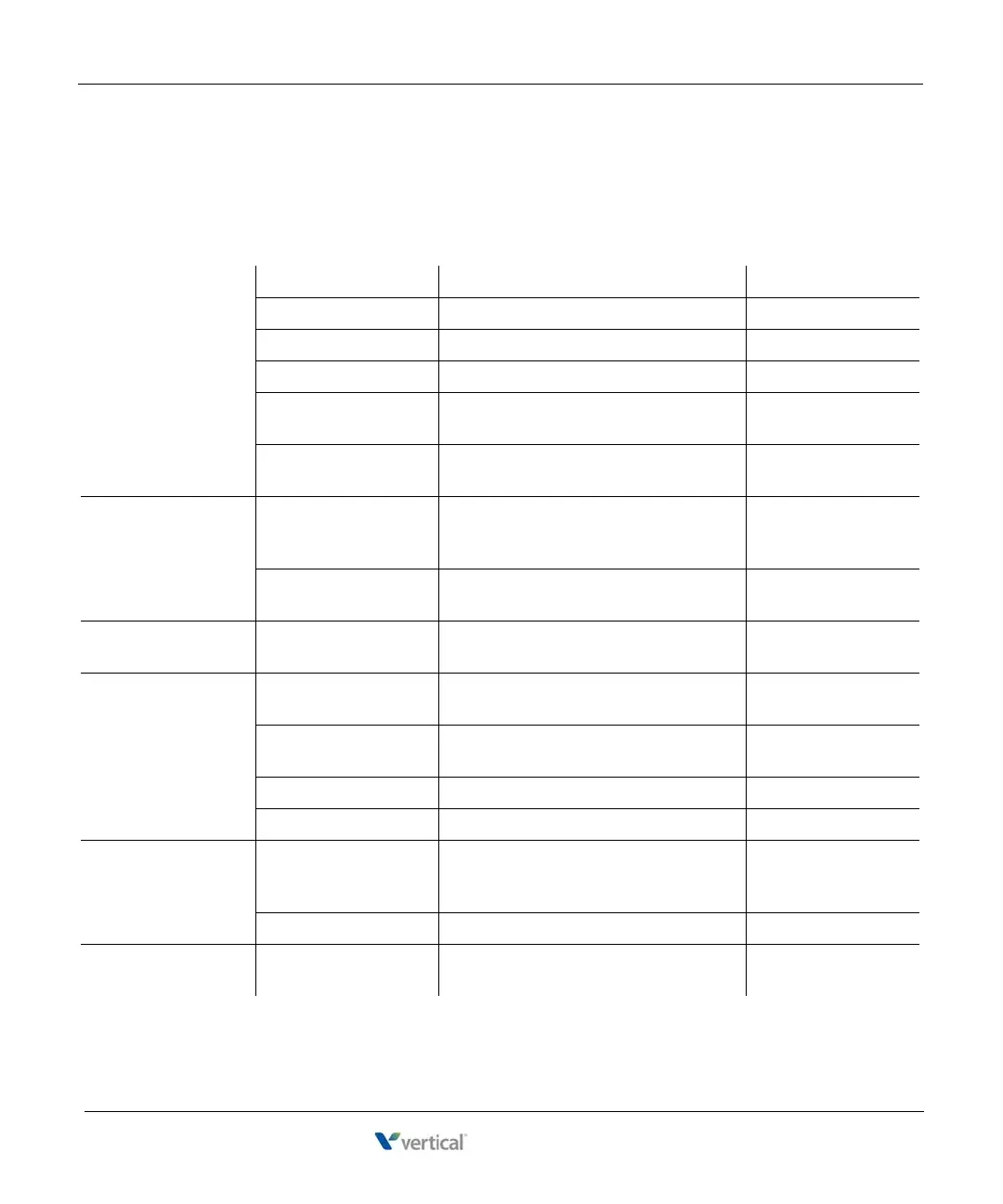
The following table lists the feature codes available from your analog phone. For details about
a particular feature, see Chapter 3.
CALL PARK Directed Park Park call on another line. Flash + *66 + extension
Retrieval Retrieve direct-parked call. *65 + extension
Self Park Park call on your primary line. Flash + *64
Retrieval Retrieve self-parked call. *65 + extension or #
System Park Park call in one of 10 parking slots on
another line for retrieval from another phone.
Flash + *62
Retrieval Retrieve system-parked call from another
extension.
*63 + slot number
CALL PICKUP Extension Pickup Answer any ringing extension in your call
pickup group, specifying which ext to
answer.
*75 + extension
Group Pickup Answer any ringing extension in your call
pickup group.
*74
CALL RETURN Callback Call back the extension or phone number of
the last answered call on your primary line.
*69
CALL WAITING Answer Answer waiting call and place the current
call (if any) on hold.
Flash
Disable Disable Call Waiting for the next call. *70 + extension or
phone number to dial
Reconnect Reconnect with the original call. Flash + 3
Toggle Toggle between the 2 calls. Flash + 4
CAMP-ON Callback Automatically call back an extension that is
busy, does not answer, or forwards you to
Vo i c e ma i l .
Hangup, go off-hook,
*76
Cancel Cancel Camp-on mode. *77
CENTREX
FEATURES
Access features You can use Centrex features, only if they are
allowed on your system.
Flash + *80 + Centrex
feature code










 To Next Page