Vertiv™ | Liebert
®
STS2
™
100-1000A, 50/60Hz User Manual | Rev. 12 | 11/2017 63
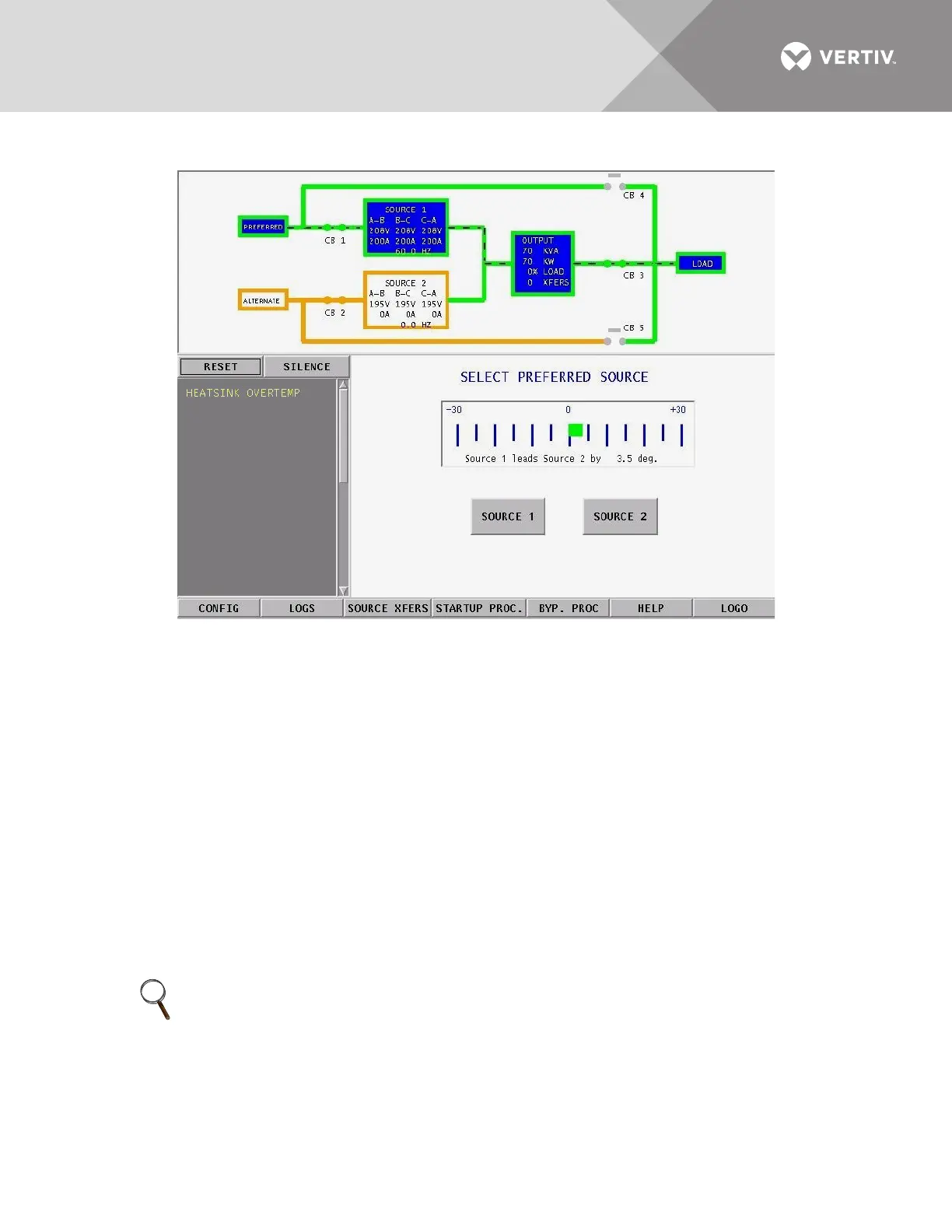
Figure 42 Source transfer screen
To manually select the preferred source:
1. Verify that the input breakers CB1 and CB2 are closed.
2. Select SOURCE XFERS from the menu bar.
The Select Preferred Source screen is displayed in the Event Display.
3. Check the Mimic to verify that Source 1 and Source 2 input voltages are correct.
4. Select SOURCE 1 or SOURCE 2 as your preferred source.
When conditions are correct, the switch transfers the load to the alternate source by selecting the alternate source as the
preferred source.
This source is now monitored as the preferred source throughout the various configurations set up through the
touchscreen.
5. Verify that the correct source is designated as the preferred source and that the input source changes to the desired
source.
The Mimic is updated to indicate the new preferred source. The source is now highlighted with blue and that
source is labeled as the preferred source.
If the Transfer Inhibit message is displayed, check for alarm messages on the Active Status window. Correct
alarm conditions before attempting a source transfer.
NOTE
The preferred source may also be changed via the optional Remote Source Selection option, thereby initiating a
transfer remotely.



 To Next Page