Vertiv™ NetSure™ Control Unit (NCU) User Manual
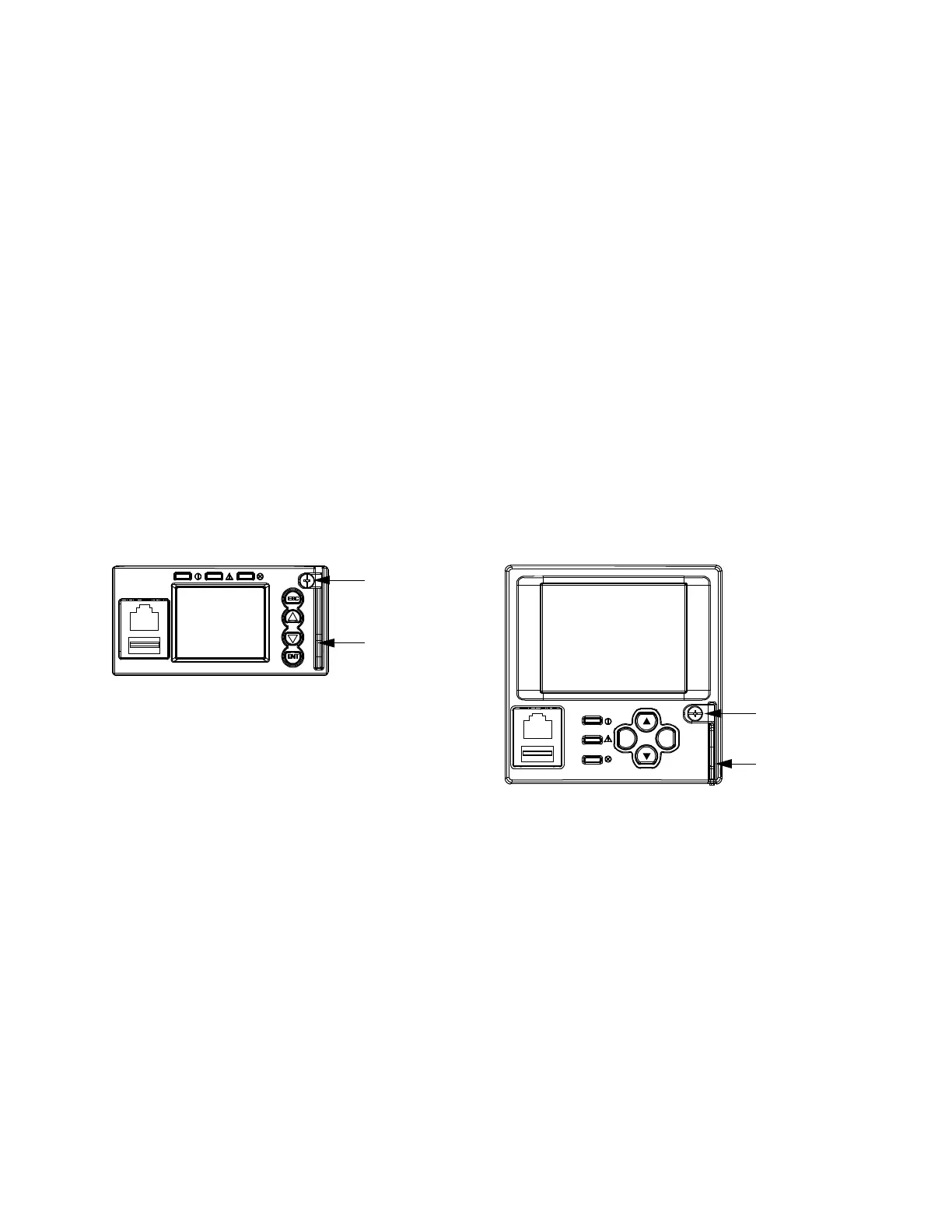
4. Loosen the captive fastener securing the latch mechanism to the front of the NCU to be replaced. Pull the latch mechanism
away from the NCU (this will retract the latch mechanism located on the bottom of the NCU). This unlocks the NCU from the
shelf. Refer to Figure 8.2.
5. Slide the NCU Controller completely from the shelf.
6. Loosen the captive fastener securing the latch mechanism to the front of the replacement NCU. Pull the latch mechanism
away from the NCU (this will retract the latch mechanism located on the bottom of the NCU).
7. Slide the NCU completely into its mounting position.
8. Push the latch mechanism into the front panel of the NCU, and secure by tightening the captive fastener. This locks the NCU
securely to the shelf.
9. Wait for the controller to finish booting and verify that the complete system operates normally.
10. Enable the external alarms, or notify appropriate personnel that this procedure is finished.
11. Ensure that there are no local or remote alarms active on the system.
Figure 8.2 Latch Mechanism on the NCU
Captive
Fastener
Latch
Mechanism
Captive
Fastener
Latch
ESC ENT



 To Next Page