34
A100K11194
Turbine Station Conguration Guide
6.2 Main Settings
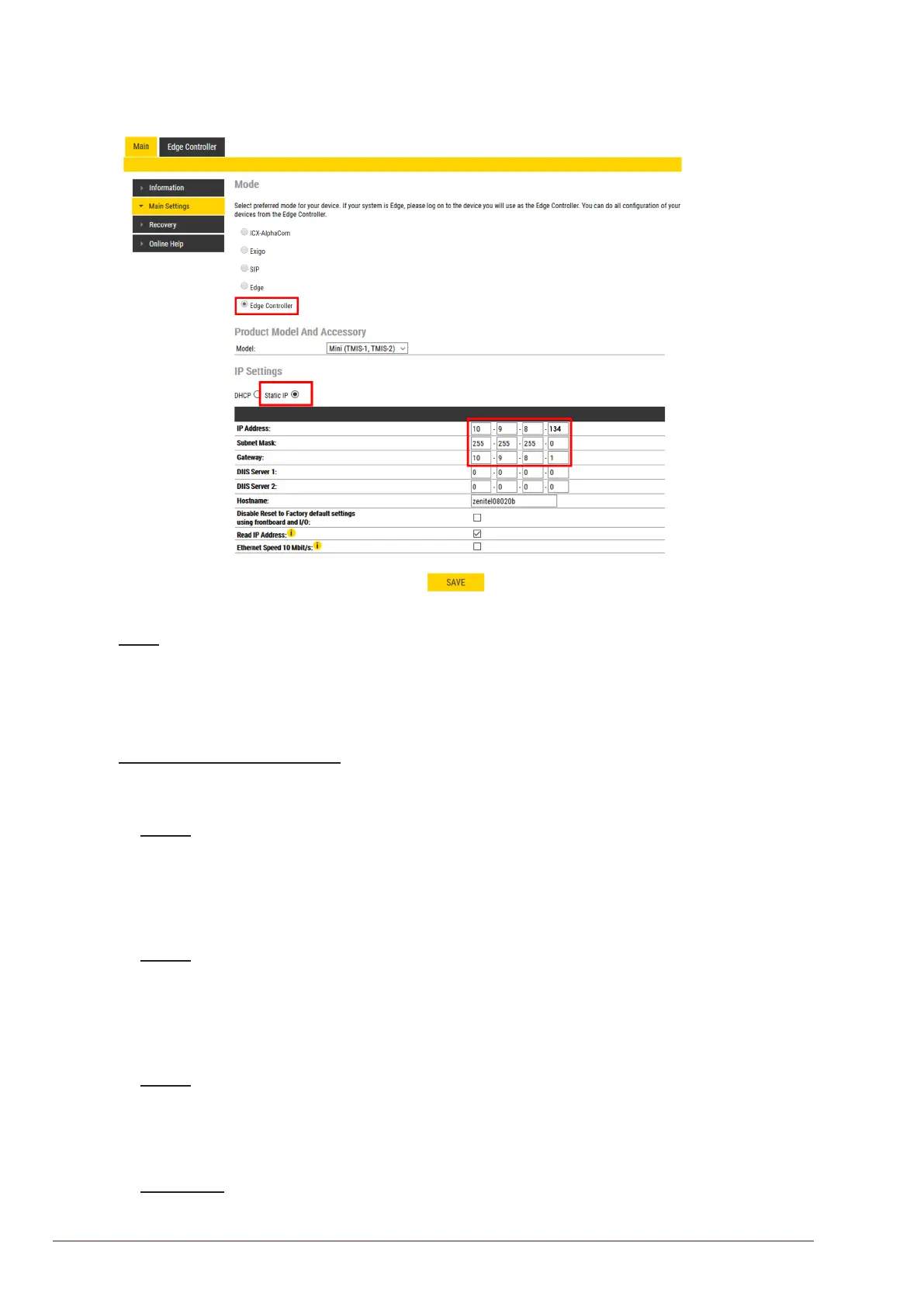
● Select Main > Main Settings to access the page for conguring station mode and IP
parameters.
Mode
● Select the Edge Controller radio-button
L Edge Controller must be selected to be able to carry out the congurations described in the following
sections.
Product Model and Accessory
The options presented will depend on the Turbine model (Compact, Industrial or Ex).
● Select one of the options from the Model drop-down box:
Model: (for Compact)
- Kit (TKIS-2)
- Normal (TCIS-1, TCIS-2, TCIS-3)
- OLED Labels (TCIS-4, TCIS-5)
- Scrolling Station (TCIS-6)
- Mini (TMIS-1, TMIS-2)
Model: (for Extended)
- TKIE-1 (Kit)
- TFIE-1
- TFIE-2
- TFIE-6
- ECPIR-3P
Model: (for Ex)
- TFIX-1
- TFIX-2
- TFIX-3
- TFIX-4
Accessory: (for Extended & Ex)
- Handset
- Handsetw/Ohook








 To Next Page