42
A100K11194
Turbine Station Conguration Guide
6.10 Congure3
rd
-party SIP Devices
Up to 10 3
rd
-party SIP devices such as SIP phones, SIP Speakers, Soft Phones can be registered
to an IC-EDGE System. Each SIP device requires that a SIP User account is dened on the Edge
Controller.
6.10.1 Install License
Before adding a 3
rd
-party SIP account to the IC-EDGE system, you need to obtain a license key. For
each SIP device used in the system, there must be a valid SIP license installed.
To install a license:
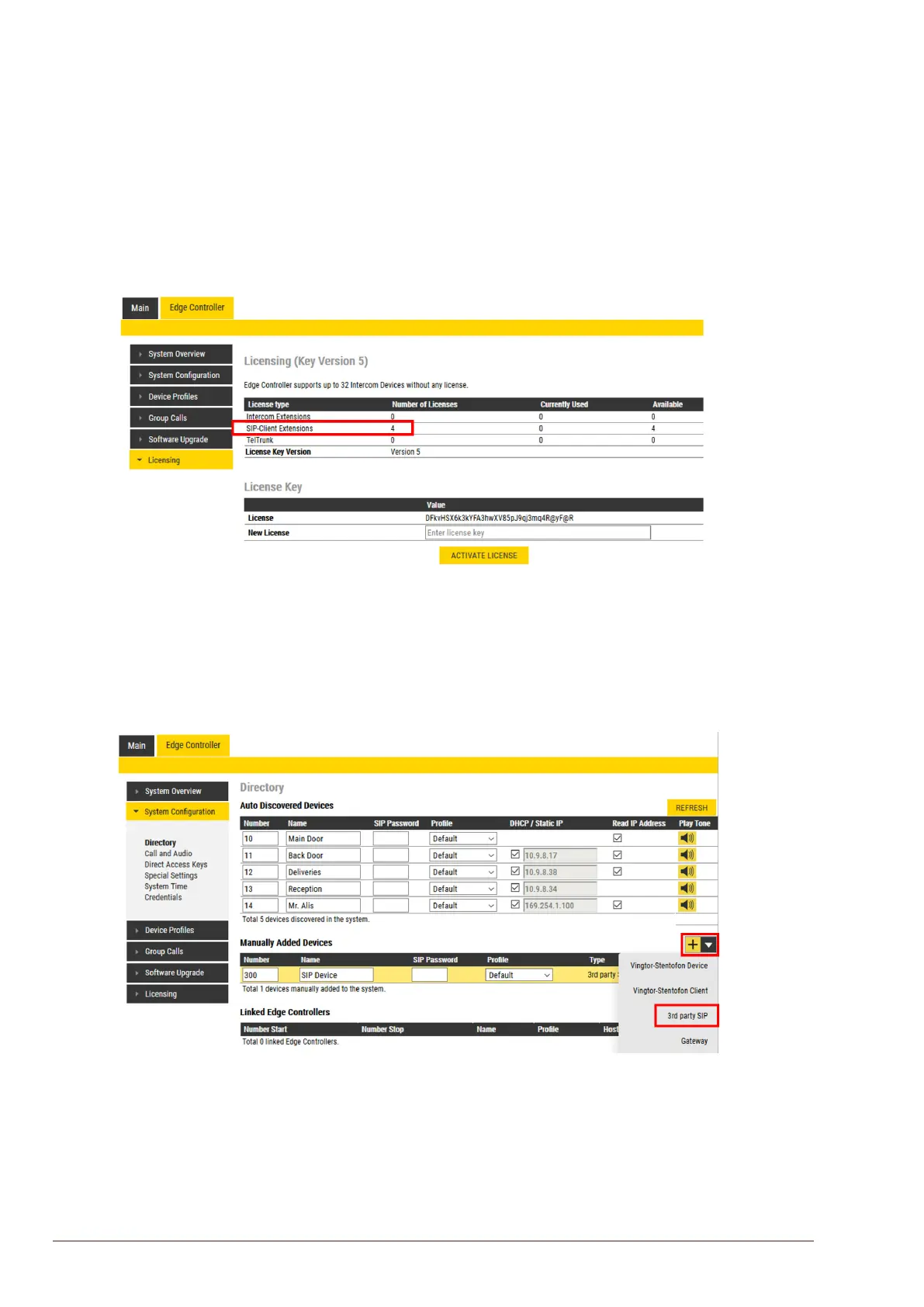
● Select Edge Controller > Licensing
● Enter the license key in the New License eld and click ACTIVATE LICENSE
The Licensing table should now show all the licenses that are available.
6.10.2 Create SIP Account
● Select Edge Controller > SystemConguration> Directory
● Under Manually Added Devices select 3rd party SIP from the dropdown list
● Modify Number and Name as required (a default Number and Name will be inserted which
you can modify)
● Optionally one can add a SIP Password. If a password is entered, one has to also manually
set the same password in the SIP device it self.
● Click SAVE to store the settings of the new SIP device in the Edge Controller.








 To Next Page