27
Turbine Station Conguration Guide
A100K11194
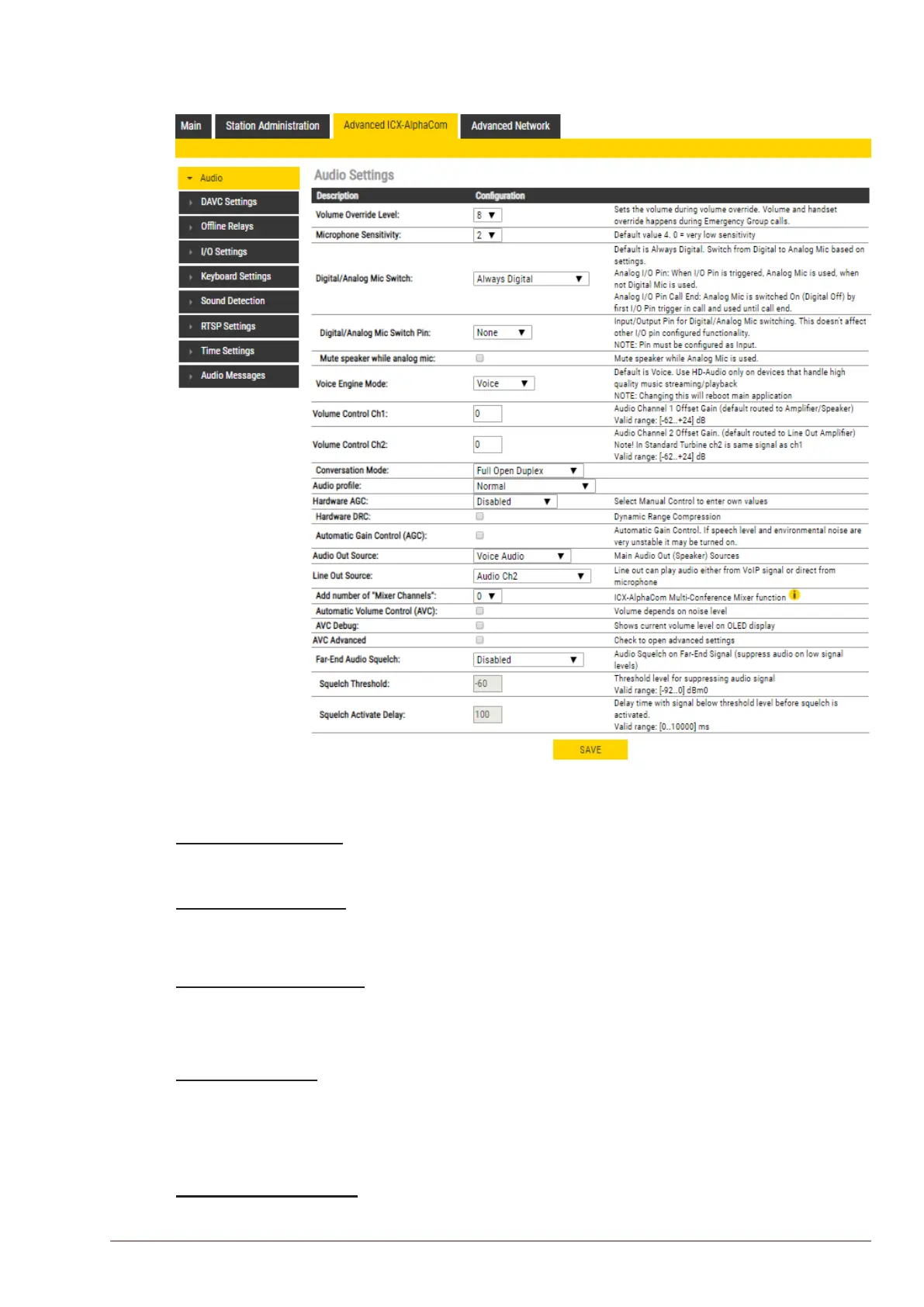
5.3 Audio Settings
● Select Advanced ICX-AlphaCom > Audio
● Select or set values for the parameters
Volume Override Level
- Select the Volume Override Level in the range 0 to 8 from the drop-down box. The default
setting is 7.
Microphone Sensitivity
- Select the sensitivity level in the range 0 to 7 from the drop-down box. The default setting is 4.
L If used as a local PA panel, a setting in the 1 to 3 range will reduce the chance of acoustic feed-
back (howling).
Digital/Analog Mic Switch
- Switches from Digital to Analog Mic based on settings.
- Options: Always Digital (Default), Always Analog, Analog I/O Pin, Analog I/O Pin Call End
- Mute speaker while analog mic
Voice Engine Mode
- Voice: Regular audio quality (default).
- HD-Audio: Play audio in PCM L16/48kHz format. Use HD-Audio only on devices that handle
high quality music streaming/playback, typically IP loudspeakers and Turbine kits used as PA
interface.
Volume Control Ch1/Ch2
- Oset Gain (default routed to Amplier/Speaker)
- Valid range: -62 to +24 dB








 To Next Page