37
Turbine Station Conguration Guide
A100K11194
● Prole 4 - Operator
● Prole 5 - Gateway
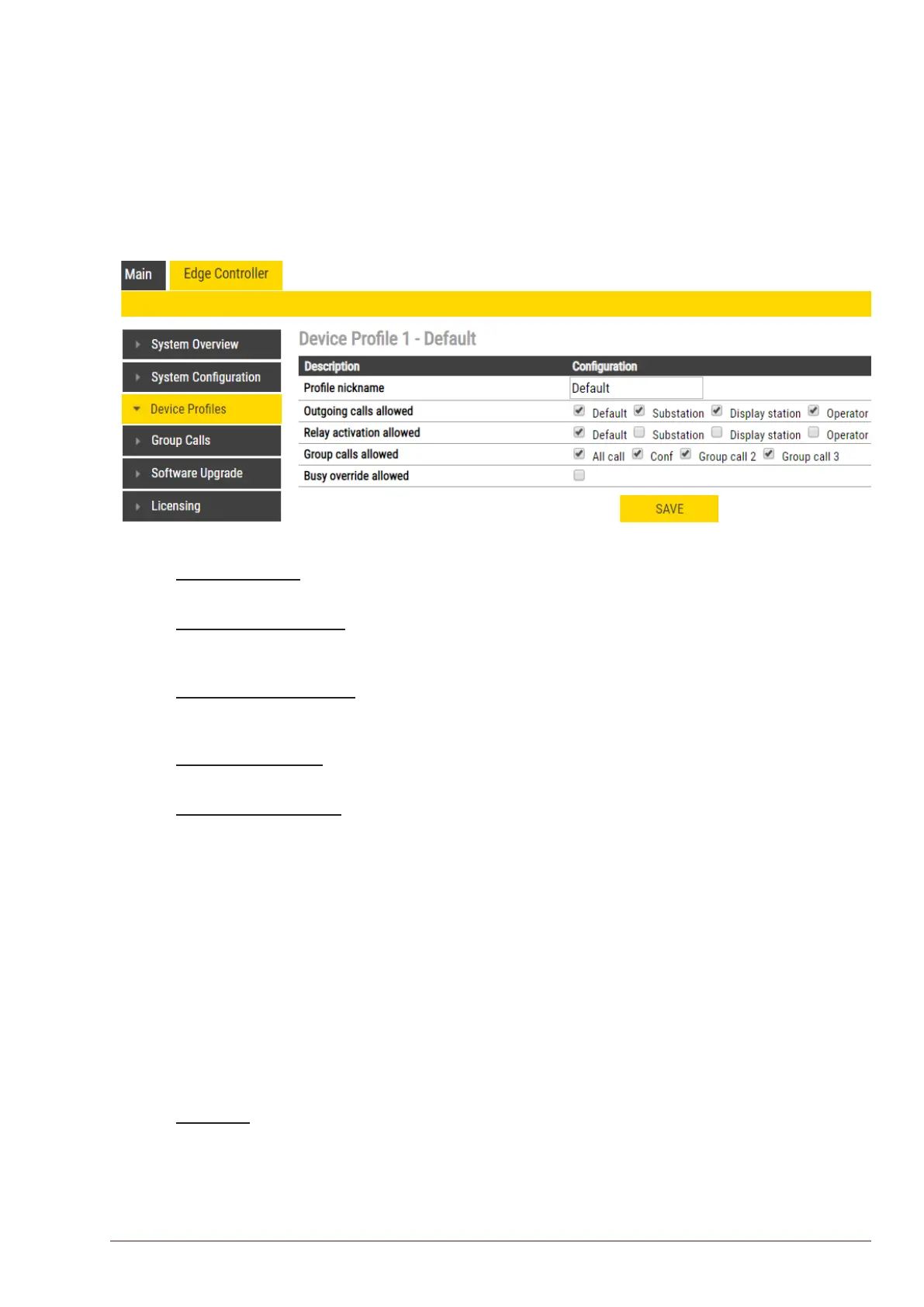
The following service features and parameters are included in the device prole:
● Outgoing Call restriction
● Relay Activation (i.e. Door opening)
● Group Call initiation
● Busy Override
To modify device proles:
● Select Edge Controller > DeviceProles
The following parameters can be set for the station prole:
Prolenickname
The name of the prole. Any text can be used.
Outgoing calls allowed
Stations with this prole can call stations with the checked proles. Forbidden will be displayed on
the station if this is denied.
Relay activation allowed
Stations with this prole can activate the relay (e.g. Door Opening) on stations with the checked
proles.
Group calls allowed
Stations with this prole are allowed to dispatch the checked group calls
Busy override allowed
When calling a busy station, stations with this prole can force a connection by pressing 5.
6.8 Group Call
The IC-EDGE system supports 4 Group Calls.
A Group Call is activated by dialing the appropriate code (e.g. 84). A ding-dong chime will be heard
on all member stations. Press the M-key to speak, and C-key to disconnect. Alternatively, Group Call
can be used in handsfree mode, i.e. no need for pressing the M-key. Stations without any M-key will
use handsfree mode by default. Group Call can be answered from any station by dialing the answer
code 99.
Group Call audio can be sent and received by all Vingtor-Stentofon IP stations and can be sent from
most modern SIP IP phones. Group Call audio can be received by SIP IP phones that have support
for IP Multicast paging.
Operation
A Group Call is activated by dialing the appropriate code (e.g. 84). A ding-dong chime is heard in all
member stations.
● Press the M-key to speak.
● Press the C-key to disconnect.








 To Next Page