39
Turbine Station Conguration Guide
A100K11194
Devices in group
Select the devices that should receive Group Call audio. You can select all devices in one operation
be checking the Add all devices box.
Group Audio Address
Multicast IP address and port used to send audio during Group Call. This information can be used to
set up a IC-EDGE Group Call (multicast page) on 3
rd
-party SIP stations.
There is a SAVE button for each Group Call.
● Remember to click SAVE before you make changes to the next Group Call.
6.9 MobileAppConguration
The Zenitel Mobile App is a mobile application for Android and IOS devices. The Mobile App enables
the use of a mobile device as an intercom station in the IC-EDGE system.
6.9.1 Add the Mobile App to the Edge Controller
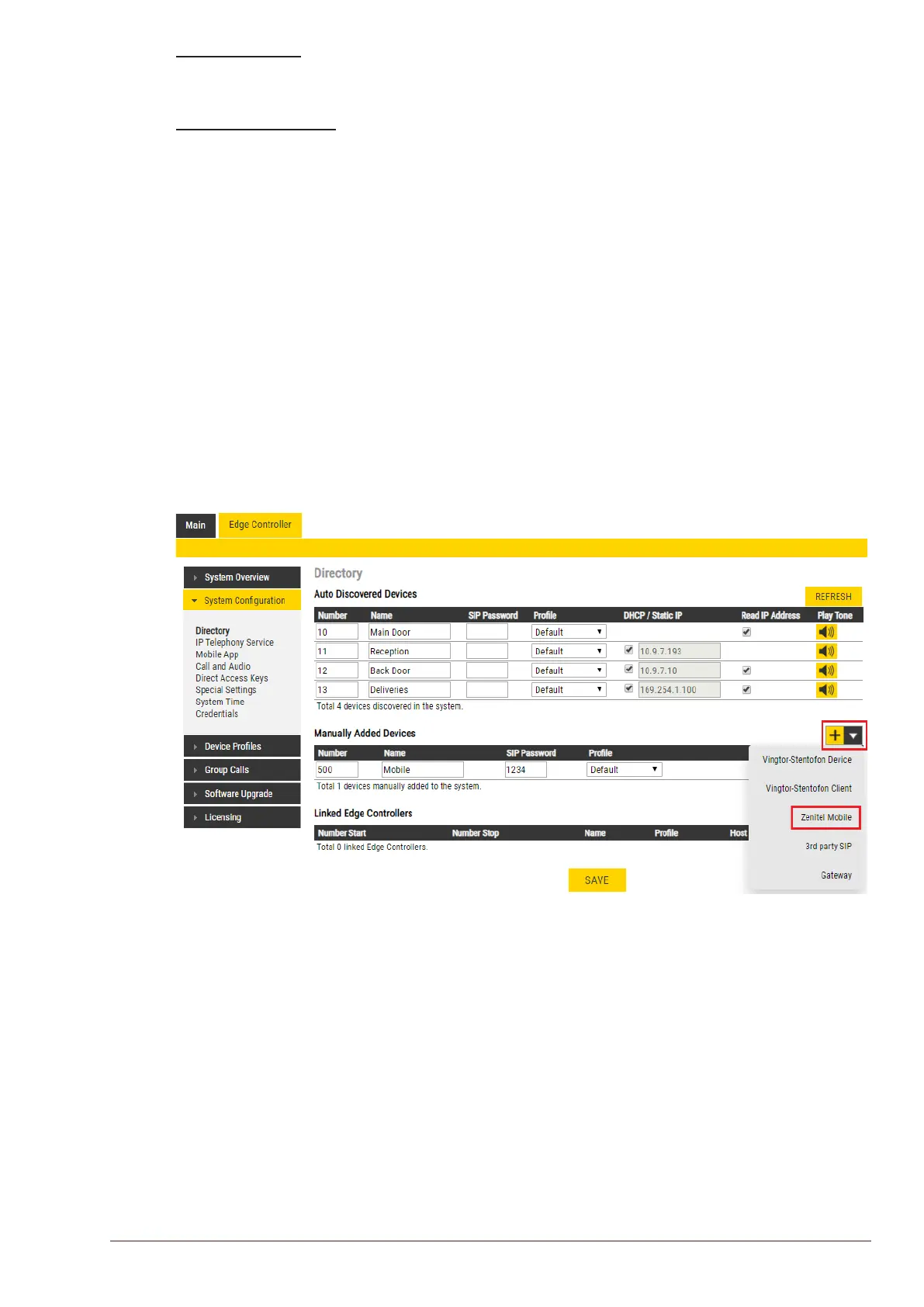
You need to manually add the Mobile App to the Edge Controller. When you add the Mobile App, it
will automatically be assigned a number and name,
● Select Edge Controller > SystemConguration> Directory
● Under Manually Added Devices select Zenitel Mobile from the dropdown list
● Modify Number and Name as required (a default Number and Name will be inserted which
you can modify)
● SIP Password must be added (used as authentication during the registration process)
● Click SAVE to store the settings of the Mobile App in the Edge Controller.








 To Next Page