Chapter 6, Using Vitals Mobile-HC (HC-100 Controller): Vitals Mobile Diagnostics
E.H. Wachs Part No. 79-MAN-04, Rev. I 121
Vitals Diagnostics is
designed to thoroughly check
the data connection between
the control board and the
controller. Noise, incorrect
data packets, etc. will prevent
a connection.
To check for wiring/connec-
tor issues, use the Diagnostic
Control Cable (for the HC-
100, p/n 79-302-20).
(Vitals Mobile is not particular
in establishing a machine
connection. If Vitals Mobile
connects, but Vitals Diagnos-
tics does not, it indicates a
connection issue.)
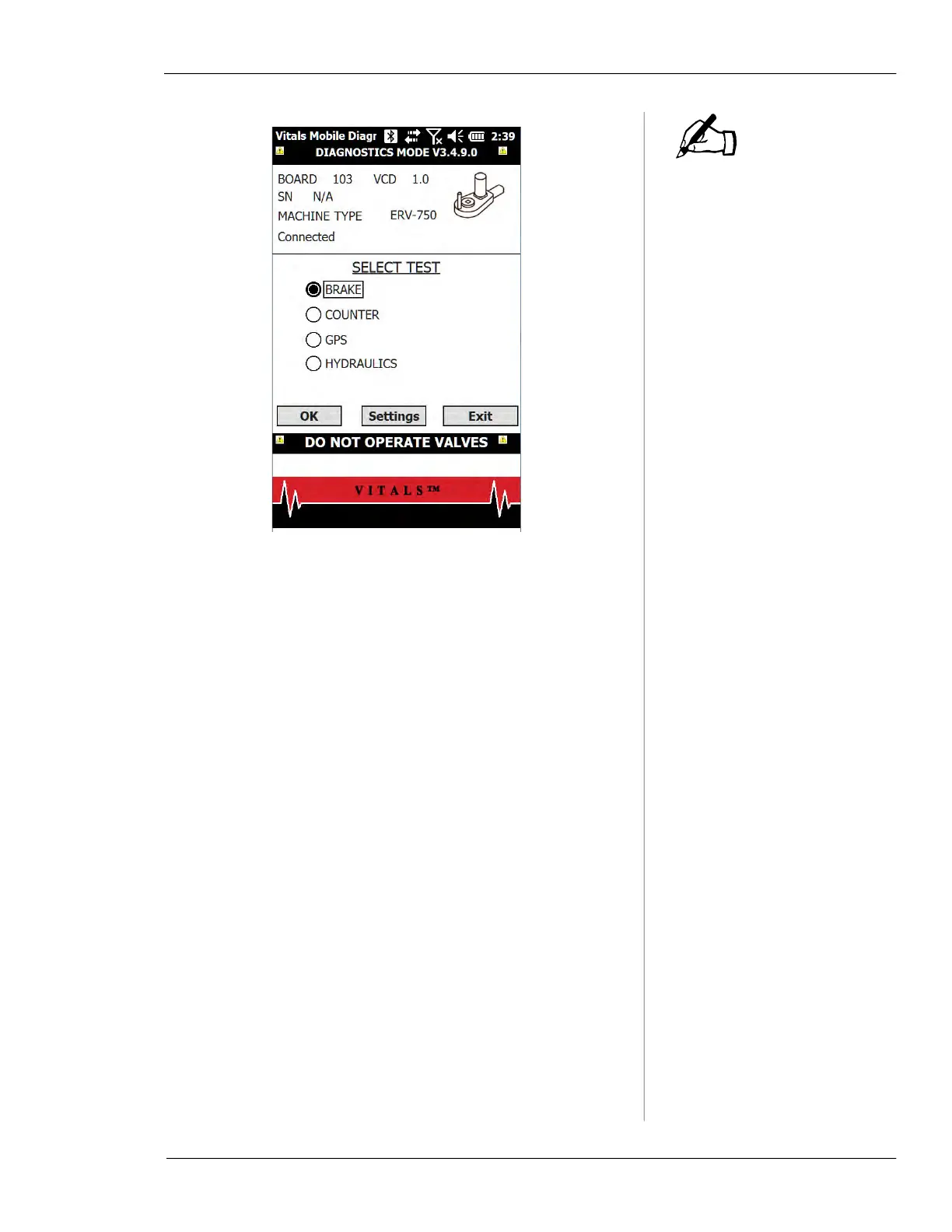
• The BRAKE test checks locking and releasing the
valve operator brake.
• The
COUNTER test checks the operation of the rota-
tion counter.
• The
GPS test checks the operation of the GPS unit.
• The
HYDRAULICS test checks operation of the
hydraulic system and the pressure transducers.
4.
Tap the checkbox for the test you want to run and tap
OK.
5.
After you have run the desired test(s), return to the
SELECT TEST screen and tap the Exit button to quit the
Diagnostic program.
Brake Test
1.
When the brake test starts, the brake on the valve
operator is locked. Tap and hold the green
PUSH but-
ton.
NOTE



 To Next Page