Chapter 5, Using Vitals Mobile-TC (TC-100 Controller): Starting Up
E.H. Wachs Part No. 79-MAN-04, Rev. I 33
• Controller, for operating the TM or ERV-750 valve
operator
• Flash transfer, for transferring activity data to Vitals
Desktop.
• Settings, for changing program defaults.
Settings
Tap the Settings icon to open the Vitals Mobile-TC settings
screen. The default view is the
Connection tab.
Touch any of the tabs to view that Settings screen.
Connection Tab
1.
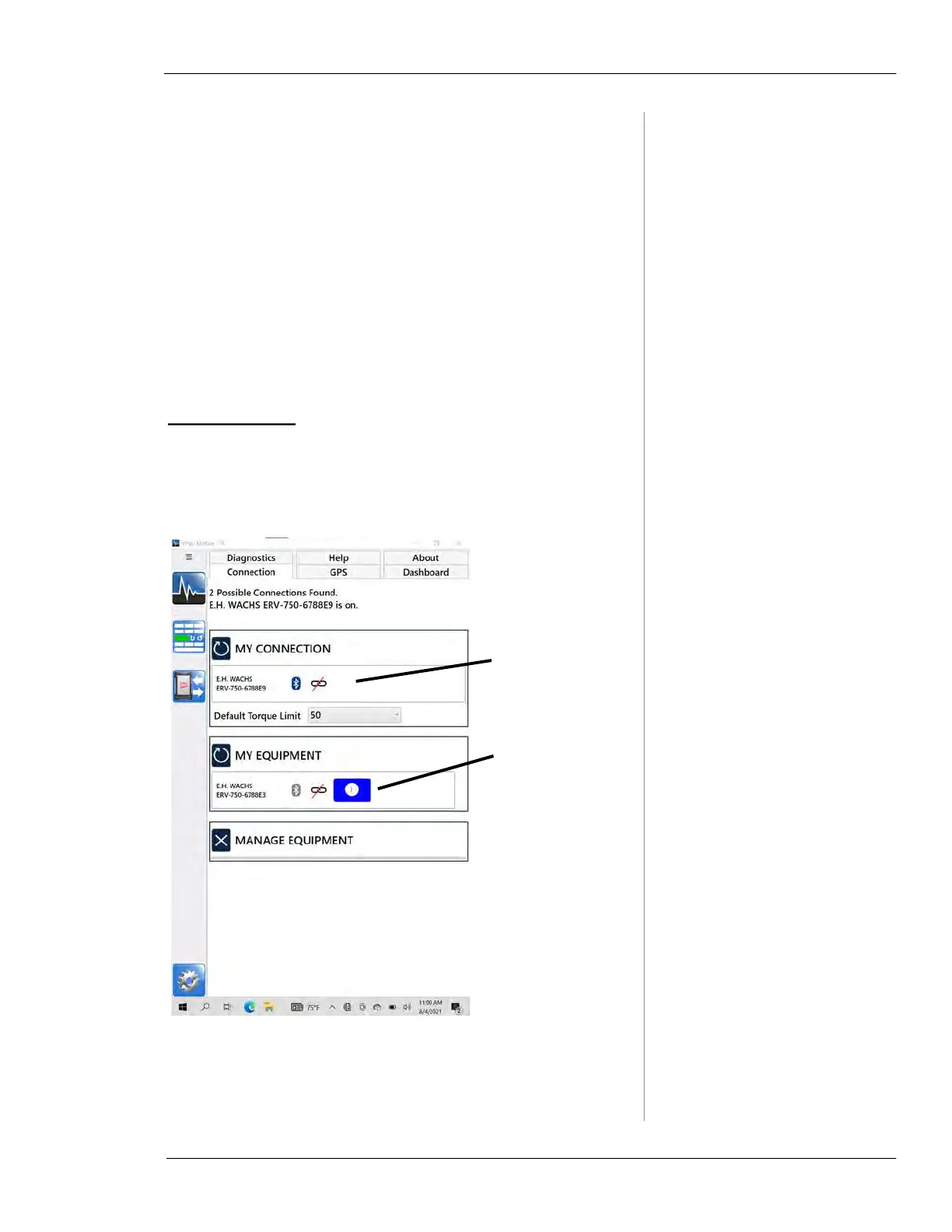
A list of paired machines appears on the Connection
tab under
MY EQUIPMENT. If multiple machines appear
in the list, tap to select the one you want to use.
Figure 5-7. Connection Settings. A list of paired valve
operators appears under
MY EQUIPMENT. Tap the
name to make it active under
MY CONNECTION. (Only
one is active at a time.)
Currently con-
nected valve
operator
Other paired
valve operators.
Tap name to
make active
under My Con-
nection above.



 To Next Page