Vitals Reference Manual
32 Part No. 79-MAN-04, Rev. I E.H. Wachs
Vitals Mobile-TC Reference
On a new TC-100 with no
Vitals data, the Query results
will be blank.
1.
Tap the Vitals Mobile-TC icon. The app appears with
the home page and All Activities Query results dis-
played.
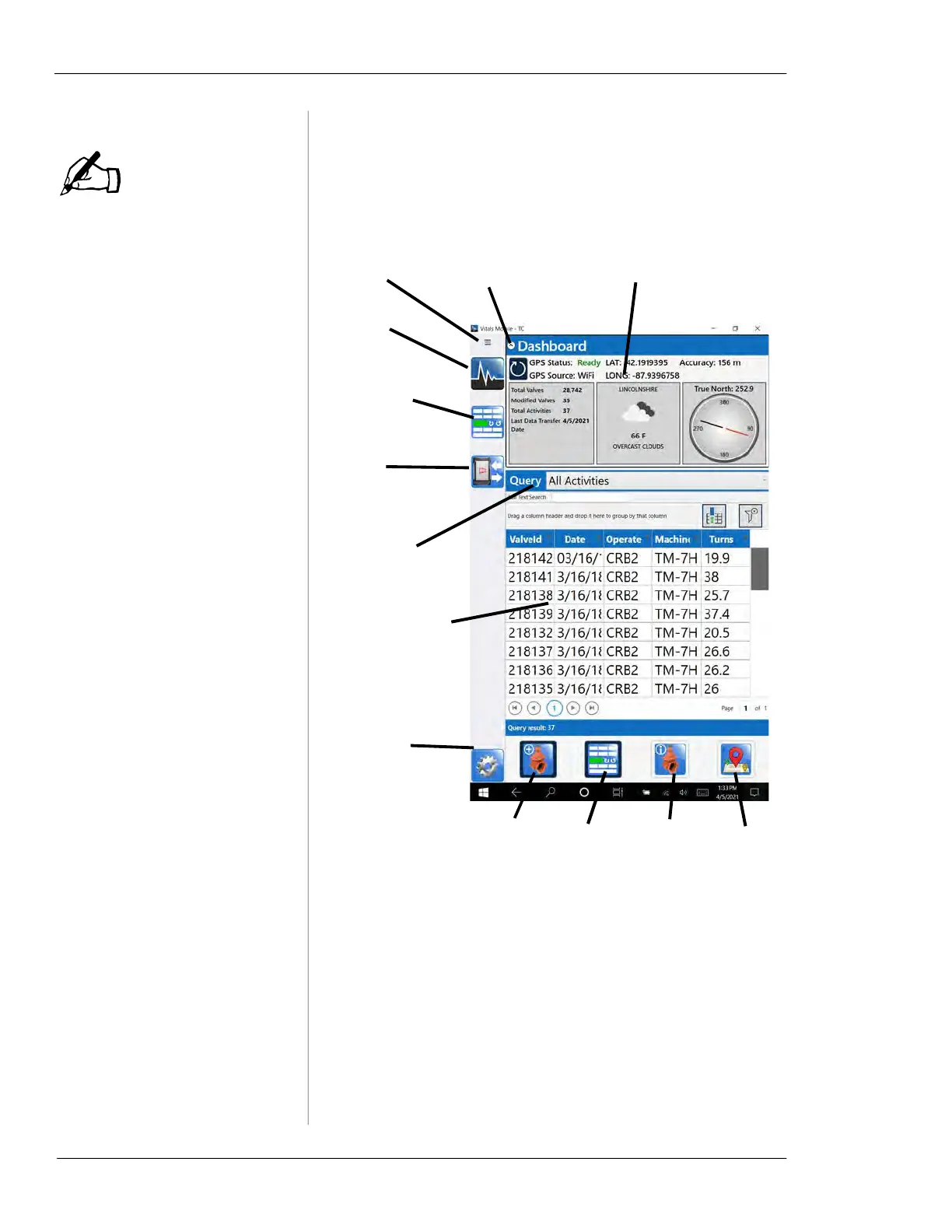
Figure 5-6. Vitals Mobile-TC Home Screen
2.
Use the menu icons on the left to access the main pro-
gram functions:
• Home Screen with valve and activity data
NOTE
Dashboard—displays GPS
and database information.
Home
screen
icon
Controller
icon
Flash
transfer
icon
Expand/hide
Dashboard
Expand/hide
menu
Query menu—
tap to select
search type
Settings
icon.
Create New
Valve
Controller Open
Maps
Activity
data
Icons on bottom of screen appear when they
are available:
—a valve must be selected for the Activity
data icon to appear
—an activity with GPS data must be selected
for Open Maps icon to be appear
Data for current
search (see
“Displaying and
Searching Valve
Data”)



 To Next Page