Vitals Reference Manual
24 Part No. 79-MAN-04, Rev. I E.H. Wachs
FOREIGN LANGUAGE SUPPORT
Vitals Mobile-TC does not
currently include foreign lan-
guage support.
Foreign languages are supported by first installing the lan-
guage file on the Vitals Desktop PC. During a Data Trans-
fer, the available languages are pushed out to the Vitals
Mobile.
1.
Make sure the new language filename is in the format
strings.Language.txt, where “Language” is the name of
the language into which the file has been translated.
2.
Copy the language file into the following directory on
your computer: C:\Program Files\Vitals Desk-
top\strings.
3.
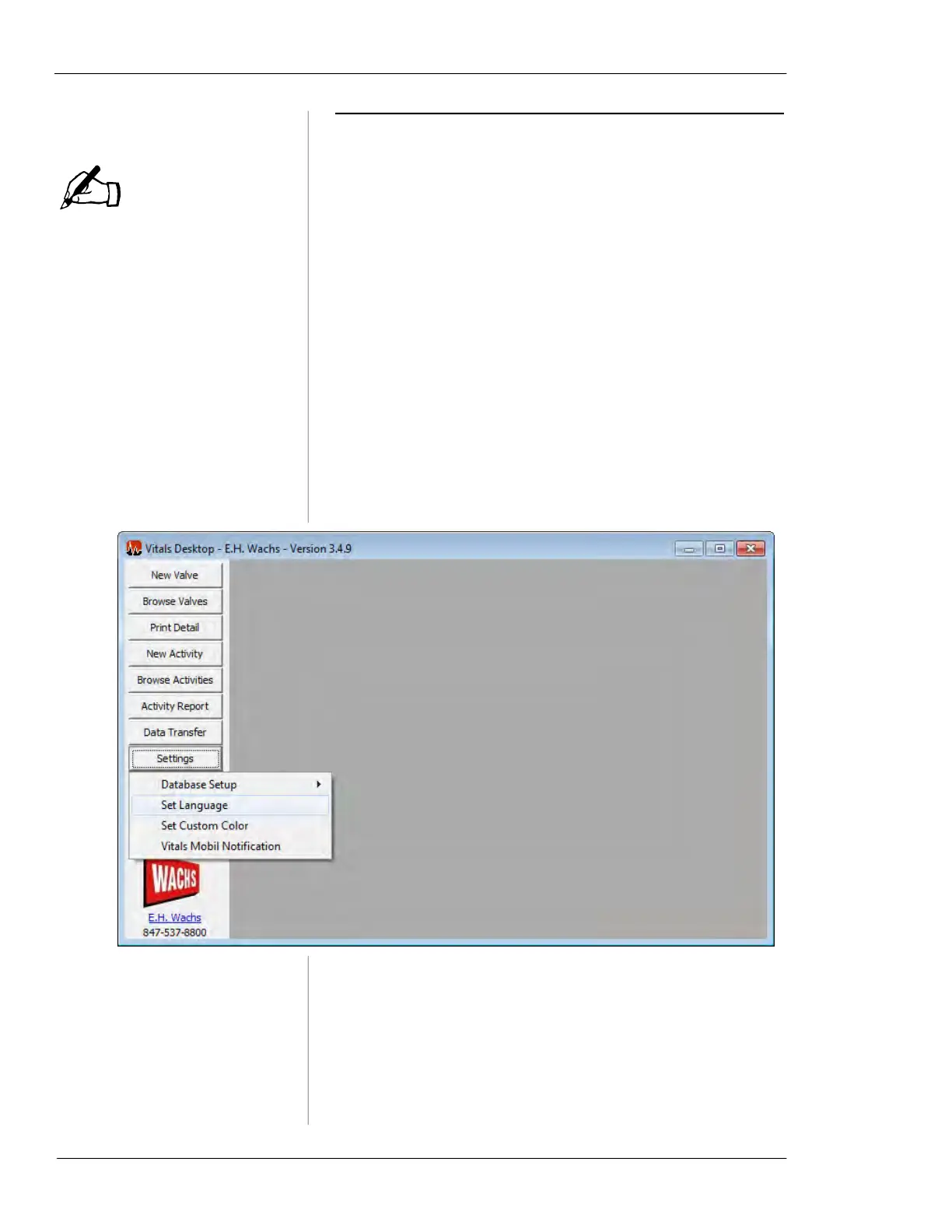
Open Vitals Desktop and select Settings >> Set Lan-
guage.
Confirm that the new language has been added
to the Vitals software.
4.
A language in Vitals Desktop will be automatically
uploaded to Vitals Mobile during a Data Transfer. To
change the Vitals Mobile operating language, simply
perform a Data Transfer while using the desired lan-
guage on Vitals Desktop.
NOTE



 To Next Page