Vitals Reference Manual
10 Part No. 79-MAN-04, Rev. I E.H. Wachs
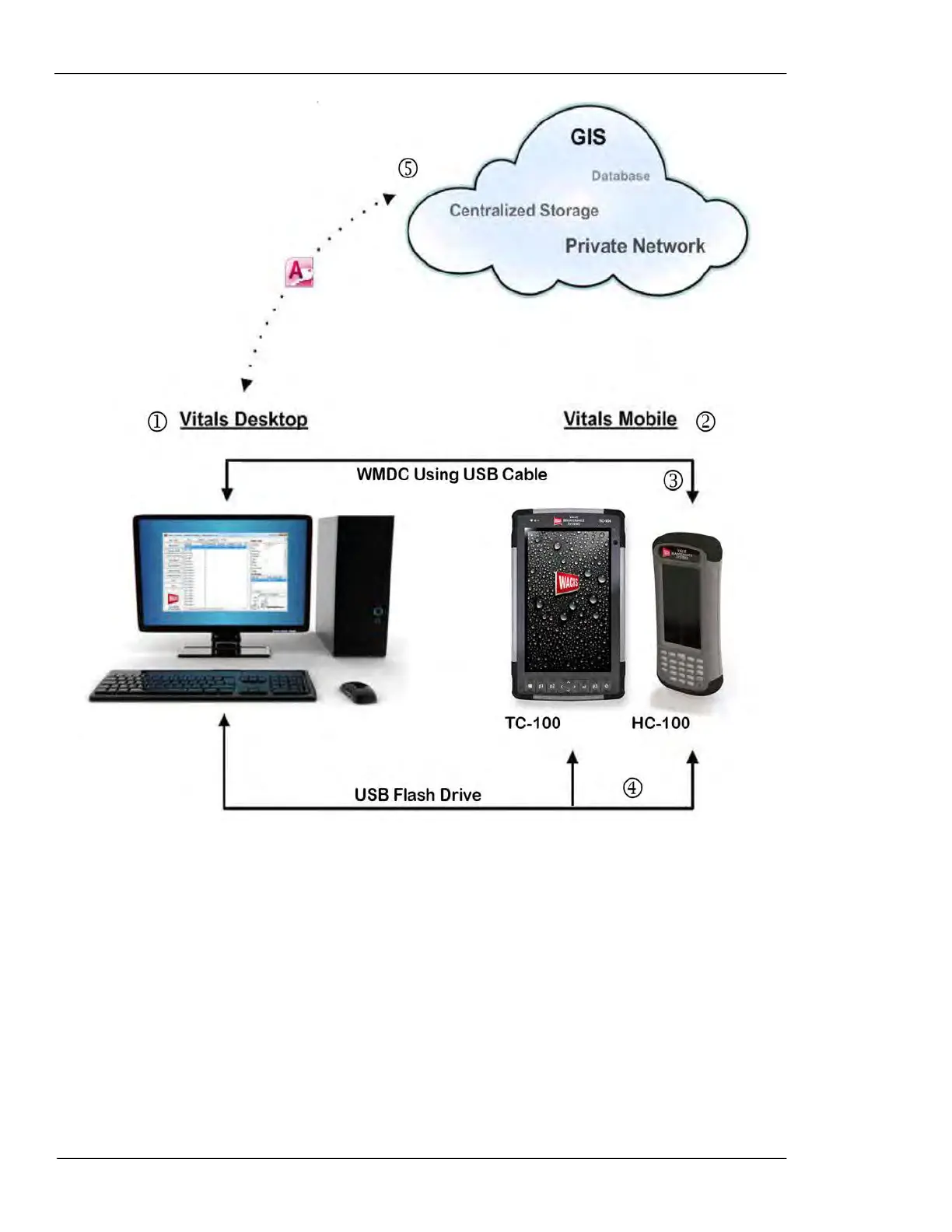
Figure 3-1. The diagram illustrates the Vitals soft-
ware and hardware architecture.
1. The master database resides in Vitals Desktop. Data is transferred between Vitals Mobile and Vitals Desktop
during a data transfer.
2. The master database is replicated in Vitals Mobile during a data transfer. Any new valve data created in
Vitals Mobile is downloaded into the master database during a data transfer.
3. Connection between Vitals Mobile-HC and Vitals Desktop can be made with the optional docking station or a
wired USB connection, using Windows Mobile Device Center (WMDC).
4. USB flash drive transfer can be initiated from either the TC-100 or HC-100. Activity data is transferred to the
Vitals Desktop database; the updated database is then transferred by flash drive back to the controller.
5. Data collected through the Vitals software suite can be exported from Vitals Desktop to your choice of GIS
software, private network, or any other location, by your IT or GIS team. (This functionality is not supported by
E.H. Wachs.) Vitals database is stored in Microsoft Access format. See Appendix B for Vitals database techni-
cal information.



 To Next Page