CFW700 | 39
Keypad (HMI) and Basic Programming
English
Time
Output
speed
24 V
open
24 V
DIx - Run/Stop
Aceleration
Deceleration
Speed
reference
Reset
Decrease
&
Increase
Enabling
Minimum
speed
Reset
Digital
inputs
DIx Decrease
DIx Increase
24 V
open
Time
Time
Time
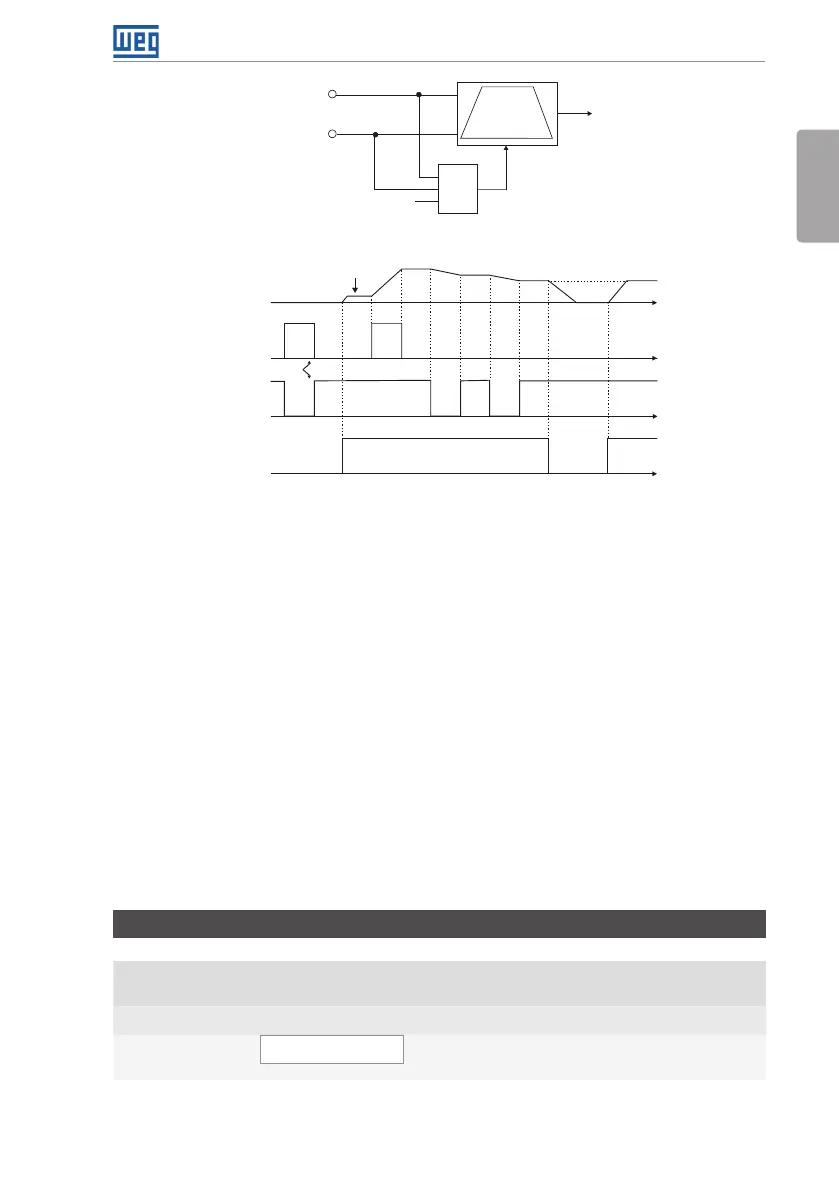
Figure 4.5: Operation of the Electronic Potentiometer Application (E.P.)
It is necessary to set P0221 or P0222 to 7 = SoftPLC for the operation of the electronic
potentiometer application.
Definitions:
The Function 1 of the Application at P0263 to P0270 represents the Accelerate command.
The Function 2 of the Application at P0263 to P0270 represents the Decelerate command.
The accelerate command is done by one of the digital inputs (DI1 to DI8). It is necessary to set
one of the DI’s parameters (P0263 to P0270) to 20 = Function 1 of the Application.
The decelerate command is also done by one of digital inputs (DI1 to DI8). However, it is necessary
to set one the DI’s parameters (P0263 to P0270) to 21 = Function 2 of the Application.
The Accelerate input is active when 24 V is applied and inactive when 0 V is applied. Otherwise,
the Decelerate input is active when 0 V is applied and inactive when 24 V is applied.
The parameters related to this application are:
P1010 – Version of the Electronic Potentiometer Application (E.P.)
Adjustable
Range:
0.00 to 10.00 Factory
Setting:
-
Properties: ro
Access Groups
via HMI:
SPLC
Description:
Read only parameter that presents the software version of the electronic potentiometer
application developed for the SoftPLC function of the CFW700.



 To Next Page