CFW700 | 49
English
First Time Power-Up and Start-Up
5.2.1 Oriented Start-up Menu
Step Action/Display Indication Step Action/Display Indication
1
2
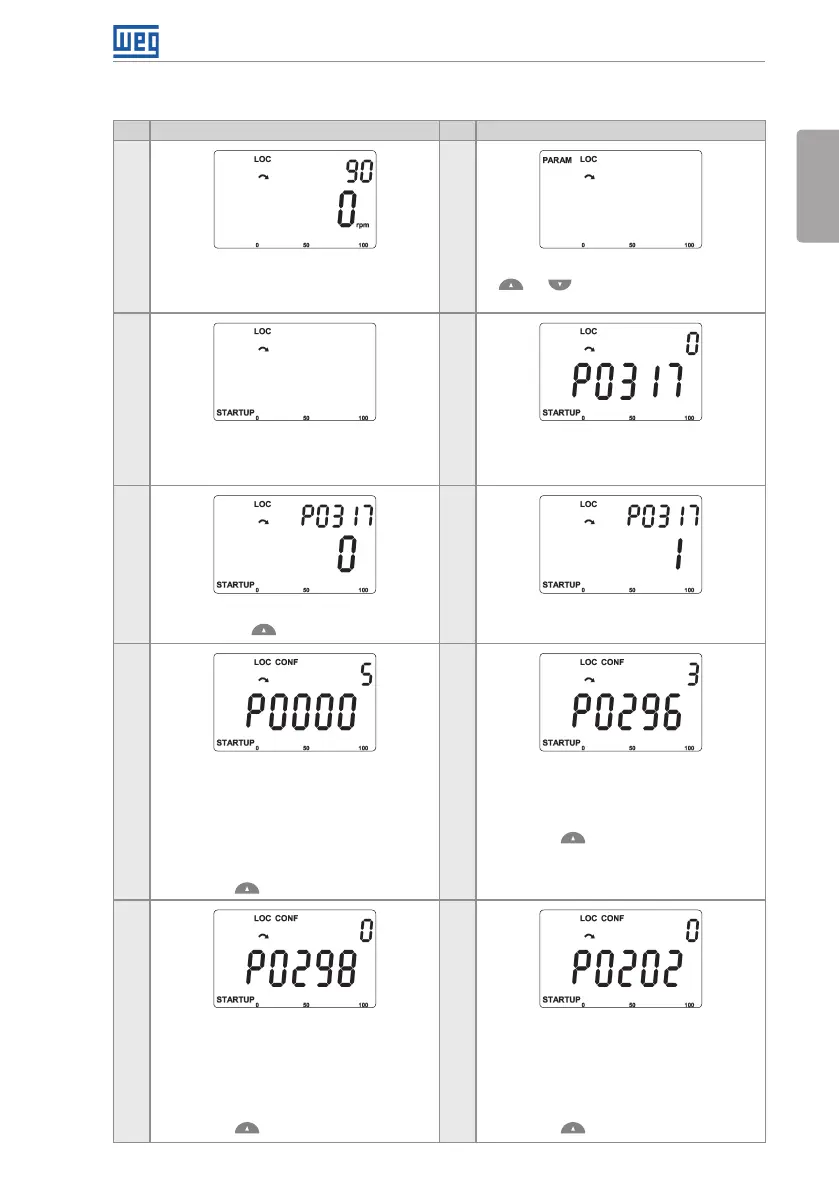
Monitoring mode.
Press the ENTER/MENU key to get into
the first level of the programming mode.
The PARAM group is selected, press the
or keys to select the STARTUP
group.
3 4
Press ENTER/MENU when the group is
selected.
The parameter “P0317 – Oriented Start-up”
is then selected, press the ENTER/MENU
to get into the parameter content.
5 6
Change the parameter P0317 to “1 – Yes”,
by using the key.
Press ENTER/MENU to save.
7 8
In this moment the Oriented Start-up
routine is initiated and the “CONF” status
is indicated at the keypad (HMI).
The parameter “P0000 - Access to
Parameters” is selected. Change the
password to set the remaining parameters
if necessary. The factory default is 5.
Press the key to the next parameter.
If necessary, change “P0296 – Line Rated
Voltage”. This change will affect P0151,
P0153, P0185, P0321, P0322, P0323 and
P0400.
Press the key to the next parameter.
9 10
If necessary, change “P0298 – Application”
parameter. This change will affect P0156,
P0157, P0158, P0401, P0404 and P0410
(this last one only if P0202 = 0, 1 or 2 - V/f
modes). The time and level of the IGBT
overload protection will also be affected.
Press the key to the next parameter.
If necessary, change “P0202 – Control
Type” parameter. This guide will only
show the setting for P0202 = 0 (V/f 60 Hz)
or P0202 = 1 (V/f 50 Hz). Refer to the
programming manual for other settings
(V/f Adjustable, VVW or Vector Modes).
Press the key to the next parameter.



 To Next Page