Operation WDR Software User Manual
3-10 24-10437-3 Rev. A
This document contains confidential and proprietary information of Weldex Corporation.9/10/08
POP-UP MENUS
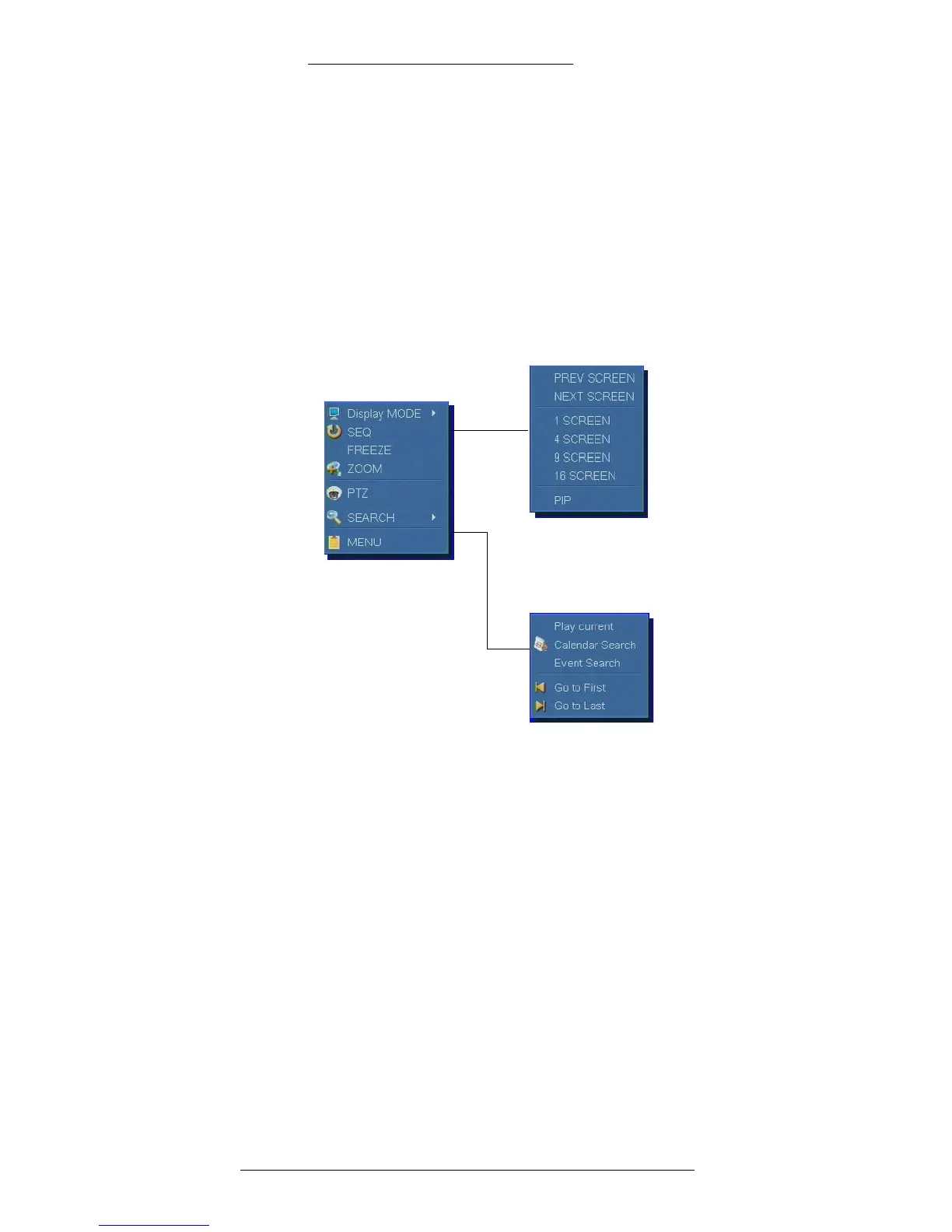
For your convenience, the Quick Access pop-up menu is provided. This menu gives
you access to several display features, such as Sequence, Freeze, Zoom, and PTZ as
well as to other menus.
To access the Quick Access pop-up menu from either the Live or Playback Mode,
right-
click on the on the screen area.
Quick Access
pop-up menu
Display Mode
pop-up menu
Search pop-up
menu
Quick Access Pop-Up Menu
You can access the Quick Access pop-up menu from either the Live or Playback
Mode by right-clicking on the on the screen area.
Display MODE – Click to
open the Display Mode pop-up menu.
SEQ – A
ctivates the sequence feature in which video from the subsequent cameras is
being shown. See page 2-8 for defining the Sequence Dwell Time.
FREEZE – Click to freeze the image.
ZOOM
– Click to zoom the image.
PTZ – Click to
access the PTZ Mode taskbar.
SEARCH – Click
to open the Search pop-up menu.
MENU – Click to go to
the Menu screen.



 To Next Page