WDR Software User Manual Operation
24-10437-3 Rev. A 3-13
This document contains confidential and proprietary information of Weldex Corporation. 9/10/08
Event Search
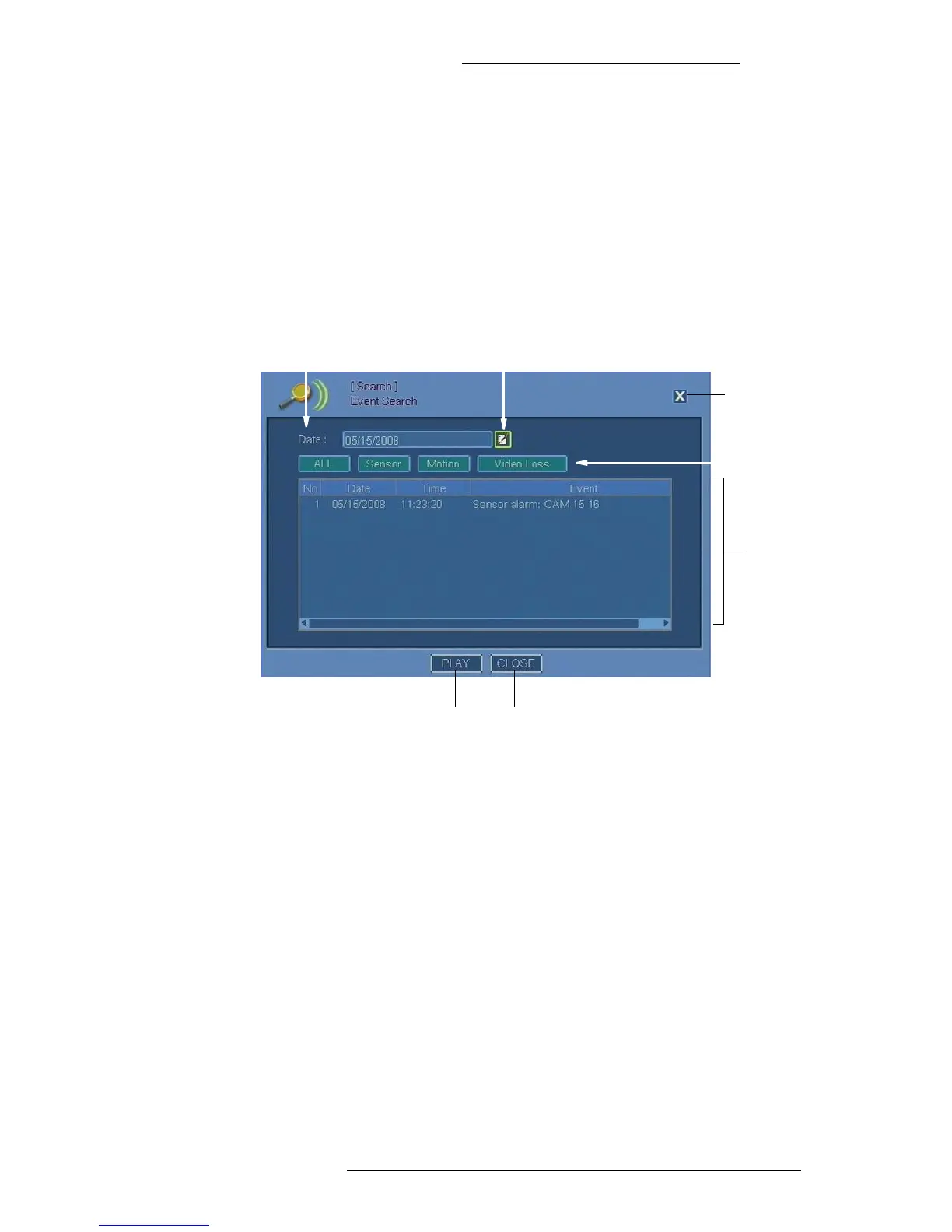
Use the Event Search screen to view a chronological list of events. You can
customize the list based on trigger type (sensor, motion alarm, and video loss) as
well as view selected event and its details.
To access the Calendar Screen, from the Live
Mode or the Playback Mode taskbar
go to Search>Event Search.
You can also right-click on the screen when in Live Mode or the Playback Mode and
selec
t Search>Event Search.
Event list
Date Calendar
Play Close
Type of event: All,
Sensor, Motion, or
Video Loss
Close
icon
Event List – Detailed list of events displaying the event number, date and time of
occurrence, event type, and recording camera(s).
Date –
Displays selected date of the recording to be searched for.
Calendar – Click this icon to open the Calendar window.
See “Virtual
Keyboard/Calendar” on page 2-2 for details.
All
– Click to show all recorded events.
Sensor – Click to display captured sen
sor events.
Motion – Click to display captured moti
on alarm events.
Video Loss – Click to
display video loss events for the specified date.
Play – Click to play the se
lected event recording.
Close (icon
and button) – Click to close the window.



 To Next Page