Operation WDR Software User Manual
3-12 24-10437-3 Rev. A
This document contains confidential and proprietary information of Weldex Corporation.9/10/08
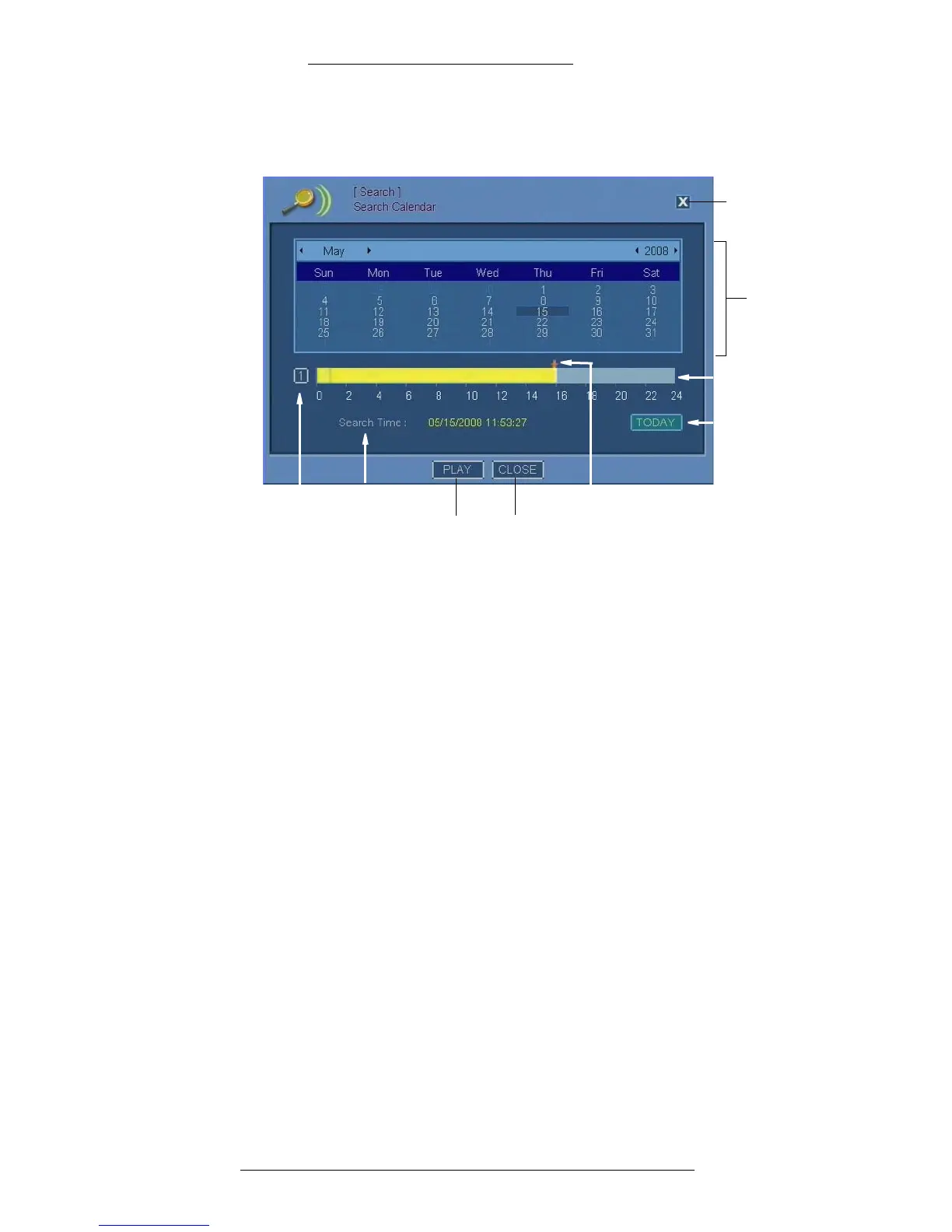
You can also right-click on the screen when in Live Mode or the Playback Mode and
select Search>Calendar Search.
Toda y
Calendar
Close
icon
Time bar
Play Close
Camera Arrow indicatorSearch time
Calendar – Use the calendar to set search criteria (day, month and, year).
Camera
– Click to display a list of cameras and select a camera.
Time bar – Yellow highlig
ht in time bar indicates the time when recording was on.
Arrow indicator – D
etermines the exact playback time. To change the indicator’s
position on the time bar, move the mouse cursor over the time bar and click on the
time you want to select.
Search time – Indicates search date and time.
Today – Press th
is button to display current date and time.
Play – Click to play the recording from the selected date/time.
Close (icon
and button) – Click to close the window.



 To Next Page