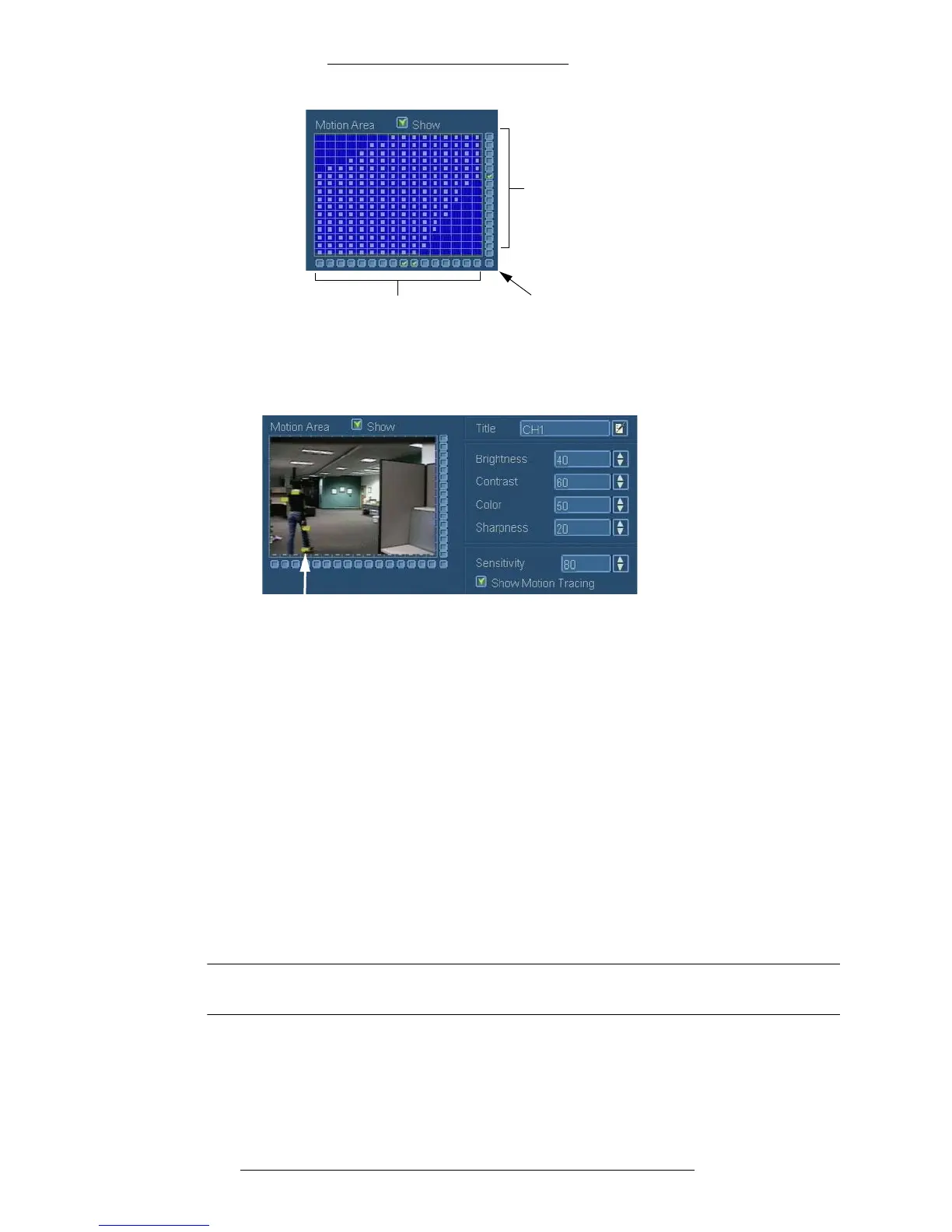
Click to select or un-select entire
corresponding column
Click to select or un-select entire
corresponding row
Click to select or
un-select entire matrix
System Setup WDR Software User Manual
2-26 24-10437-3 Rev. A
This document contains confidential and proprietary information of Weldex Corporation.9/10/08
With the motion tracing enabled, motion is indicated by yellow highlights like in the
following example.
Motion tracing
highlights
Configuring PTZ Cameras, Presets, and Guard Tours
Different PTZ (Pan, Tilt, and Zoom) cameras use different protocols to
communicate with the DVR through the RS-485 interface, such as Pelco-D and
Pelco-P. For proper functioning you need to define what protocol a camera will be
using.
For each PTZ camera you can define up to
8 presets and 1 guard tour.
Presets are used to quickly move camera to a desired
position by simply clicking on
the preset number on the PTZ Mode taskbar.
Guard tours are based on the 8 presets defined by the user. Gu
ard tour moves the
camera from preset to preset automatically.
NOTE
The AUX function is not currently supported.



 To Next Page