System Setup WDR Software User Manual
2-42 24-10437-3 Rev. A
This document contains confidential and proprietary information of Weldex Corporation.9/10/08
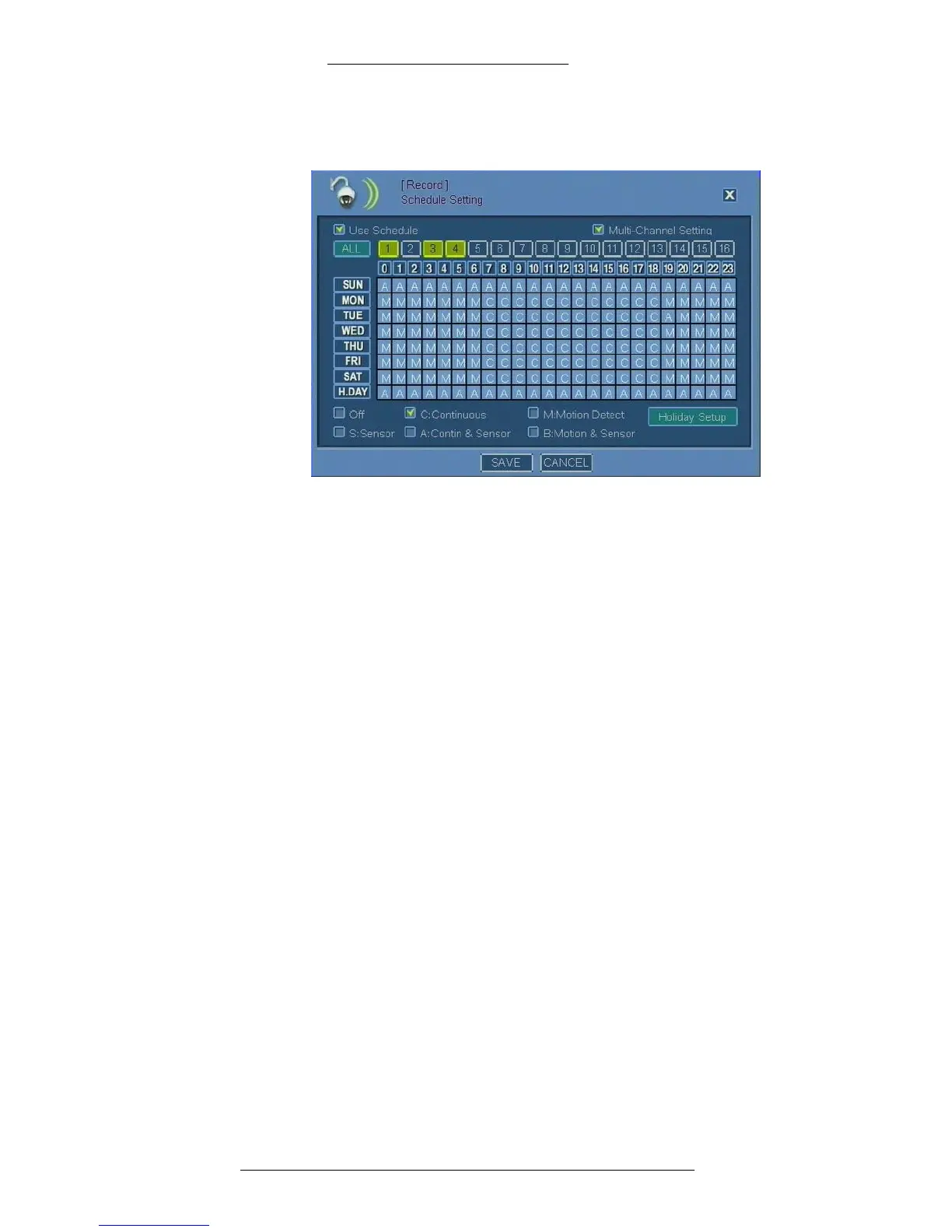
4. Apply the selected recording option to the matrix. See “Tips on Using the
Recording Matrix”for details.
5. Repeat steps 2-4 until recording schedule is set for all cameras.
6. Click Save.
Schedule Setting Field Definitions
Use Schedule – Select this check box to enable schedule use. For continuous
recording leave the check box un-selected. This function is enabled by default.
Multi- Channel Setting – When selected,
you can choose multiple cameras at the
same time. This feature is useful when applying the same settings to multiple
cameras.
Camera –
Select one or more camera(s). The All button allows you to select all
cameras at once, provided the Multi-Channel Setting is enabled.
0 through 23 – Indicates th
e time to record: 0 through 23 hour(s).
When you click a button indicating an hour, you will apply currently
selected
recording option (Off, C:Continuous, etc.) to an entire column. See “Tips on Using
the Recording Matrix” on page 2-43 for more details.
SUN through MO
N and H-DAY - Indicates the days (Sunday through Monday and
Holiday, as defined in Holiday Setup).
When you click a button indicating a day, you will apply
currently selected
recording option (Off, C:Continuous, etc.) to an entire row. See “Tips on Using the
Recording Matrix” on page 2-43 for more details.



 To Next Page