WDR Software User Manual System Setup
24-10437-3 Rev. A 2-33
This document contains confidential and proprietary information of Weldex Corporation. 9/10/08
Configuring Motion Alarms
Alarms work independently from recording. This means that motion alarm, when
configured, will be triggered by detected motion whether or not recording is
currently enabled according to recording schedule.
NOTE
When motion alarm and sensor alarm occur at the same time, the latter will
override the first. For example, if motion alarm is triggered first and sensor
alarm is triggered 0.01 second later, sensor alarm settings will override
motion alarm settings.
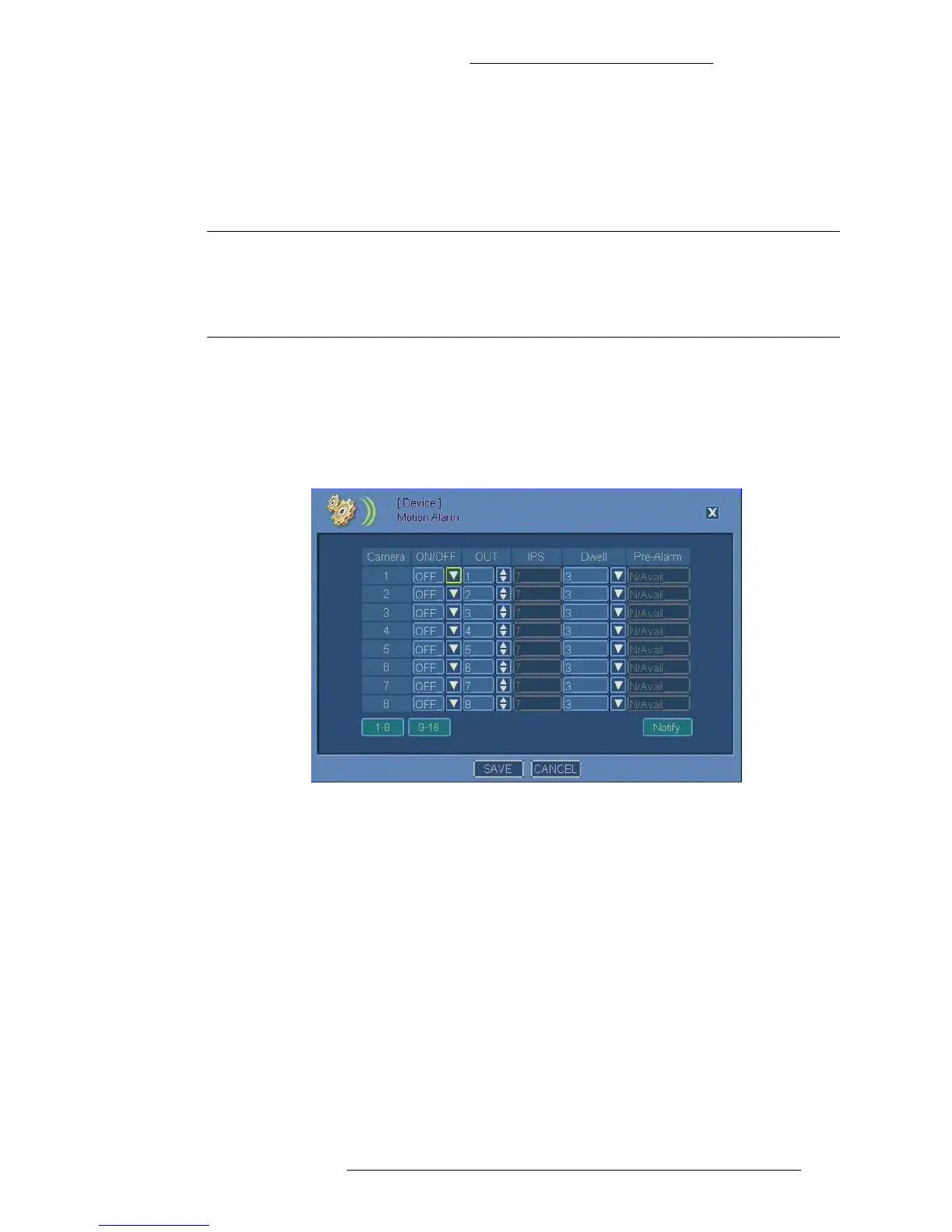
To configure motion alarms:
1. From the Main menu select De
vice>Motion Alarm.
2. For each camera, make selections as required. Refer to “Motion Alarm Field
Definitions” for details.
Motion Alarm Field Definitions
Camera – Lists of cameras (1 through 8 and 9 through 16).
ON/OFF – Turn the motion alarms
on or off.
OUT – Selec
t the output to associate with the motion alarm. The outputs are
predefined via hardware, therefore the OUT number corresponds to the physical
alarm output port on the back of the DVR. See Table 2-1 for details.
IPS – Disp
lays the Images Per Second recording rate as set in the camera’s recording
options.
Dwell – Specify dwell time in seconds from the beginning of
the alarm. Dwell time
applies to notifications and the relay/alarm outputs duration. See “Alarm
Notifications” on page 2-36 for details.



 To Next Page