Internet Direct Connection (IDC)
9
Chapter
98
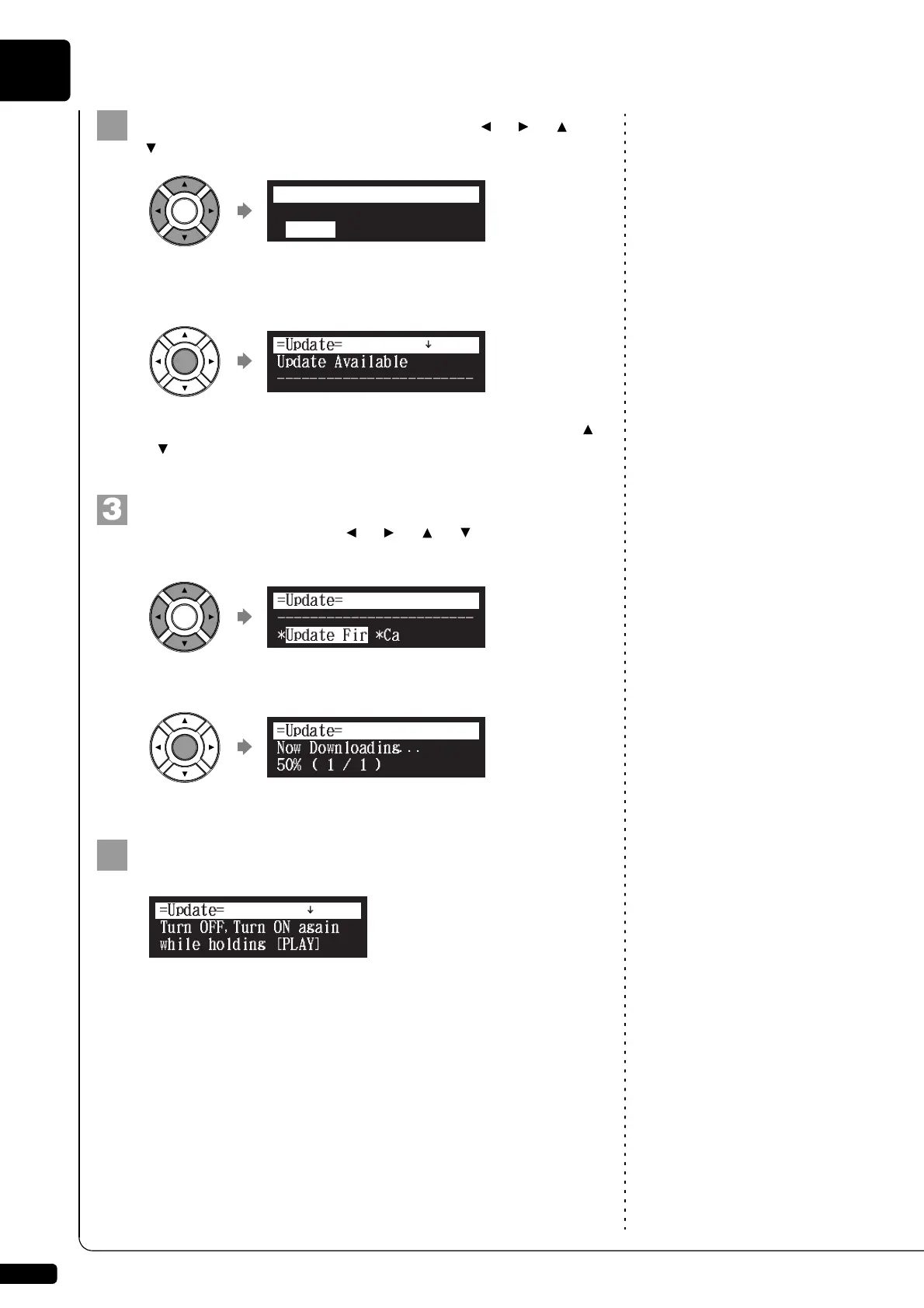
Select “Update” with the cursor buttons ([ ] [ ] [ ]
[ ]), then press [ENTER].
The update screen appears if there is any update program
available.
You can scroll the screen up or down with the cursor buttons ([ ]
[]).
Following the instructions on the screen, select the option
with the cursor buttons ([ ] [ ] [ ] [ ]), then press
[ENTER].
The download process of the update program starts.
Shut down the Disklavier with [ON/OFF] on the control unit
after the download process is completed.
The update program is now prepared.
Update the firmware following the procedures in Chapter 11 “Other
Settings – Updating the Disklavier” on page 121.
*D-Radio
*Update
*MyAccount
=Internet=
(1/1)
]
------------------------
*Update Fir
=Update=
*Cancel
Now Downloading...
50%(1/1)
=Update=
]







 To Next Page