Introduction
1
Chapter
2
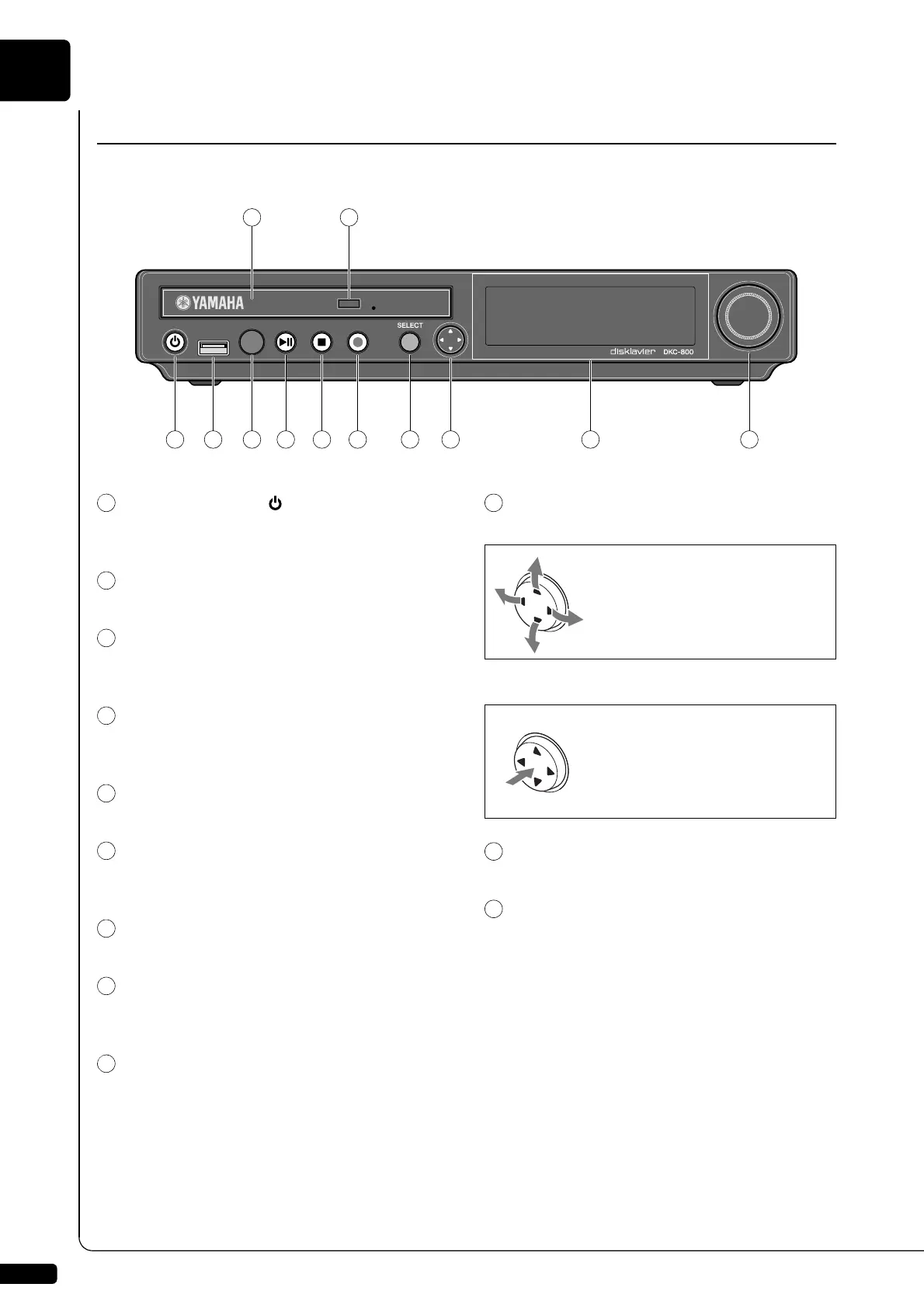
[ON/OFF] button
Turns on or shuts down the Disklavier. Press once
to turn it on, and once again to shut it down.
USB port
Used to connect a USB flash memory, etc.
Remote control sensor
When using the remote control, point it toward this
sensor.
CD drive
Insert a PianoSoft·PlusAudio or other audio or
audio/MIDI CD here.
CD eject button
Used to open the CD drive.
[PLAY/PAUSE] button
(
pages 19 and 21)
Used to start and pause playback.
[STOP] button (
page 21)
Used to stop playback and recording.
[RECORD] button (
page 45)
Used to engage the record standby mode before
recording starts.
[SELECT] button
Used to select media.
Cursor/[ENTER] buttons
Cursor: Used to select options and parameters.
[ENTER]: Used to execute the selection.
Display
Shows various information.
Dial
Used to adjust the volume, and to set parameter
values.
Names of Parts and Their Functions
■ Control Unit — Front Panel
Press this button inclining
slightly upward/downward/left/
right.
Press straight the center of
this button.







 To Next Page